Multi-WAN egress with health-based selection
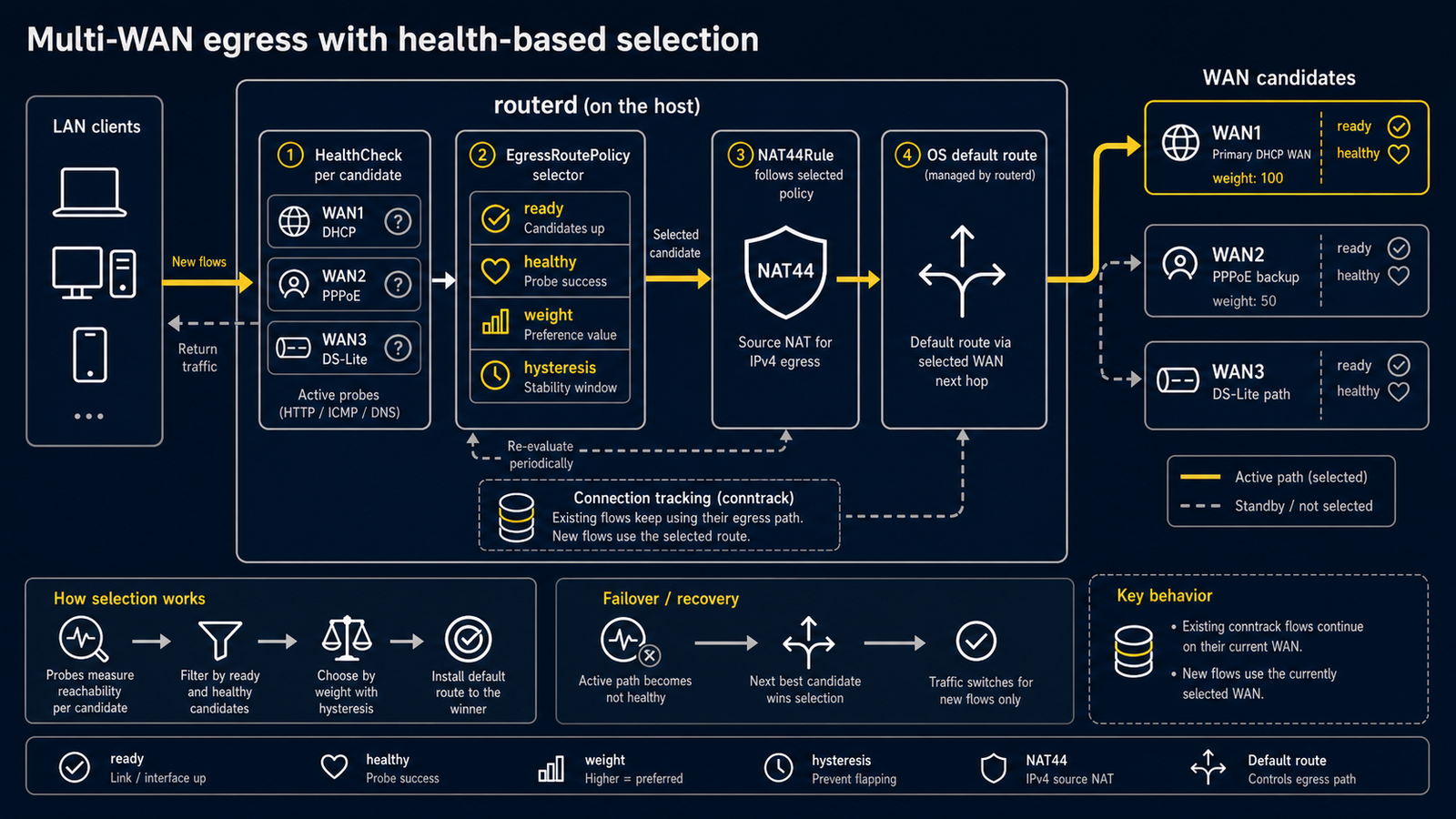
Scenario
You have a router with more than one path to the internet and want routerd to:
- Pick the best available path automatically.
- Fall back to a slower or backup link if the preferred one becomes unhealthy.
- Avoid hard cutovers that drop existing connections.
Typical examples:
- A home router with a DS-Lite tunnel as primary and the upstream residential gateway as a NAT fallback.
- A SOHO router with two ISP uplinks (e.g. fibre + LTE) for redundancy.
- A site router that prefers a private VPN circuit but falls back to public internet.
How routerd solves it
EgressRoutePolicy declares the candidate paths and how to choose between them.
At any moment routerd selects the highest-weight candidate that is ready (the source resource has settled) and healthy (its HealthCheck is passing).
On a transition, routerd updates the OS route table and reapplies any NAT rule that follows the policy. It does not flush conntrack, so existing flows continue on their current path while new flows take the freshly selected one.
Convergence is intentional: a low-weight backup can serve traffic the moment it is ready at boot, and routerd switches to the preferred path only after that path is confirmed healthy.
For fallback links that consume scarce sessions, such as a test PPPoE login,
keep the resource in YAML but set enabled: false on the PPPoESession,
its HealthCheck, and the matching EgressRoutePolicy candidate. routerd
will stop and disable the generated services during normal apply. The rendered
unit remains available for an explicit manual test.
Minimal configuration
Three building blocks: a HealthCheck per candidate, an EgressRoutePolicy that lists the candidates, and a NAT44Rule that follows the policy.
Health checks
apiVersion: net.routerd.net/v1alpha1
kind: HealthCheck
metadata:
  name: internet-via-primary
spec:
  target: 1.1.1.1
  protocol: tcp
  port: 443
  interval: 30s
  timeout: 3s
Reference each check from the matching EgressRoutePolicy candidate. routerd derives the probe source binding and socket mark from that reference, so the probe rides the candidate path without exposing host-specific mechanics in config. Use TCP/443 against a well-known stable target rather than ICMP, so transient ICMP filtering does not flap the selection.
Egress policy
apiVersion: net.routerd.net/v1alpha1
kind: EgressRoutePolicy
metadata:
  name: ipv4-default
spec:
  family: ipv4
  destinationCIDRs:
    - 0.0.0.0/0
  selection: highest-weight-ready
  hysteresis: 30s
  candidates:
    - name: ds-lite-primary
      source: DSLiteTunnel/ds-lite-primary
      deviceFrom:
        resource: DSLiteTunnel/ds-lite-primary
        field: interface
      gatewaySource: none
      weight: 90
      healthCheck: internet-via-primary

    - name: hgw-fallback
      source: Interface/wan
      deviceFrom:
        resource: Interface/wan
        field: ifname
      gatewaySource: static
      gateway: 192.0.2.1
      weight: 50
      healthCheck: internet-via-hgw
hysteresis damps flapping: routerd waits this long after a candidate becomes unhealthy before demoting it.
NAT that follows the policy
apiVersion: net.routerd.net/v1alpha1
kind: NAT44Rule
metadata:
  name: lan-to-egress
spec:
  type: masquerade
  egressPolicyRef: ipv4-default
  sourceRanges:
    - 192.0.2.0/24
The masquerade source address is taken from the interface routerd selected at this instant. When the policy switches, the next packet is masqueraded with the new path's address.
Avoiding NAT for private destinations
If the upstream gateway has a static route back to the LAN, you can keep NAT for the public internet but skip it when traffic is destined for other private networks.
apiVersion: net.routerd.net/v1alpha1
kind: NAT44Rule
metadata:
  name: lan-to-wan-hgw
spec:
  type: masquerade
  egressInterface: wan
  sourceRanges:
    - 192.0.2.0/24
  excludeDestinationCIDRs:
    - 192.168.0.0/16
    - 172.16.0.0/12
    - 10.0.0.0/8

---

apiVersion: net.routerd.net/v1alpha1
kind: IPv4Route
metadata:
  name: hgw-lan
spec:
  destination: 192.168.0.0/16
  device: wan
With this combination, RFC 1918 destinations are routed (not NATed), and the public internet still flows through the selected egress.
Operational notes
- Always keep an out-of-band management path (mgmt interface, console, dedicated SSH NIC). Do not test router SSH over an untrusted WAN path while applying firewall or route changes.
- Prefer health checks that are referenced by exactly one candidate, so routerd can derive a single probe path and a failure clearly means that path is broken.
- Avoid clearing conntrack when the path switches. routerd does not flush conntrack on purpose; existing TCP flows that already finished their handshake should be allowed to die naturally.
- The selected candidate is visible at any time via
routerctl describe EgressRoutePolicy/<name>(status.selectedCandidate).