Resource model
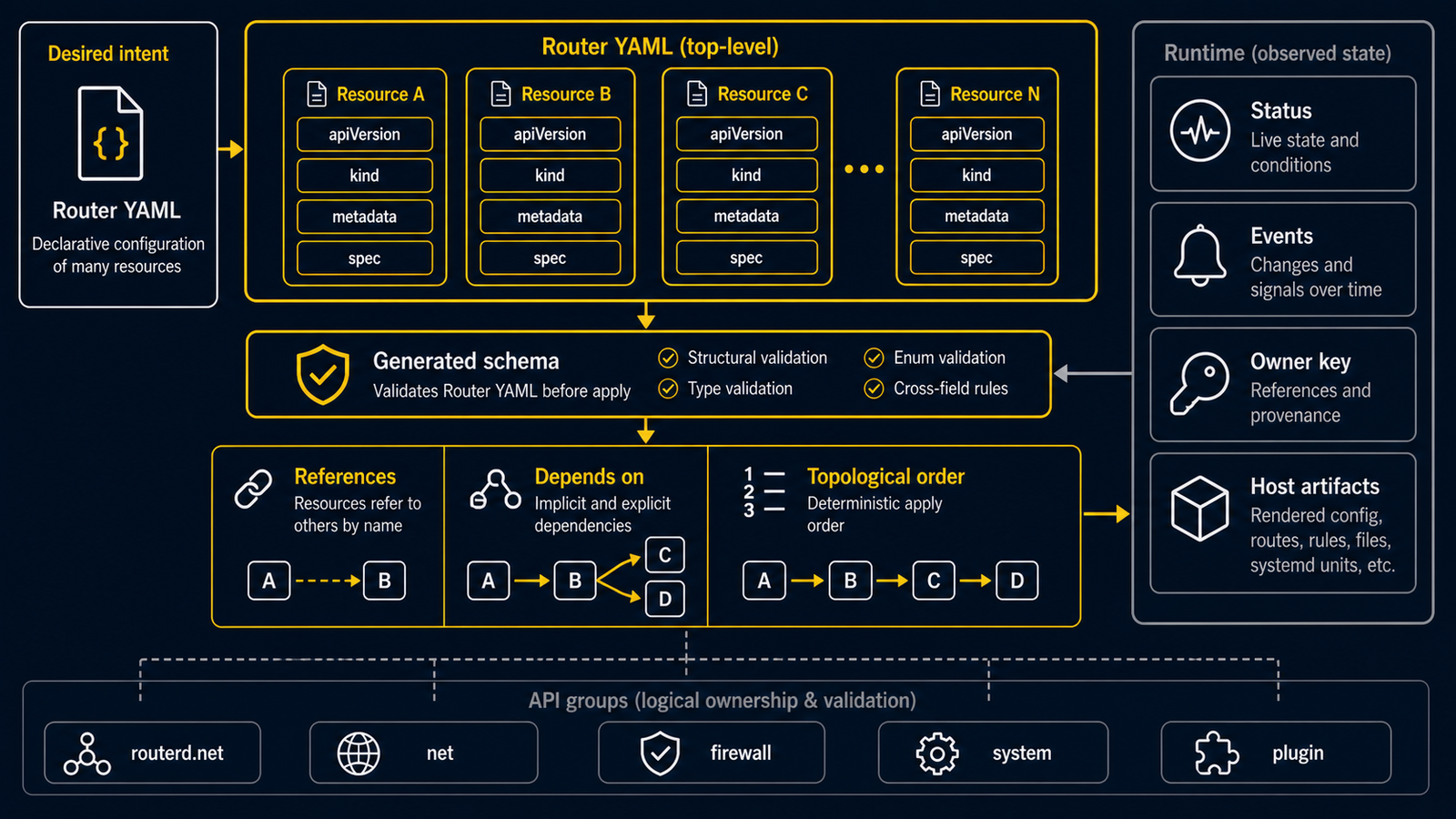
routerd configuration is a top-level Router resource with a list of typed
resources. The shape is intentionally close to Kubernetes resources, but
routerd applies them to one local router host. Think of it as a labelled parts
list: each part says what it is, what you call it, and the settings it needs.
apiVersion: routerd.net/v1alpha1
kind: Router
metadata:
  name: my-lab-router
spec:
  resources:
    - apiVersion: net.routerd.net/v1alpha1
      kind: DHCPv6PrefixDelegation
      metadata:
        name: wan-pd
      spec:
        interface: wan
Common Fields
apiVersion: the family and version of a part.kind: what kind of part it is, such asInterfaceorDHCPv4Server.metadata.name: a short label you choose so other parts can refer to it.spec: the settings you want.status: what routerd or a managed daemon observed after it runs.
Configuration files normally contain spec. status is read through the
control API, state database, daemon /v1/status, routerctl, and Web Console.
API Groups
routerd uses these API groups:
| Group | Purpose |
|---|---|
routerd.net/v1alpha1 | top-level Router |
net.routerd.net/v1alpha1 | interfaces, DHCP, DNS, routes, tunnels, WAN selection, flow logs |
firewall.routerd.net/v1alpha1 | firewall zones, policies, rules, and logs |
system.routerd.net/v1alpha1 | hostname, packages, sysctl, network adoption, systemd units, NTP, log sinks, Web Console |
plugin.routerd.net/v1alpha1 | trusted local plugin manifests |
Do not use placeholder groups such as routerd.io.
Dependencies
Resources refer to each other by name. For example, IPv6DelegatedAddress
depends on DHCPv6PrefixDelegation, and DSLiteTunnel can depend on
DHCPv6Information, DNSResolver, or a source address policy.
If a dependency is not ready, the dependent resource stays Pending. When the
dependency becomes ready, resources move through phases such as Applied,
Bound, Up, Installed, and Healthy.
dependsOn
Some resources support dependsOn to make readiness conditions explicit.
dependsOn:
  - resource: DHCPv6PrefixDelegation/wan-pd
    phase: Bound
  - resource: Interface/lan
    phase: Up
Do not put dynamic status expressions into normal literal fields. Use typed
source fields such as deviceFrom, gatewayFrom, addressFrom, ipv4From,
ipv6From, prefixFrom, rdnssFrom, and addressFrom.
deviceFrom:
  resource: DSLiteTunnel/ds-lite
  field: interface
This keeps dependencies visible to validation, planning, event subscriptions, and controller reconciliation.
ownerRefs
ownerRefs declares that one resource is owned by another. If the owner is not
ready, the child should not keep publishing stale host state.
This matters for delegated IPv6 networks. When DHCPv6-PD is lost, LAN IPv6 addresses, RA, DNS records, and DS-Lite state that depend on that prefix should stop or become pending rather than continuing to advertise an old prefix.
Next steps
- Apply and render — how validate, plan, dry-run, and serve use the resource graph
- State and ownership — how routerd tracks what it owns on the host
- Resource API reference — full field reference for every resource kind