Getting Started on Nix and NixOS

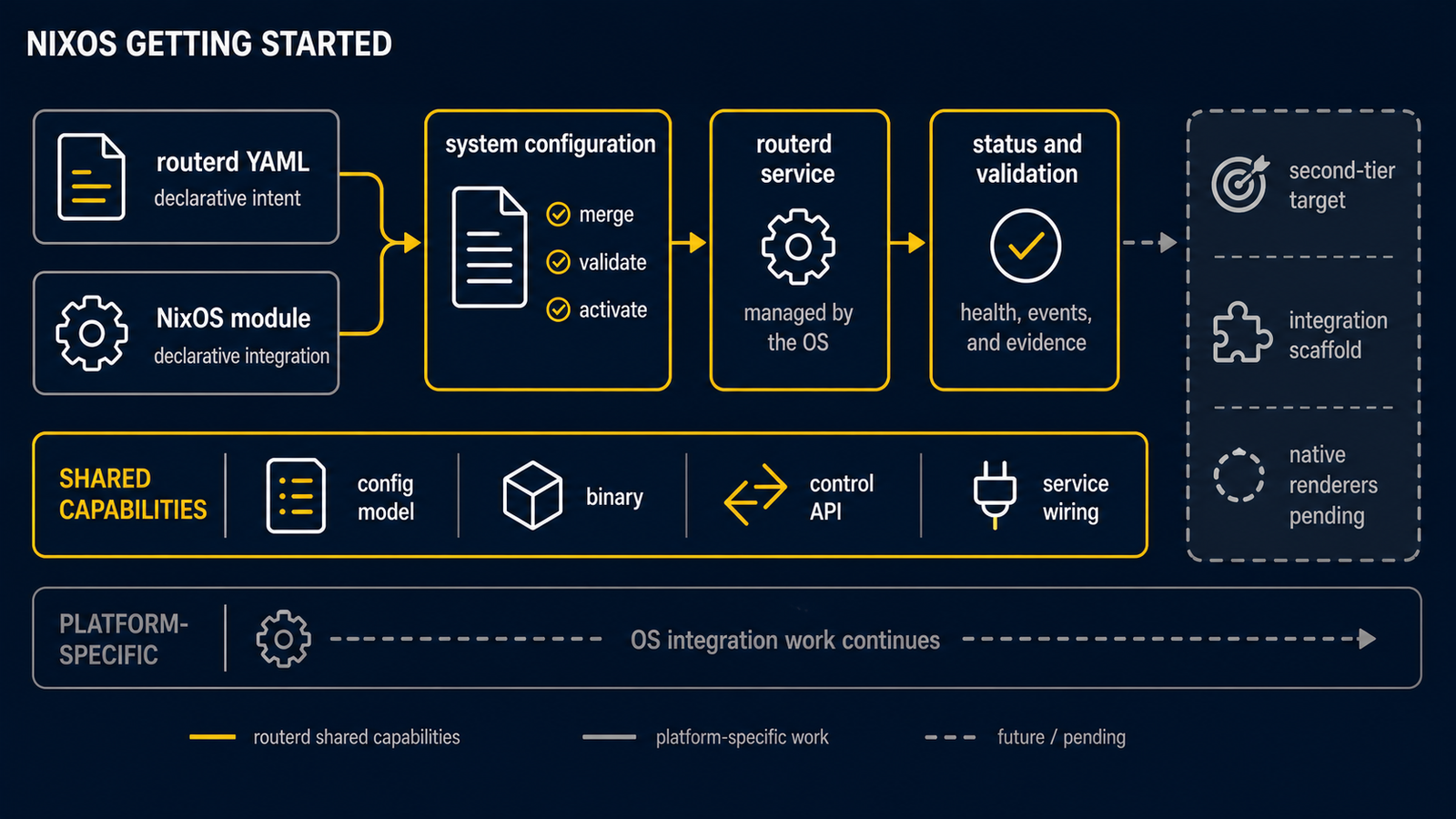
This tutorial is for operators who are new to Nix. It walks through three levels of involvement, in order of commitment:

  1. Try the binary — run routerd from the upstream flake without touching your system configuration.
  2. Develop against the source — use nix develop to get a shell with every host tool routerd talks to.
  3. Run on NixOS — wire routerd into a NixOS host with the supplied module, and (optionally) generate persistent host settings from router.yaml.

NixOS is a Tier 2 platform for routerd. The build, the systemd unit, and the routerd render nixos flow are wired up; many resource kinds still fall back to non-persistent runtime decisions. The current matrix lives in Supported platforms.

Prerequisites

You need one of the following:

  • Any Linux host with the Nix package manager installed and Flakes enabled.
  • A NixOS host (Flakes are recommended; enable them per the NixOS Wiki).

To enable Flakes on a non-NixOS host once, add this to ~/.config/nix/nix.conf:

experimental-features = nix-command flakes

routerd's flake targets x86_64-linux and aarch64-linux. macOS and Windows are non-goals for the daemon itself.

1. Try the binary without committing

You can run routerd straight from GitHub. The flake builds the same Go binaries the Ubuntu source install ships:

nix run github:imksoo/routerd#routerd -- --help
nix run github:imksoo/routerd#routerctl -- --help

To produce a local result/bin/routerd symlink instead of running once:

nix build github:imksoo/routerd#routerd
./result/bin/routerd --help

This is the fastest way to confirm the binary works on your kernel and architecture before you invest in a NixOS configuration.

2. Develop against the source

Clone the repository and enter the dev shell. The shell pre-installs every host tool routerd's renderers shell out to (iproute2, nftables, dnsmasq, conntrack-tools, ppp), plus Go and Make:

git clone https://github.com/imksoo/routerd
cd routerd
nix develop

Inside the shell you can use the regular Makefile workflow without installing anything globally:

make build
make test
make validate-example
make dry-run-example

bin/routerd and bin/routerctl are produced inside the working tree; they are not installed anywhere.

3. Use routerd on NixOS

routerd ships a NixOS module at contrib/nix/module.nix. The module installs the routerd package, declares the systemd unit, and ensures the renderers can find iproute2, nftables, dnsmasq, conntrack, and ppp at runtime.

3.1 Add the flake input

In your system flake (typically /etc/nixos/flake.nix or your dotfiles flake), add routerd as an input:

{
inputs.nixpkgs.url = "github:NixOS/nixpkgs/nixos-unstable";
inputs.routerd.url = "github:imksoo/routerd";

outputs = { self, nixpkgs, routerd, ... }: {
nixosConfigurations.router = nixpkgs.lib.nixosSystem {
system = "x86_64-linux";
modules = [
./configuration.nix
routerd.nixosModules.default
({ pkgs, ... }: {
services.routerd = {
enable = true;
package = routerd.packages.${pkgs.system}.routerd;
configFile = ./router.yaml;
};
})
];
};
};
}

router.yaml is the same declarative config that the Ubuntu install uses. If you are not ready to write one yet, copy examples/basic-dhcp.yaml from the routerd repository as a starting point and adapt the interface names to your host.

Apply with:

sudo nixos-rebuild switch --flake .#router

After the switch, routerctl status over the Unix socket gives you the runtime view:

sudo routerctl status

At this point, routerd is running as a systemd unit and reconciling runtime decisions. Persistent NixOS settings (hostname, users, SSH, boot loader) are still your responsibility — they are part of your hand-written configuration.nix.

3.2 Optional: let routerd own the host config too

For routers that are only a router, you can move host settings into router.yaml as a NixOSHost resource and have routerd render them as a NixOS module. The split looks like this:

  • router.yaml is the source of truth. It contains a NixOSHost resource (hostname, boot loader, users, SSH, sudo, optional extra packages) plus the usual network resources.
  • routerd render nixos reads router.yaml and writes routerd-generated.nix. routerd owns this file; do not hand-edit it.
  • configuration.nix stays minimal. It imports hardware-configuration.nix and routerd-generated.nix, and nothing else unless you have site-specific overrides that don't belong in router.yaml.
  • nixos-rebuild switch applies persistent state. routerd serve handles non-persistent runtime decisions (health checks, route selection, AFTR resolution, status reporting, conntrack inspection).

A working lab example lives at:

  • examples/nixos-router02.yamlrouter.yaml with NixOSHost, Interface, IPv4DHCPAddress, IPv6DHCPAddress.
  • examples/nixos-router02-configuration.nix — the matching minimal hand-written configuration.nix.

The render command is:

routerd render nixos \
--config /etc/nixos/router.yaml \
--out /etc/nixos/routerd-generated.nix
sudo nixos-rebuild switch

routerd render nixos only writes the generated Nix file. It does not run nixos-rebuild and does not edit your hand-written configuration.nix.

3.3 What the module options look like

The most relevant services.routerd options:

OptionPurpose
enableTurn the unit on.
packageWhich routerd build to install. Usually routerd.packages.${pkgs.system}.routerd.
configFilePath to a router.yaml outside the Nix store.
configTextInline router.yaml, written into the Nix store. Use either this or configFile.
socketControl API Unix socket path. Default /run/routerd/routerd.sock.
reconcileIntervalPeriodic reconcile interval as a Go duration. Default 60s.
extraFlagsExtra command-line flags appended to routerd serve.

The full set is in contrib/nix/module.nix.

Common pitfalls

  • Flakes not enabled. If nix run github:... errors on experimental-features, enable Flakes per the prerequisites section.
  • Editing routerd-generated.nix by hand. routerd will overwrite it. Put hand-written settings in configuration.nix or another imported module instead.
  • Mixing the Ubuntu source install with the NixOS module on the same host. Pick one. On NixOS, prefer the module.
  • Expecting full Nix-native rendering for every resource. The current renderer covers host settings, dependency packages, and basic systemd-networkd .network declarations. Other resource kinds run through the runtime reconciler. The roadmap is in Supported platforms.

Next steps