LAN-side services
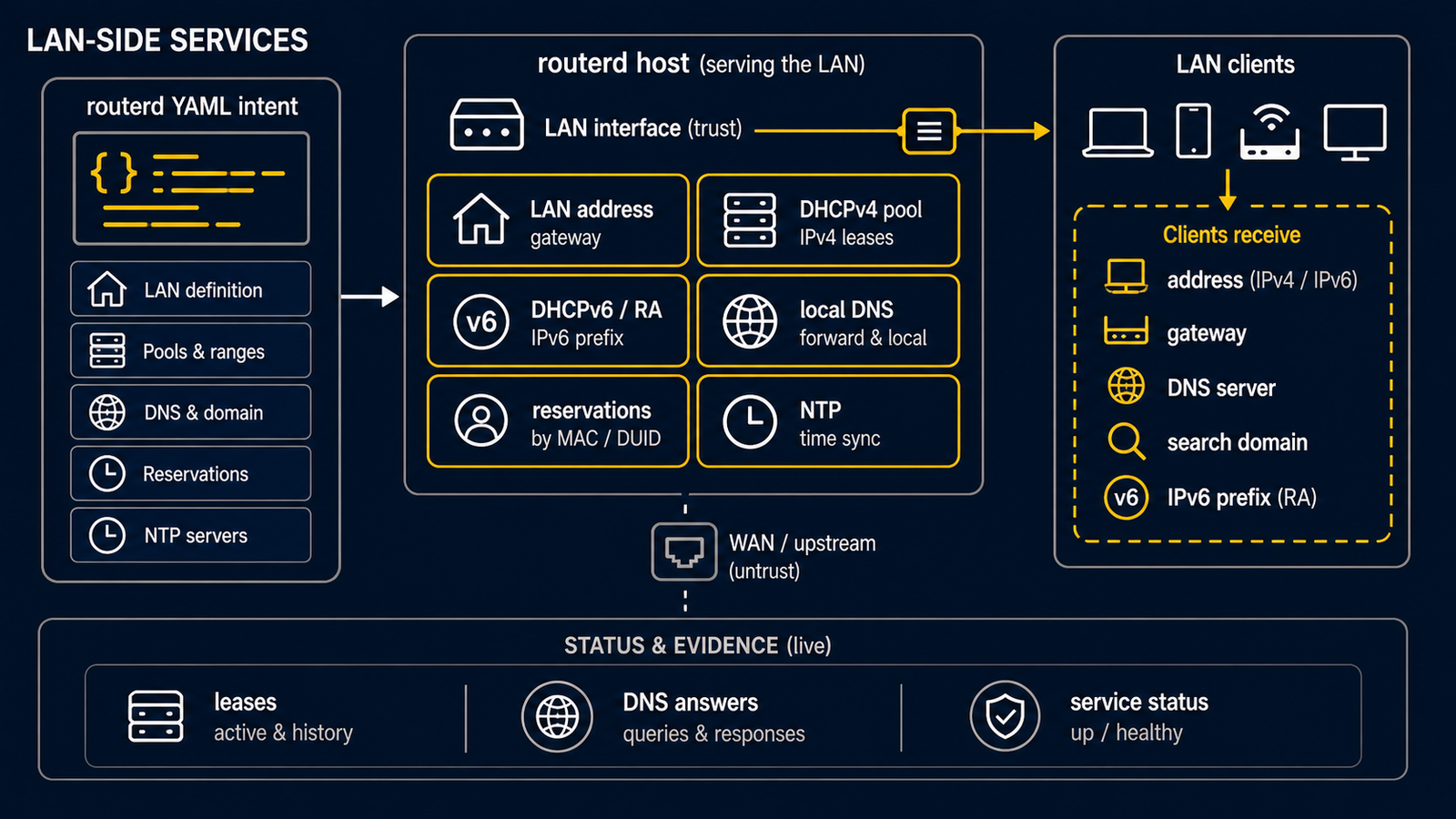
This page introduces the routerd resources that handle the LAN side of a router: addresses on the inside interface, DHCPv4 / DHCPv6 leases, IPv6 Router Advertisement, and the local DNS resolver.
The companion page on the WAN side covers how the router gets its upstream addresses; this page is what the router publishes to the inside.
Every YAML block on this page is a fragment to add to the same top-level
spec.resources: list. It assumes the referenced Interface, address, and DNS
resources already exist. Do not paste one fragment into an empty file and apply
it to a live LAN. Start with the first lab router, then add
one service and test it at a time.
Service split
routerd splits LAN service across two daemons with clear boundaries:
- dnsmasq handles DHCPv4, DHCPv6, DHCP relay, and IPv6 Router Advertisement.
routerd-dns-resolverhandles DNS zones, conditional forwarding, cache, and query logging.
Keeping DHCP next to dnsmasq avoids reimplementing a battle-tested DHCP server. Keeping DNS in routerd-dns-resolver lets us model resolver policy as typed routerd resources (DNSResolver, DNSZone).
Summary table
| Concern | Resource | Daemon backing it |
|---|---|---|
| LAN interface address | IPv4StaticAddress, IPv6DelegatedAddress | (kernel) |
| DHCPv4 scope | DHCPv4Server | dnsmasq |
| DHCPv4 reservation | DHCPv4Reservation | dnsmasq |
| DHCPv6 (stateless / stateful) | DHCPv6Server | dnsmasq |
| IPv6 Router Advertisement | IPv6RouterAdvertisement | dnsmasq (RA mode) |
| LAN time server advertisement | DHCPv4Server, DHCPv6Server | dnsmasq |
| DNS zone (local authoritative) | DNSZone | routerd-dns-resolver |
| DNS resolver listener | DNSResolver | routerd-dns-resolver |
| DHCP lease event relay | (built-in) | routerd-dhcp-event-relay |
DHCPv4 scope
- apiVersion: net.routerd.net/v1alpha1
  kind: DHCPv4Server
  metadata:
    name: lan-dhcpv4
  spec:
    interface: lan
    addressPool:
      start: 192.0.2.64
      end: 192.0.2.191
      leaseTime: 12h
    gatewayFrom:
      resource: IPv4StaticAddress/lan-base
      field: address
    dnsServerFrom:
      - resource: IPv4StaticAddress/lan-base
        field: address
    ntpServerFrom:
      - resource: IPv4StaticAddress/lan-base
        field: address
    domainFrom:
      resource: DNSZone/lan
      field: zone
    stickyHoldDays: 3
Use a separate range for automatic clients and reserve a smaller block for fixed-address devices if it makes operations clearer.
stickyHoldDays is optional. When it is greater than zero, routerd keeps a short DHCP lease history and renders temporary dnsmasq dhcp-host holds after a lease is released or expires, so the same MAC can reclaim the same address during the hold window and the address is not handed to another client immediately.
Static DHCPv4 reservation
- apiVersion: net.routerd.net/v1alpha1
  kind: DHCPv4Reservation
  metadata:
    name: smart-meter
  spec:
    server: lan-dhcpv4
    macAddress: "02:00:00:00:00:01"
    hostname: smart-meter
    ipAddress: 192.0.2.10
DHCPv4Reservation renders to a dnsmasq host reservation entry. It also gives the Web Console and event log a stable resource name for the device, independent of its current IP.
An explicit reservation takes precedence over a sticky hold with the same MAC address or IP address. You do not need to clear the sticky database before adding or changing a reservation; routerd omits the conflicting temporary hold when it renders dnsmasq configuration.
On FreeBSD, routerd keeps the dnsmasq lease file under /var/db/routerd/dnsmasq instead of /var/run. The rc.d script creates both the runtime directory and the lease directory before starting dnsmasq. During routerctl apply, routerd runs dnsmasq --test before restarting the service and renders the pf exceptions required for DHCP, DHCPv6, Router Advertisement, and DNS traffic.
IPv6 RA and DHCPv6
For an IPv6 LAN, publish RDNSS in Router Advertisement so Android clients can pick up the resolver (Android does not use DHCPv6 for DNS configuration). For Windows clients you usually also need a DHCPv6 stateless server.
Router Advertisement does not carry a standard NTP server option. Use DHCPv4 option 42 and DHCPv6 option 31 (SNTP) when the router should advertise itself as the LAN time source.
- apiVersion: net.routerd.net/v1alpha1
  kind: IPv6RouterAdvertisement
  metadata:
    name: lan-ra
  spec:
    interface: lan
    prefixFrom:
      resource: IPv6DelegatedAddress/lan-base
      field: address
    mFlag: false
    oFlag: true
    rdnssFrom:
      - resource: IPv6DelegatedAddress/lan-base
        field: address
    dnsslFrom:
      - resource: DNSZone/lan
        field: zone
    mtu: 1454

- apiVersion: net.routerd.net/v1alpha1
  kind: DHCPv6Server
  metadata:
    name: lan-dhcpv6
  spec:
    interface: lan
    mode: stateless
    dnsServerFrom:
      - resource: IPv6DelegatedAddress/lan-base
        field: address
    sntpServerFrom:
      - resource: IPv6DelegatedAddress/lan-base
        field: address
    domainSearchFrom:
      - resource: DNSZone/lan
        field: zone
Use mode: stateful or mode: both only when DHCPv6 address assignment (in addition to SLAAC) is required.
Use domainFrom, dnsslFrom, and domainSearchFrom when the LAN DNS suffix should follow a DNSZone resource. This keeps the DHCPv4 domain-name option, RA DNSSL option, and DHCPv6 domain-search option tied to the same local zone without repeating the domain string.
Local DNS zone
- apiVersion: net.routerd.net/v1alpha1
  kind: DNSZone
  metadata:
    name: lan
  spec:
    zone: lan.example.org
    ttl: 300
    records:
      - hostname: router
        ipv4From:
          resource: IPv4StaticAddress/lan-base
          field: address
        ipv6From:
          resource: IPv6DelegatedAddress/lan-base
          field: address
    dhcpDerived:
      sources:
        - DHCPv4Server/lan-dhcpv4
        - DHCPv6Server/lan-dhcpv6
      ddns: true
      ttl: 60
Manual records are placed under records:. Records derived from DHCP leases come from dhcpDerived.sources. The two are merged at lookup time.
When DHCP-derived hostnames are relative names, they are published under the zone itself, so hostnameSuffix is usually not needed.
DNS resolver listener
- apiVersion: net.routerd.net/v1alpha1
  kind: DNSResolver
  metadata:
    name: lan-resolver
  spec:
    listen:
      - name: lan
        addressFrom:
          - resource: IPv4StaticAddress/lan-base
            field: address
          - resource: IPv6DelegatedAddress/lan-base
            field: address
        port: 53
        sources: [local-zone, default]
    cache:
      enabled: true
      maxEntries: 10000

- apiVersion: net.routerd.net/v1alpha1
  kind: DNSForwarder
  metadata:
    name: local-zone
  spec:
    resolver: DNSResolver/lan-resolver
    match:
      - lan.example.org
    zoneRefs:
      - DNSZone/lan

- apiVersion: net.routerd.net/v1alpha1
  kind: DNSForwarder
  metadata:
    name: default
  spec:
    resolver: DNSResolver/lan-resolver
    match:
      - "."
    upstreams:
      - DNSUpstream/public-dns

- apiVersion: net.routerd.net/v1alpha1
  kind: DNSUpstream
  metadata:
    name: public-dns
  spec:
    protocol: doh
    address: dns.example.net
    path: /dns-query
The sources under a listener name DNSForwarder resources; they do not
contain inline resolver configuration. The resolver listens on every address
routerd derives from the referenced status fields. New IPv6 addresses (e.g. on
PD renewal) are picked up without a restart.
Verification
# Confirm the LAN interface has both v4 and v6
sudo routerctl describe Interface/lan

# Watch DHCP events live
sudo routerctl get events --topic 'routerd.dhcp.lease.**' --resource DHCPv4Server/lan-dhcpv4

# Resolve a name through the local resolver
dig @<lan-ip> router.lan.example.org
dig @<lan-ip> example.com
Operational notes
- Before a daemon exists, begin with
routerd validate --config FILEand an isolatedrouterd apply --once --dry-run. Only enable a real LAN listener after the management path and a known rollback are ready. Userouterctl planonly after the local daemon is running. - Manual dnsmasq lease-file edits do not notify routerd automatically. Reconcile the affected lease through the supported configuration workflow;
routerd-dhcp-event-relayis a one-shot dnsmasq hook, not a service to restart. Prefer changing the lease through routerd. - Keep upstream public resolvers as a fallback:
routerd-dns-resolverwill demote a forwarder that fails health checks but only if a working alternative exists.