Apply and render
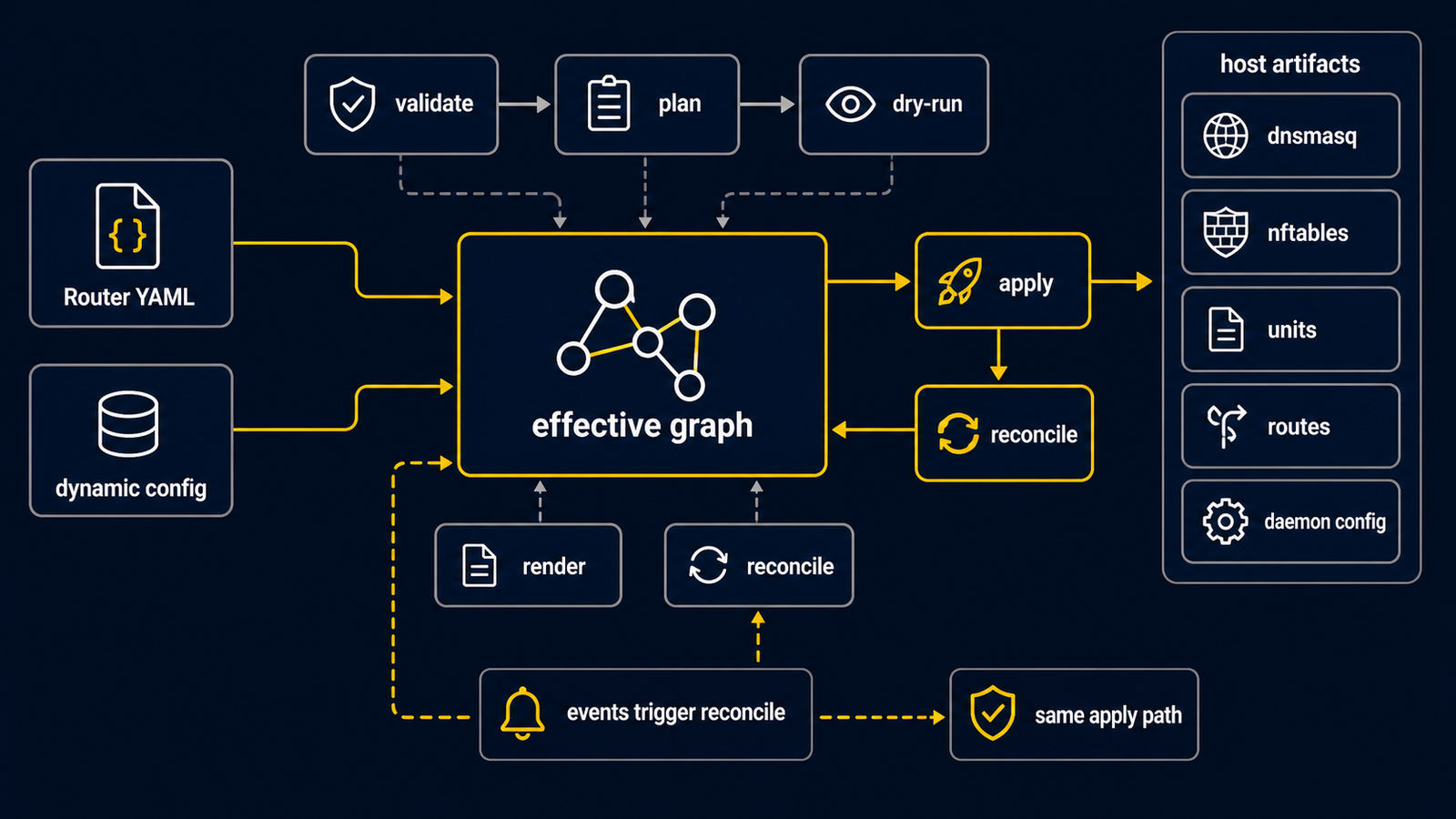
There are two ways to work with a routerd configuration. The important first
question is whether routerd is already running as a service.
| Situation | Use | What it does |
|---|---|---|
| Before the service exists | routerd validate --config FILE | Reads and validates a YAML file directly. |
| Before a live change | routerd apply --config FILE --once --dry-run | Builds the desired work without committing host changes. Use explicit temporary state paths for a first lab. |
| Service already running | routerctl validate, routerctl plan, routerctl apply | Sends a candidate file to the local routerd daemon through a Unix socket. |
Validate a file directly
routerd validate --config /path/to/router.yaml
This is the safe first validation command. It does not need a running
routerd.service.
Preview without committing a network change
For a first lab, keep every generated state file in a new temporary directory:
workdir=$(mktemp -d)
routerd apply --config /path/to/router.yaml --once --dry-run \
  --state-file "$workdir/state.db" \
  --ledger-file "$workdir/ledger.db" \
  --status-file "$workdir/status.json"
This is a preview, not a permission to apply the configuration to a production router. Read the result, then remove the temporary directory when finished.
Live one-shot apply
routerd apply --once changes the host and exits. Use it only from a console
or an independent management path after reviewing the configuration:
sudo routerd apply --config /usr/local/etc/routerd/router.yaml --once
Run the service and use routerctl
routerd serve is the long-running reconcile loop. The packaged service starts
it for normal deployments:
sudo systemctl enable --now routerd.service
sudo routerctl get status
Once the service is running, routerctl is the local control client. For
example, a plan asks the daemon what it would change for a candidate file:
sudo routerctl plan -f /usr/local/etc/routerd/router.yaml --replace
routerctl apply asks that daemon to make a live update. It is not a standalone
one-shot host command, and neither routerctl plan nor a repeated plan is a
dry-run apply.
Interpreting a partial apply failure
An apply error can occur after the canonical configuration has been replaced.
The error and daemon log include stage, generation, canonical,
durabilityConfirmed, terminal-record flags, and the confirmed runtime epoch.
Healthy describes a dataplane observation; it does not confirm persistence.
| Failure point | Canonical configuration | Runtime and completion |
|---|---|---|
| Before replacement | Previous configuration | A changed runtime is restored if possible; a failed restoration reports the actual fallback or unavailable state. |
| After rename, during chmod/directory sync | New configuration is visible | New runtime is retained; durability is unconfirmed. |
| Terminal generation UPDATE | New configuration | New runtime is retained; the command/API fails without emitting a normal success result. |
| Result/status output | New configuration | The completed generation remains completed; output failure is returned. |
The daemon retains failed configuration-attempt diagnostics in memory, including when SQLite cannot record them. A successful scheduled observation does not clear those diagnostics; a subsequent configuration operation must resolve the failure. This memory does not survive a process restart. Inspect the error, canonical YAML, generation history and controller status before retrying. These contracts do not promise rollback of all OS changes or power-loss durability on every filesystem.
A runtime reload accepted by the supervisor retains exclusive mutation ownership until its completion acknowledgement, even if the request context expires. If preparation does not cooperate with cancellation, new mutations are fenced and serve is asked to stop. There is no hard completion-time guarantee for a stuck builder. A confirmed generation belongs to serve, not to the HTTP request context.
--no-reconcile deliberately commits configuration without changing the running
generation. Standby keeps the existing HA behavior and skips canonical commit and
host mutation. Dry-run creates no production generation or canonical change.
Dry-run snapshots copy object statuses, state variables and dynamic desired parts from one SQLite read transaction, preserving timestamps, expiry, source, generation, digest and withdrawal intent. Debug logs contain an input manifest with the candidate hash and evaluation time, without payloads. Jobs, event cursors, event/action journals, federation history and generation history are excluded. Host observations and controller evaluation are not frozen; execution still checks TTL and ownership. The manifest is an account of acquired inputs, not authorization to apply them later.
Render
When this documentation says "render", it means routerd produces host-side files such as a dnsmasq configuration, an nftables ruleset, a systemd unit, or a NixOS module. Whether those files reach the host depends on the operation: validation only checks the description; a dry-run previews; a live apply or serve reconciliation can update the host.
In current routerd, dnsmasq provides DHCPv4, DHCPv6, relay, and RA rendering.
DNS listening, local zones, conditional forwarding, and encrypted DNS are
handled by DNSResolver and routerd-dns-resolver.
Reconcile
In serve mode, routerd consumes events and re-evaluates affected resources. The shrinking difference between the description and the observed host is called reconcile. For example, after a DHCPv6-PD renewal changes a prefix, routerd can update the derived LAN address, RA, DNS answers, and DS-Lite path in order.