State database
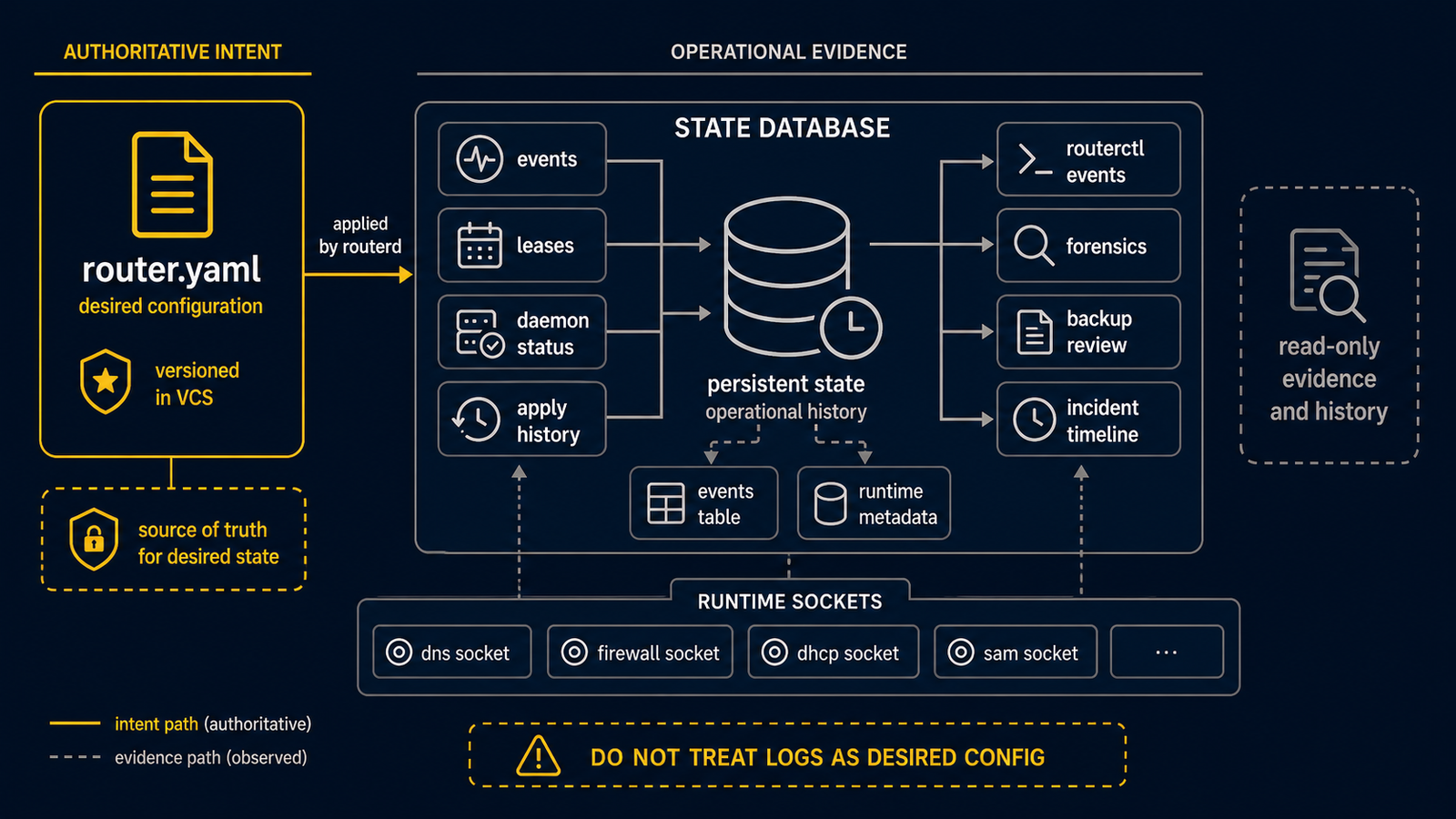
routerd persists state and events in SQLite. Each managed daemon additionally keeps its own lease or state file and an event log.
Key paths
| Kind | Path |
|---|---|
| routerd state DB | /var/lib/routerd/routerd.db |
| DHCPv6-PD lease | /var/lib/routerd/dhcpv6-client/<name>/lease.json |
| DHCPv4 lease | /var/lib/routerd/dhcpv4-client/<name>/lease.json |
| PPPoE state | /var/lib/routerd/pppoe-client/<name>/state.json |
| HealthCheck state | /var/lib/routerd/healthcheck/<name>/state.json |
| Per-daemon events | /var/lib/routerd/<daemon>/<name>/events.jsonl |
Events table
The bus persists events into SQLite. EventRule and DerivedEvent consume this stream as input. For day-to-day operations, prefer routerctl get events over running sqlite3 against the database directly:
routerctl get events --limit 20
routerctl get events --topic routerd.resource.status.changed
routerctl get events --resource DNSResolver/lan-resolver -o json
Even without a LogRetention resource, the local event journal is bounded to
24 hours, 100,000 rows, and 64 MiB of logical payload. Use a LogSink before
increasing local forensic retention; router operation must not depend on an
unbounded event table.
Storage-full recovery
Check routerctl doctor disk, systemctl status routerd, and
/run/routerd/storage-critical.json. For a volatile Live ISO COW filesystem,
reboot the router OS and then verify its persistent configuration contains the
intended LogRetention. For persistent storage, stop routerd, run
routerctl ledger prune-events --older-than 24h, and only run
routerctl ledger vacuum after enough working space is available. A reboot by
itself does not reclaim persistent storage.
Mobility holder transitions
CloudEdge SAM failover emits routerd.mobility.holder.transition events with
machine-readable attributes such as transitionKind, address, timestamp,
issuedAt, fromNode, toNode, mobilityPathSig, and
assignmentGeneration.
For provider-secondary-IP capture, seize-complete means the provider capture
assign action succeeded in the action journal for an active /32
bgpCaptureAssignment. Its issuedAt is the journal ExecutedAt, so
timestamp - issuedAt measures the delay from provider acceptance to event
recording. T_seize is the provider acceptance time.
capture-confirmed is still discovery-observation based. T_confirm is the
time the local process observed the provider capture taking effect. Together,
seize-complete and capture-confirmed measure the accepted-to-effective
interval.
After a node restart or rejoin, reconfirmation events can reuse the original
journal acceptance time as issuedAt. In that case, timestamp - issuedAt
includes the time while the node was stopped or absent. Treat those deltas as
reconfirmation age, not convergence latency.
For non-capture flows such as static-owned, static-handover, and local-home,
seize-complete still comes from the active-holder plus self-identity BGP
observation. Lab evidence currently proves the capture flow; static and
handover completion events are not yet proven in a real environment.
Backup philosophy
The state database holds observed state — it is not a substitute for the configuration. The authoritative description of intent lives in the YAML configuration, version-controlled in git. If a host is rebuilt, restoring the configuration and letting routerd reconcile is preferred over restoring the SQLite database.
If you want history of operational events for forensic purposes, export or take periodic snapshots of routerd.db, dns-queries.db, traffic-flows.db, and firewall-logs.db. The controller event journal currently lives in routerd.db; preserve the complete database when event history is required.