Reconcile and removal
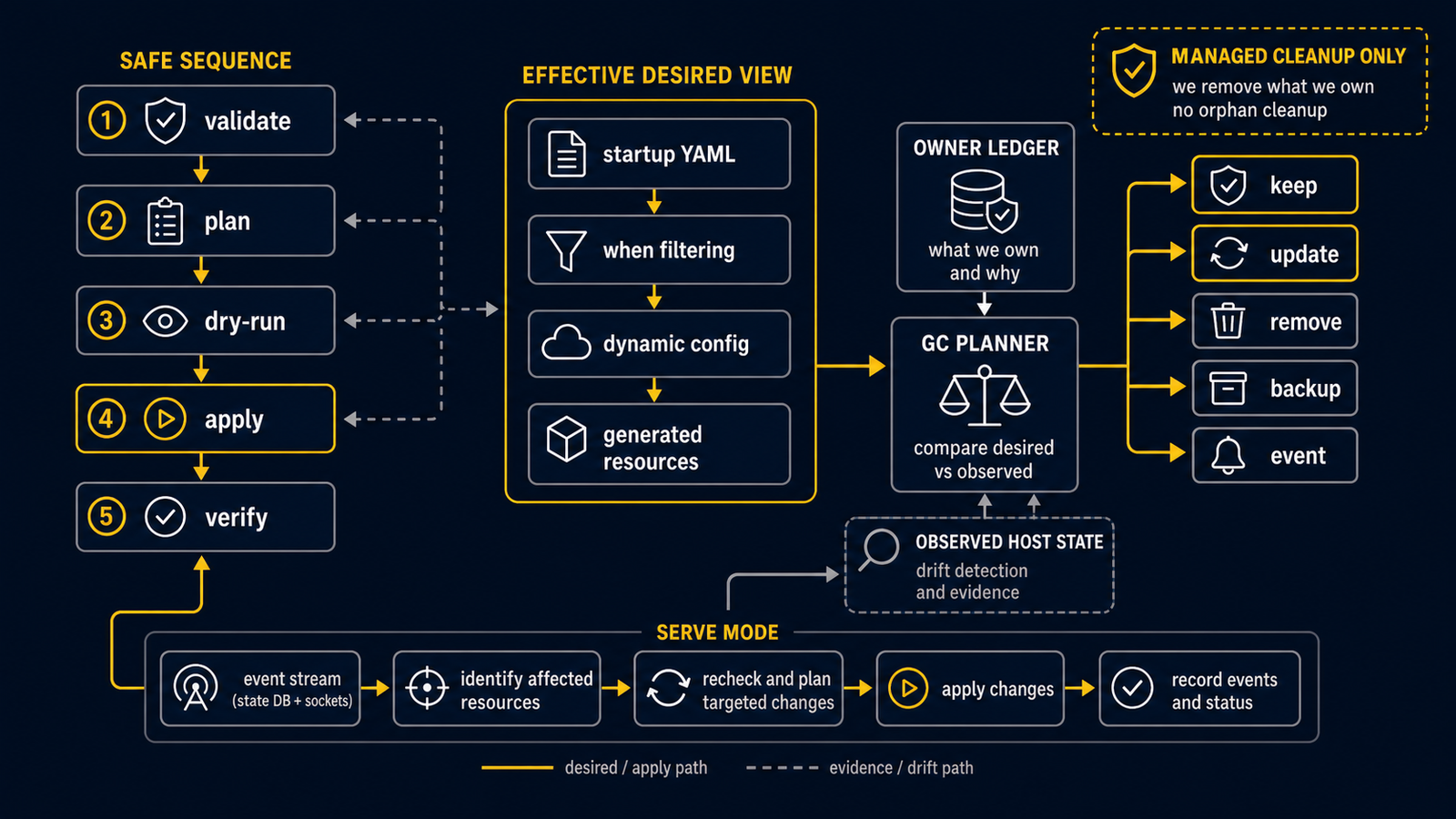
routerd compares the intent declared in YAML with the host's current state. When they differ, routerd computes a plan and then applies it.
Standard sequence
routerctl validate -f router.yaml --replace
routerctl plan -f router.yaml --replace
routerctl apply -f router.yaml --replace
For a remote router, confirm that the management connection (SSH, console, hypervisor console) will survive the change before running apply.
On a live router, plan and observe read the state database as a transient snapshot; when the daemon is writing SQLite WAL pages concurrently, that snapshot can be slightly stale, so treat it as advisory preflight input rather than a rollback record.
Long-running mode
routerd serve --config router.yaml
In serve mode, routerd reacts to events on the bus and re-evaluates only the resources affected. Inputs include DHCPv6-PD renewals, health-check results, derived events, and configuration changes detected by inotify.
routerd serve runs the controller runtime directly from the declared config.
There is no public flag to choose a partial controller set; if a resource is
declared, the matching controller decides how to converge it. Use routerctl plan
as the pre-apply check rather than treating preview mode as a persistent
operating mode.
When the config contains resources that forward traffic, such as
IngressService, PortForward, NAT, BGP, or static/policy routes, routerd
derives the required runtime sysctls. routerctl apply observes, plans,
and renders those derived settings without mutating them; routerd serve
converges them during controller reconcile. This keeps one-shot apply bounded to
config validation and artifact rendering while the long-running controller owns
daemon and runtime kernel lifecycle.
A panic in a controller's synchronous reconcile call is recorded as a failed reconcile, including the existing OpenTelemetry count, duration and error event. The panic payload is omitted from the error and logs. The runner releases its locks and continues with subsequent controllers; periodic retries return to the shortest configured interval. Bootstrap still records reconcile failures and returns only context cancellation or deadline errors. Panics in separate goroutines and process termination are outside this recovery boundary.
Drift checks
routerd does not treat the status database as the only source of truth. The status store records what the previous apply observed, but controllers also check the host state they are responsible for before deciding to skip work. Examples include systemd unit enabled/active state, whether dnsmasq is running with the expected config file, whether a DHCPv4 lease address is still present on the interface, and whether managed nftables tables exist on the host.
This matters after a reboot, a failed manual edit, or an interrupted upgrade: the status database can still say "Applied" while the OS state has drifted. Controllers should converge the OS back to the declared YAML instead of assuming that the previous status row is still true.
Derived resources
Some host objects are generated from higher-level intent instead of being
written in YAML directly. For example, routerd.service,
routerd-healthcheck@*.service, firewall log daemons, and helper DPI services
are derived service units. Use this view to inspect those generated resources:
routerctl dynamic list
The default view is derived from the current config. Old status rows that no
longer come from the current config are hidden so they do not look active.
Use --include-stale when you need to inspect those rows while cleaning up an
old state database.
If a removed or unsupported resource kind is still present in YAML, routerd fails config loading instead of silently ignoring it.
Managed cleanup
When a resource disappears from YAML, the owning controller removes or disables
only the artifacts it owns. Stale routerd-healthcheck@*.service and supervised
client daemon units are disabled and removed when no matching owning resource
remains. NAT44 clears the managed routerd_nat table or pf anchor when no NAT
rules remain.
If an old state row belongs to a resource kind that no longer exists in the
schema, remove it with routerctl delete --force <kind>/<name>. When more than
one API group has a row for the same kind/name, add --api-version <version> so
routerd can delete the exact state row without guessing.
Firewall rendering keeps the managed nftables table in place and reloads it in
one nft -f batch. For named sets such as firewall zone interface sets and
client-policy MAC sets, routerd destroys the managed set before redefining it so
removed elements do not remain. It does not destroy and recreate the whole
filter table during normal apply.
Removal
routerd only deletes objects whose ownership it can attribute (i.e. that routerd previously created or adopted). It does not remove third-party configuration or manual changes.
Generation-based rollback is supported. routerctl rollback --list shows the stored generations recorded by past applies, and routerctl rollback --to <generation> re-applies a stored Router YAML through the normal apply path. Rollback re-applies the declared config and the artifacts routerd manages; it does not restore live conntrack, kernel transient state, daemon runtime state, or any host change made outside routerd's ledger. For changes that include deletions, always run routerctl plan first and confirm the deletion list before applying.