Release process
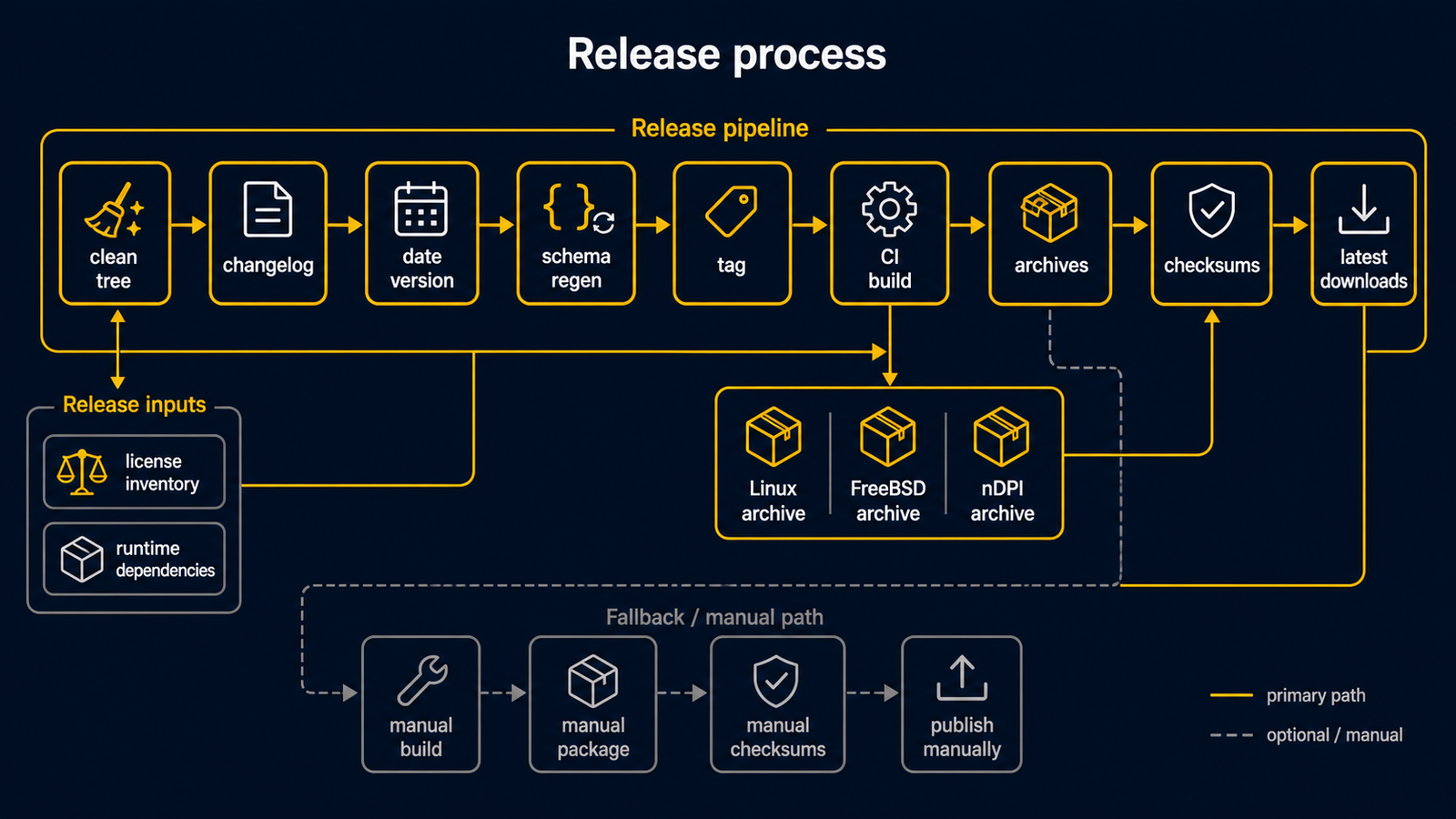
routerd uses date-based release versions.
The executable version, release tag, and release archive name use
vYYYYMMDD.HHmm format.
The date and time are calculated in UTC by default.
Automated release
Use the release helper from a clean working tree:
make release
The helper uses the current date and start time in UTC, updates the
executable version strings, promotes the current Unreleased changelog entries
to the new release tag while leaving a fresh empty Unreleased heading,
regenerates the checked-in schemas, commits the change, creates the tag, and
pushes both main and the tag.
For example, a release started at 15:30 UTC uses the .1530 suffix.
Useful options:
scripts/release.sh --dry-run
scripts/release.sh --date 20260510
scripts/release.sh --timezone UTC
scripts/release.sh --no-push
The working tree must be clean before running the helper. Commit feature and
changelog changes first; the helper should only create the release commit.
The changelog must keep ## Unreleased as the first release section, and that
section must contain entries before a release can be created.
Pushing the release tag starts the GitHub Actions workflow.
The Release workflow builds these targets:
linux-amd64linux-arm64freebsd-amd64freebsd-arm64routerd-ndpi-agent-libndpi-linux-amd64as an optional native nDPI agent override archive
Each target archive is published with two names:
routerd-<tag>-<os>-<arch>.tar.gzfor an exact releaserouterd-<os>-<arch>.tar.gzfor a fixed latest-download URLrouterd-ndpi-agent-libndpi-<tag>-linux-amd64.tar.gzandrouterd-ndpi-agent-libndpi-linux-amd64.tar.gzfor the optional native nDPI agent override
Linux archives are built with CGO_ENABLED=0, so the routerd binaries in those
archives are statically linked and do not depend on the target host's glibc
version. The workflow runs make check-linux-static before packaging Linux
archives. The optional native nDPI agent archive is intentionally separate:
it is built with CGO_ENABLED=1 -tags libndpi, links to the host libndpi
runtime, and is not included in the normal static Linux archive.
Both names also have .sha256 files.
The archive contains:
bin/:routerd,routerctl, and the managed daemon binariesinstall.sh: POSIX sh installeruninstall.sh: POSIX sh uninstalleretc/routerd/router.yaml.sample: sanitized sample configurationsystemd/orrc.d/: service templates for the target OSshare/doc/: README, VERSION, LICENSE, and third-party license inventory
The native nDPI agent override archive contains only bin/routerd-ndpi-agent
and minimal documentation. Install it together with a normal routerd archive on
hosts that should run routerd-ndpi-agent with libndpiLoaded=true:
sudo ./install.sh --with-ndpi \
  --with-ndpi-archive ./routerd-ndpi-agent-libndpi-linux-amd64.tar.gz
The installer keeps downloads explicit. It does not fetch the feature archive
itself; release runbooks should download the archive and its .sha256 file
before invoking install.sh.
The workflow uploads the versioned archive, the fixed-name archive, and their
.sha256 files to the GitHub Release page.
Documentation should use the fixed latest-download URL for quick starts:
https://github.com/imksoo/routerd/releases/latest/download/routerd-linux-amd64.tar.gz
Use versioned URLs only when a runbook must pin a specific release.
Normal branch pushes and pull requests use the separate CI workflow.
That workflow runs development checks only and does not publish release assets.
See Development checks for the pre-commit hook and CI scope.
Responsibility split
Installation logic lives in install.sh.
The Makefile is only for development tasks such as building, testing, schema checks, example validation, website builds, and release archive generation.
The release archive does not include the Makefile.
This keeps end-user installation and upgrade behavior in one script.
Development tests use Makefile targets:
make test
make check-schema
make validate-example
make dist ROUTERD_OS=linux GOARCH=amd64 VERSION="$(git describe --tags --abbrev=0)"
make dist-ndpi-agent-libndpi ROUTERD_OS=linux GOARCH=amd64 VERSION="$(git describe --tags --abbrev=0)"
Deployment smoke checks use install.sh.
After installation, install.sh calls routerctl get status when the routerd
read-only status socket exists.
The GitHub release workflow also extracts each archive and runs install.sh with a temporary non-system prefix.
That smoke test verifies that the archive can install and uninstall without using a Makefile.
The CI smoke test passes --no-install-deps because dependency installation belongs to the target router host.
Install a release archive on the router host:
tar -xzf routerd-linux-amd64.tar.gz
sudo ./install.sh
install.sh copies binaries to /usr/local/sbin, installs service templates, and writes router.yaml.sample.
At the start of the run, it detects the OS package manager and installs known runtime packages unless --no-install-deps is passed.
It does not overwrite an existing /usr/local/etc/routerd/router.yaml.
When an existing /usr/local/sbin/routerd is found, the installer switches to upgrade mode automatically.
It prints the old and new routerd --version output, replaces binaries and service templates, preserves configuration and state, and restarts routerd.service or the FreeBSD routerd rc.d service if it was already running.
On systemd hosts, it waits for the restarted routerd.service status socket and restarts only active routerd helper services that are still running a deleted pre-upgrade binary or whose unit file was updated after the helper process started.
Replaced files are copied to *.backup.YYYYMMDDHHMMSS before replacement.
Pass --no-restart to replace files without restarting the service.
Pass --dry-run to print planned file and service-manager changes.
Pass --verbose for shell tracing.
Pass --no-config-update to leave router.yaml.sample unchanged.
Pass --no-install-deps to skip OS package installation.
Pass --list-deps to print the package and command list without changing the host.
Pass --deps-only to install packages and then exit before copying routerd files.
Pass --with-tailscale to include the optional Tailscale package and command check.
Pass --enable-service or --start-service when you want a fresh install to call the host service manager.
After installation, the script runs routerctl get status when the routerd
read-only status socket exists.
The installer never modifies these runtime or state locations:
/usr/local/etc/routerd/router.yaml/var/lib/routerd/var/db/routerd/run/routerd/var/run/routerd/var/log/otelcol
License Inventory
routerd itself is distributed under the BSD 3-Clause License. Release archives and the live ISO include third-party software with separate licenses. Before publishing a release, regenerate the inventory:
go mod download all
make third-party-licenses
Populate the complete module cache first so license detection reads each dependency's license instead of falling back to the repository directory.
The generated THIRD_PARTY_LICENSES.md records Go module license files and
Alpine package license metadata. The live ISO is an aggregate distribution:
GPL-licensed Alpine packages keep their own licenses and source availability
paths. The ISO is not relicensed as a single GPL work.
Runtime dependencies
install.sh keeps dependency installation in the same end-user path as binary installation.
This avoids a separate Makefile install path.
On Debian and Ubuntu, the installer uses apt-get and installs:
ca-certificates curl dnsmasq-base nftables wireguard-tools chrony bind9-dnsutils tcpdump cron jq ppp pppoe conntrack iproute2 iputils-ping iputils-tracepath net-tools kmod radvd strongswan-swanctl iptables keepalived
On Fedora-like systems, the installer uses dnf and installs:
ca-certificates curl dnsmasq nftables wireguard-tools chrony bind-utils tcpdump cronie jq ppp rp-pppoe conntrack-tools iproute iputils traceroute kmod radvd strongswan iptables keepalived openssh-server
On Arch-like systems, the installer uses pacman and installs:
ca-certificates curl dnsmasq nftables wireguard-tools chrony bind tcpdump cronie jq ppp rp-pppoe conntrack-tools iproute2 iputils traceroute kmod radvd strongswan iptables keepalived openssh
On Alpine, the installer uses apk and installs:
alpine-conf ca-certificates curl dnsmasq nftables wireguard-tools chrony bind-tools tcpdump cronie jq ppp ppp-pppoe conntrack-tools iproute2 iputils iputils-tracepath kmod radvd strongswan iptables keepalived util-linux e2fsprogs dosfstools exfatprogs qemu-guest-agent openssh
On FreeBSD, the installer uses pkg and installs:
ca_root_nss curl dnsmasq wireguard-tools mpd5 bind-tools tcpdump jq chrony strongswan
FreeBSD pf, ifconfig, route, service, sysrc, and cron are base-system tools and are checked as commands rather than installed as packages.
On NixOS, the installer prints a warning instead of calling nix-env.
Declare packages in the NixOS configuration or in routerd Package resources.
After dependency installation, the script checks that the expected commands exist. Missing commands are warnings, not fatal errors, because package names vary between distributions. Use this command to inspect the dependency set:
./install.sh --list-deps
Uninstall
Use uninstall.sh when you want to remove installed files separately from state:
sudo ./uninstall.sh --yes
The default uninstall stops and disables the service, removes routerd binaries, removes the service template, and removes runtime files.
It keeps /usr/local/etc/routerd, /var/lib/routerd, /var/db/routerd, and /var/log/otelcol.
Purge options are explicit:
sudo ./uninstall.sh --yes --purge-config
sudo ./uninstall.sh --yes --purge-state
sudo ./uninstall.sh --yes --all
Use --dry-run to preview removal without changing the host.
Manual dispatch
If a tag already exists, the workflow can also be started from GitHub Actions with the workflow_dispatch input:
tag = vYYYYMMDD.HHmm
The workflow checks out that tag before building.
Fallback
If GitHub Actions is unavailable, build the same archives locally:
tag=$(git describe --tags --abbrev=0)
make dist ROUTERD_OS=linux GOARCH=amd64 VERSION="$tag"
make dist ROUTERD_OS=freebsd GOARCH=amd64 VERSION="$tag"
make dist-ndpi-agent-libndpi ROUTERD_OS=linux GOARCH=amd64 VERSION="$tag"
Then create a release with the GitHub CLI:
tag=$(git describe --tags --abbrev=0)
gh release create "$tag" \
  "dist/linux-amd64/routerd-${tag}-linux-amd64.tar.gz" \
  "dist/linux-amd64/routerd-${tag}-linux-amd64.tar.gz.sha256" \
  dist/linux-amd64/routerd-linux-amd64.tar.gz \
  dist/linux-amd64/routerd-linux-amd64.tar.gz.sha256 \
  "dist/freebsd-amd64/routerd-${tag}-freebsd-amd64.tar.gz" \
  "dist/freebsd-amd64/routerd-${tag}-freebsd-amd64.tar.gz.sha256" \
  dist/freebsd-amd64/routerd-freebsd-amd64.tar.gz \
  dist/freebsd-amd64/routerd-freebsd-amd64.tar.gz.sha256 \
  "dist/linux-amd64/routerd-ndpi-agent-libndpi-${tag}-linux-amd64.tar.gz" \
  "dist/linux-amd64/routerd-ndpi-agent-libndpi-${tag}-linux-amd64.tar.gz.sha256" \
  dist/linux-amd64/routerd-ndpi-agent-libndpi-linux-amd64.tar.gz \
  dist/linux-amd64/routerd-ndpi-agent-libndpi-linux-amd64.tar.gz.sha256 \
  --title "routerd ${tag}" \
  --generate-notes \
  --verify-tag