リリース手順
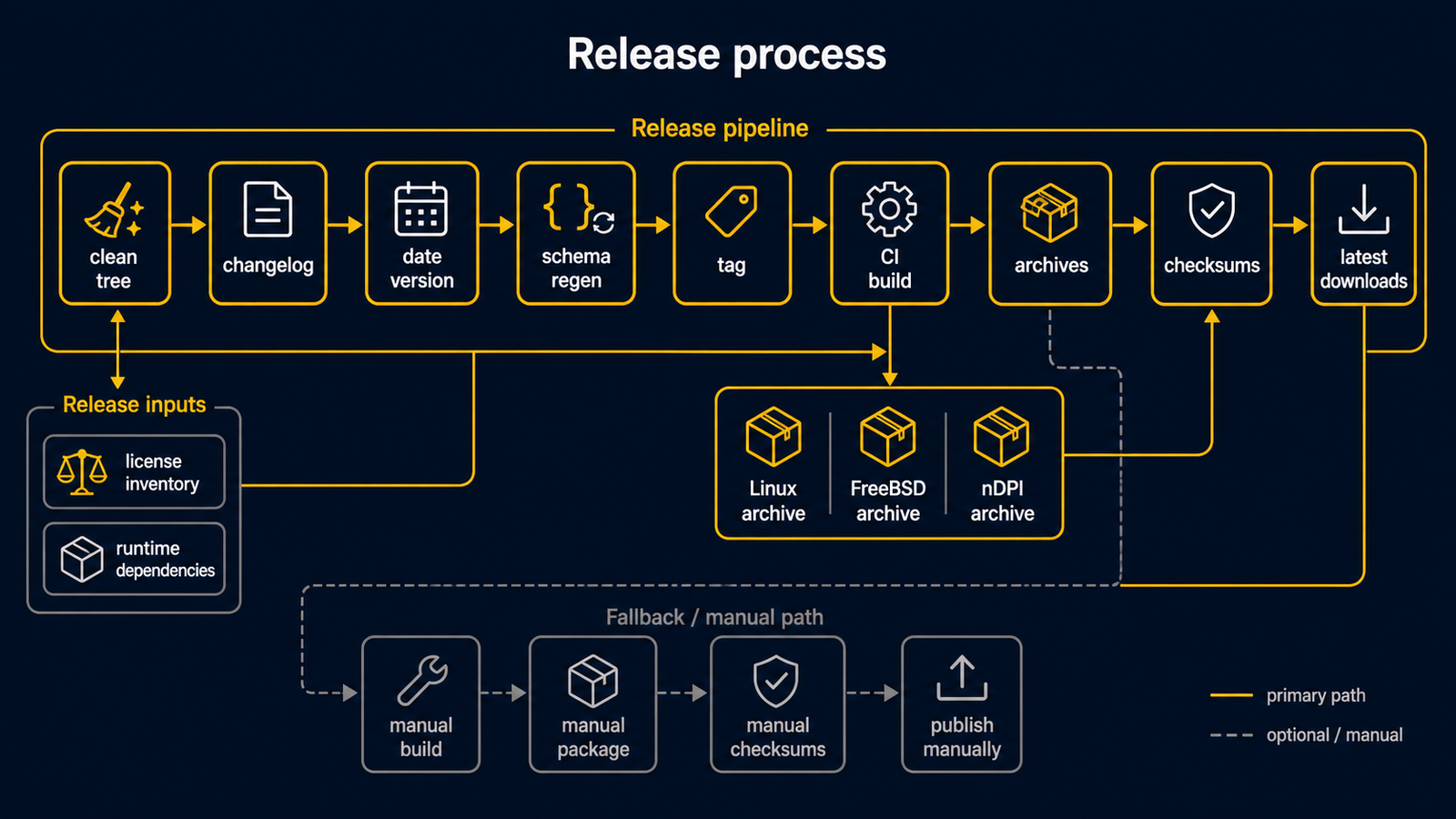
routerd は日付ベースのリリース版番号を使います。
実行ファイルの版番号、リリースタグ、リリースアーカイブ名は、いずれも
vYYYYMMDD.HHmm 形式です。
日付と時刻は、既定で UTC を基準に算出します。
自動リリース
作業ツリーをクリーンにした状態で、リリース用ヘルパーを実行します。
make release
ヘルパーは UTC の現在の日付と開始時刻を使い、実行ファイルの版番号文字列を
更新し、現在の Unreleased(未リリース)変更履歴エントリーを新しいリリースタグへ昇格し、
新しい空の Unreleased 見出しを残します。さらに、リポジトリ管理下のスキーマを
再生成し、変更をコミットし、タグを作成して、main とタグの両方を push します。
たとえば 15:30 UTC に開始したリリースは、.1530 のサフィックスを使います。
便利なオプションは次の通りです。
scripts/release.sh --dry-run
scripts/release.sh --date 20260510
scripts/release.sh --timezone UTC
scripts/release.sh --no-push
ヘルパーを実行する前に、作業ツリーをクリーンにしておく必要があります。
機能変更と変更履歴の変更は先にコミットしてください。ヘルパーが作るのは
リリースコミットだけです。
リリース用変更履歴では ## Unreleased を先頭のリリースセクションとして保ち、
そのセクションにエントリーがある状態でないとリリースを作成できません。
リリースタグを push すると、GitHub Actions のワークフローが始まります。
Release ワークフローは次のターゲットをビルドします。
linux-amd64linux-arm64freebsd-amd64freebsd-arm64routerd-ndpi-agent-libndpi-linux-amd64(任意のネイティブ nDPI エージェント 上書き用アーカイブ)
各ターゲットのアーカイブは、2 つの名前で公開します。
- 特定リリースを指す
routerd-<tag>-<os>-<arch>.tar.gz - 最新版を固定 URL でダウンロードするための
routerd-<os>-<arch>.tar.gz - 任意のネイティブ nDPI エージェント上書き用の
routerd-ndpi-agent-libndpi-<tag>-linux-amd64.tar.gzとrouterd-ndpi-agent-libndpi-linux-amd64.tar.gz
Linux アーカイブは CGO_ENABLED=0 でビルドします。そのため、アーカイブ内の
routerd バイナリは静的リンクで、ターゲットホストの glibc バージョンに依存しません。
ワークフローは、Linux アーカイブをパッケージ化する前に make check-linux-static
を実行します。任意のネイティブ nDPI エージェントアーカイブは意図的に分離しています。
これは CGO_ENABLED=1 -tags libndpi でビルドし、ホストの libndpi ランタイムに
リンクするため、通常の静的 Linux アーカイブには含めません。
どちらの名前にも .sha256 ファイルが付きます。
アーカイブには次を入れます。
bin/:routerd、routerctl、および管理対象デーモンのバイナリinstall.sh: POSIX sh のインストーラーuninstall.sh: POSIX sh のアンインストーラーetc/routerd/router.yaml.sample: 秘匿情報を除いたサンプル設定systemd/またはrc.d/: ターゲット OS 向けのサービステンプレートshare/doc/: README、VERSION、LICENSE、第三者ライセンスの一覧
ネイティブ nDPI エージェント上書き用アーカイブには、bin/routerd-ndpi-agent と
最小限のドキュメントだけが入ります。libndpiLoaded=true で routerd-ndpi-agent
を動かしたいホストでは、通常の routerd アーカイブと一緒にインストールします。
sudo ./install.sh --with-ndpi \
  --with-ndpi-archive ./routerd-ndpi-agent-libndpi-linux-amd64.tar.gz
インストーラーはダウンロードを明示的なものに保ちます。機能用アーカイブを自分で
取得することはしません。リリースのランブックでは、install.sh を呼ぶ前に
アーカイブとその .sha256 ファイルをダウンロードしてください。
ワークフローは、バージョン付きアーカイブ、固定名アーカイブ、それぞれの
.sha256 ファイルを GitHub Release ページにアップロードします。
クイックスタートのドキュメントでは、最新版を固定 URL でダウンロードする形を使います。
https://github.com/imksoo/routerd/releases/latest/download/routerd-linux-amd64.tar.gz
特定のリリースに固定する必要があるランブックでだけ、バージョン付き URL を使います。
通常のブランチへの push と pull request では、別の CI ワークフローを使います。
このワークフローは開発時のチェックだけを実行し、リリース成果物は公開しません。
pre-commit hook と CI の範囲は 開発時のチェック を参照してください。
責務の分担
インストール処理は install.sh にあります。
Makefile はビルド、テスト、スキーマチェック、example の検証、website のビルド、
リリースアーカイブの生成など、開発作業のためだけのものです。
リリースアーカイブに Makefile は含めません。
これにより、エンドユーザー向けのインストールとアップグレードの挙動を 1 つの
スクリプトにまとめられます。
開発時のテストは Makefile ターゲットを使います。
make test
make check-schema
make validate-example
make dist ROUTERD_OS=linux GOARCH=amd64 VERSION="$(git describe --tags --abbrev=0)"
make dist-ndpi-agent-libndpi ROUTERD_OS=linux GOARCH=amd64 VERSION="$(git describe --tags --abbrev=0)"
デプロイ時のスモークチェックは install.sh を使います。
インストール後、routerd の読み取り専用 status socket があれば、install.sh は
routerctl get status を呼びます。
GitHub のリリースワークフローも、各アーカイブを展開し、システム外の一時 prefix で
install.sh を実行します。
このスモークテストは、Makefile を使わずにアーカイブをインストール・アンインストール
できることを確認します。
依存パッケージの導入はターゲットのルーターホストの責務なので、CI のスモークテストは
--no-install-deps を渡します。
ルーターホストにリリースアーカイブをインストールします。
tar -xzf routerd-linux-amd64.tar.gz
sudo ./install.sh
install.sh はバイナリを /usr/local/sbin にコピーし、サービステンプレートを
インストールし、router.yaml.sample を書き出します。
実行の最初に OS のパッケージマネージャーを検出し、--no-install-deps を渡さない
限り、既知のランタイムパッケージを導入します。
既存の /usr/local/etc/routerd/router.yaml は上書きしません。
既存の /usr/local/sbin/routerd が見つかると、インストーラーは自動でアップグレード
モードに切り替わります。
このとき、古い routerd --version と新しい routerd --version の出力を表示し、
バイナリとサービステンプレートを置き換え、設定と状態を保ち、すでに動いていれば
routerd.service または FreeBSD の routerd rc.d サービスを再起動します。
systemd ホストでは、再起動した routerd.service の status socket を待ち、削除済みの
アップグレード前バイナリでまだ動いている、あるいはヘルパープロセスの起動後に
ユニットファイルが更新された、稼働中の routerd ヘルパーサービスだけを再起動します。
置き換えたファイルは、置き換え前に *.backup.YYYYMMDDHHMMSS へコピーします。
サービスを再起動せずにファイルだけ置き換えるには --no-restart を渡します。
予定されるファイルとサービスマネージャーの変更を表示するには --dry-run を渡します。
シェルのトレースを出すには --verbose を渡します。
router.yaml.sample を変えずに残すには --no-config-update を渡します。
OS パッケージの導入を省くには --no-install-deps を渡します。
ホストを変えずにパッケージとコマンドの一覧を表示するには --list-deps を渡します。
パッケージを導入したら routerd ファイルをコピーする前に終了するには --deps-only を渡します。
任意の Tailscale パッケージとコマンドのチェックを含めるには --with-tailscale を渡します。
新規インストール時にホストのサービスマネージャーを呼びたい場合は --enable-service
または --start-service を渡します。
インストール後、routerd の読み取り専用 status socket があれば、スクリプトは
routerctl get status を実行します。
インストーラーは、次のランタイム・状態の場所には一切変更を加えません。
/usr/local/etc/routerd/router.yaml/var/lib/routerd/var/db/routerd/run/routerd/var/run/routerd/var/log/otelcol
ライセンス一覧
routerd 本体は BSD 3-Clause License で配布します。 リリースアーカイブとライブ ISO には、別ライセンスの第三者ソフトウェアを含みます。 リリースを公開する前に、一覧を再生成してください。
go mod download all
make third-party-licenses
生成される THIRD_PARTY_LICENSES.md には、Go モジュールのライセンスファイルを記録します。ライブ ISO は集合的な配布物です。
GPL ライセンスのパッケージは、それぞれのライセンスとソース入手経路を保ちます。
ISO 全体を 1 つの GPL 著作物として再ライセンスする扱いではありません。
ランタイム依存関係
install.sh は、依存パッケージの導入を、バイナリのインストールと同じ
エンドユーザー向けの経路に置きます。
これにより、Makefile を使う別のインストール経路を避けられます。
Debian と Ubuntu では、インストーラーは apt-get を使い、次を導入します。
ca-certificates curl dnsmasq-base nftables wireguard-tools chrony bind9-dnsutils tcpdump cron jq ppp pppoe conntrack iproute2 iputils-ping iputils-tracepath net-tools kmod radvd strongswan-swanctl iptables keepalived
Fedora 系では、インストーラーは dnf を使い、次を導入します。
ca-certificates curl dnsmasq nftables wireguard-tools chrony bind-utils tcpdump cronie jq ppp rp-pppoe conntrack-tools iproute iputils traceroute kmod radvd strongswan iptables keepalived openssh-server
Arch 系では、インストーラーは pacman を使い、次を導入します。
ca-certificates curl dnsmasq nftables wireguard-tools chrony bind tcpdump cronie jq ppp rp-pppoe conntrack-tools iproute2 iputils traceroute kmod radvd strongswan iptables keepalived openssh
FreeBSD では、インストーラーは pkg を使い、次を導入します。
ca_root_nss curl dnsmasq wireguard-tools mpd5 bind-tools tcpdump jq chrony strongswan
FreeBSD の pf、ifconfig、route、service、sysrc、cron は基本システムの
ツールなので、パッケージとして導入せず、コマンドの有無だけを確認します。
依存パッケージを導入したあと、スクリプトは期待するコマンドが存在するか確認します。 パッケージ名はディストリビューションごとに異なるため、コマンドが見つからない場合は 致命的エラーではなく警告にします。 依存関係の一覧を確認するには、次のコマンドを使います。
./install.sh --list-deps
アンインストール
インストール済みのファイルを状態とは別に削除したいときは、uninstall.sh を使います。
sudo ./uninstall.sh --yes
既定のアンインストールは、サービスを停止・無効化し、routerd バイナリを削除し、
サービステンプレートを削除し、ランタイムファイルを削除します。
/usr/local/etc/routerd、/var/lib/routerd、/var/db/routerd、/var/log/otelcol
は残します。
完全削除のオプションは明示的に指定します。
sudo ./uninstall.sh --yes --purge-config
sudo ./uninstall.sh --yes --purge-state
sudo ./uninstall.sh --yes --all
ホストを変えずに削除内容をプレビューするには --dry-run を使います。
手動ディスパッチ
タグがすでに存在する場合は、GitHub Actions の workflow_dispatch 入力でも
ワークフローを開始できます。
tag = vYYYYMMDD.HHmm
ワークフローは、ビルド前にそのタグをチェックアウトします。
フォールバック
GitHub Actions が使えない場合は、同じアーカイブをローカルでビルドします。
tag=$(git describe --tags --abbrev=0)
make dist ROUTERD_OS=linux GOARCH=amd64 VERSION="$tag"
make dist ROUTERD_OS=freebsd GOARCH=amd64 VERSION="$tag"
make dist-ndpi-agent-libndpi ROUTERD_OS=linux GOARCH=amd64 VERSION="$tag"
その後、GitHub CLI でリリースを作成します。
tag=$(git describe --tags --abbrev=0)
gh release create "$tag" \
  "dist/linux-amd64/routerd-${tag}-linux-amd64.tar.gz" \
  "dist/linux-amd64/routerd-${tag}-linux-amd64.tar.gz.sha256" \
  dist/linux-amd64/routerd-linux-amd64.tar.gz \
  dist/linux-amd64/routerd-linux-amd64.tar.gz.sha256 \
  "dist/freebsd-amd64/routerd-${tag}-freebsd-amd64.tar.gz" \
  "dist/freebsd-amd64/routerd-${tag}-freebsd-amd64.tar.gz.sha256" \
  dist/freebsd-amd64/routerd-freebsd-amd64.tar.gz \
  dist/freebsd-amd64/routerd-freebsd-amd64.tar.gz.sha256 \
  "dist/linux-amd64/routerd-ndpi-agent-libndpi-${tag}-linux-amd64.tar.gz" \
  "dist/linux-amd64/routerd-ndpi-agent-libndpi-${tag}-linux-amd64.tar.gz.sha256" \
  dist/linux-amd64/routerd-ndpi-agent-libndpi-linux-amd64.tar.gz \
  dist/linux-amd64/routerd-ndpi-agent-libndpi-linux-amd64.tar.gz.sha256 \
  --title "routerd ${tag}" \
  --generate-notes \
  --verify-tag