发布流程
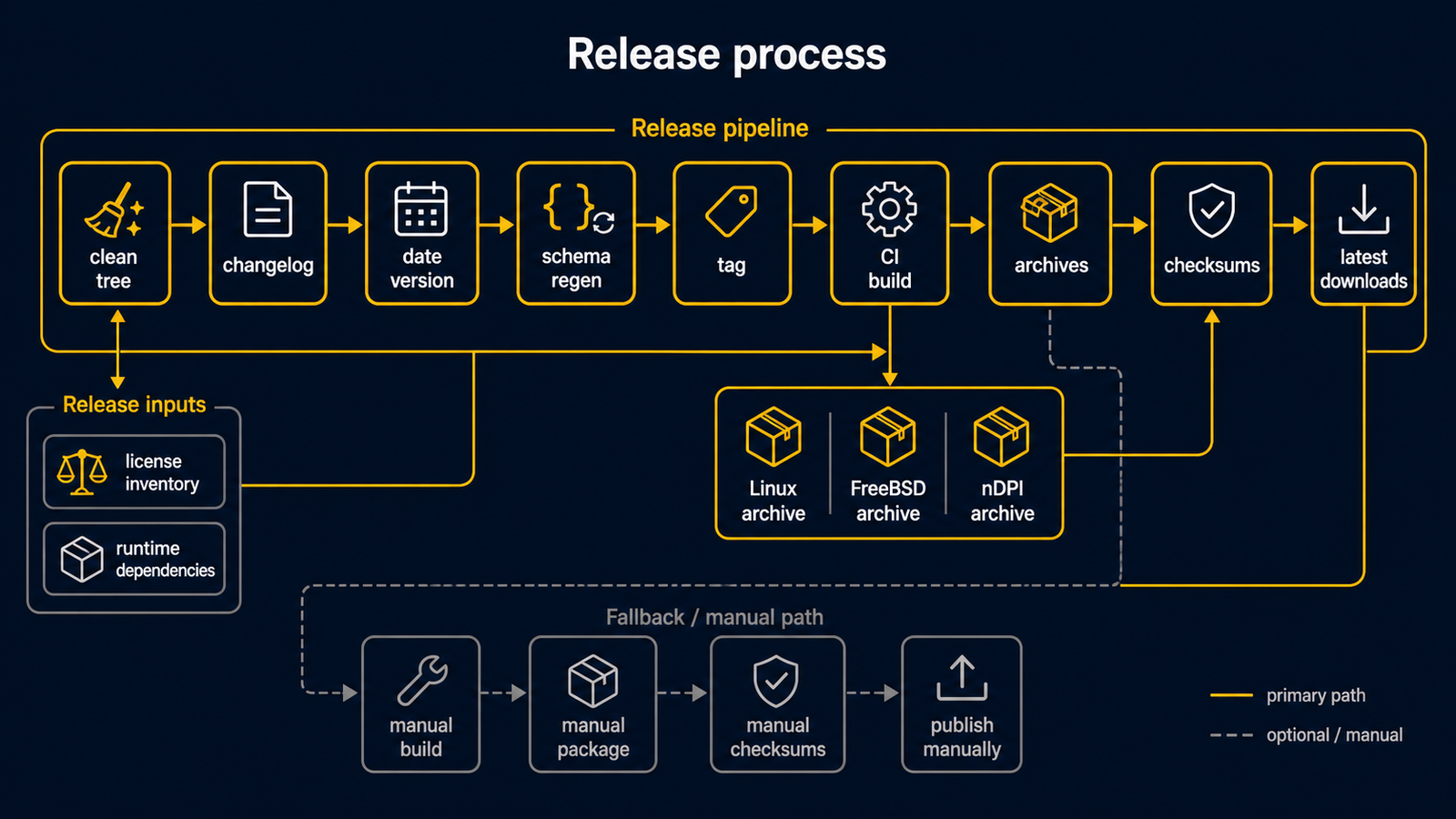
routerd 采用以日期为基础的版本号。
可执行文件版本号、发布标签与发布归档名称均使用 vYYYYMMDD.HHmm 格式。
日期与时间默认以 UTC 为基准计算。
自动发布
确保工作目录干净后,执行发布辅助命令:
make release
辅助程序会使用 UTC 的当前日期与起始时间,更新可执行文件的版本号字符串,将当前 Unreleased 的 changelog 条目升格至新的发布标签,并保留一个新的空 Unreleased 标题。然后重新生成(render)仓库管理的 schema,提交变更,创建标签,并同时将 main 与标签推送至远端。
例如,在 UTC 15:30 开始的发布会使用 .1530 后缀。
常用选项如下:
scripts/release.sh --dry-run
scripts/release.sh --date 20260510
scripts/release.sh --timezone UTC
scripts/release.sh --no-push
执行辅助程序前,工作目录必须是干净状态。
功能变更与 changelog 变更请先提交。辅助程序只创建发布提交。
changelog 中请以 ## Unreleased 作为最前面的发布区块,且该区块必须有条目才能创建发布。
推送发布标签后,GitHub Actions 工作流程将会启动。
Release 工作流程会构建下列目标:
linux-amd64linux-arm64freebsd-amd64freebsd-arm64routerd-ndpi-agent-libndpi-linux-amd64(可选的原生 nDPI 代理程序覆盖归档)
每个目标的归档以两个名称发布:
- 指向特定发布的
routerd-<tag>-<os>-<arch>.tar.gz - 以固定 URL 下载最新版的
routerd-<os>-<arch>.tar.gz - 可选原生 nDPI 代理程序覆盖用的
routerd-ndpi-agent-libndpi-<tag>-linux-amd64.tar.gz与routerd-ndpi-agent-libndpi-linux-amd64.tar.gz
Linux 归档以 CGO_ENABLED=0 构建,因此归档内的 routerd 二进制文件为静态链接,不依赖目标主机的 glibc 版本。工作流程在打包 Linux 归档前会执行 make check-linux-static。可选的原生 nDPI 代理程序归档刻意分离,因为它以 CGO_ENABLED=1 -tags libndpi 构建并链接至主机的 libndpi 运行期,不包含在一般静态 Linux 归档中。
每个名称均附有对应的 .sha256 文件。
归档包含下列内容:
bin/:routerd、routerctl及受管理守护进程的二进制文件install.sh:POSIX sh 安装程序uninstall.sh:POSIX sh 卸载程序etc/routerd/router.yaml.sample:不含密钥的配置示例systemd/或rc.d/:目标 OS 的服务模板share/doc/:README、VERSION、LICENSE、第三方授权清单
原生 nDPI 代理程序覆盖用归档仅包含 bin/routerd-ndpi-agent 与最精简的文档。希望以 libndpiLoaded=true 运行 routerd-ndpi-agent 的主机,应与一般 routerd 归档一同安装:
sudo ./install.sh --with-ndpi \
  --with-ndpi-archive ./routerd-ndpi-agent-libndpi-linux-amd64.tar.gz
安装程序的下载动作保持明确。它不会自行获取功能归档。发布 runbook 中请在调用 install.sh 前先下载归档与对应的 .sha256 文件。
工作流程会将版本化归档、固定名称归档及各自的 .sha256 文件上传至 GitHub Release 页面。
快速入门文档使用固定 URL 下载最新版:
https://github.com/imksoo/routerd/releases/latest/download/routerd-linux-amd64.tar.gz
只有在需要固定特定发布的 runbook 中才使用版本化 URL。
一般分支的推送与 pull request 使用另一个 CI 工作流程,该工作流程只执行开发期间的检查,不发布发布产物。pre-commit hook 与 CI 的范围请参阅开发时的检查。
职责分工
安装逻辑位于 install.sh。
Makefile 仅供开发作业使用,包含构建、测试、schema 检查、示例验证、网站构建及发布归档生成等。
发布归档不含 Makefile。
这样可将面向终端用户的安装与升级行为集中在单一 script 中。
开发时的测试使用 Makefile 目标:
make test
make check-schema
make validate-example
make dist ROUTERD_OS=linux GOARCH=amd64 VERSION="$(git describe --tags --abbrev=0)"
make dist-ndpi-agent-libndpi ROUTERD_OS=linux GOARCH=amd64 VERSION="$(git describe --tags --abbrev=0)"
部署时的冒烟测试使用 install.sh。
安装完成后,若 routerd 的只读 status socket 存在,install.sh 会调用 routerctl get status。
GitHub 发布工作流程也会展开每个归档,并在系统外的临时 prefix 下执行 install.sh。
此冒烟测试确认归档可在不使用 Makefile 的情况下正常安装与卸载。
由于安装依赖软件包是目标路由器主机的职责,CI 冒烟测试会传入 --no-install-deps。
在路由器主机上安装发布归档:
tar -xzf routerd-linux-amd64.tar.gz
sudo ./install.sh
install.sh 会将二进制文件复制至 /usr/local/sbin、安装服务模板,并写出 router.yaml.sample。
执行开始时会检测 OS 的软件包管理器,并在未传入 --no-install-deps 的情况下安装已知的运行期软件包。
不会覆盖现有的 /usr/local/etc/routerd/router.yaml。
若发现现有的 /usr/local/sbin/routerd,安装程序会自动切换至升级模式。
此时会显示旧版与新版的 routerd --version 输出,替换二进制文件与服务模板,保留配置与状态,并在服务已在运行时重新启动 routerd.service 或 FreeBSD 的 routerd rc.d 服务。
在 systemd 主机上,重新启动后会等待 routerd.service 的 status socket,并仅重新启动仍以已删除的升级前二进制文件运行、或在辅助进程启动后 unit 文件已更新的活跃 routerd 辅助服务。
替换的文件在替换前会复制为 *.backup.YYYYMMDDHHMMSS。
若只想替换文件而不重新启动服务,请传入 --no-restart。
若要显示预计的文件与服务管理器变更而不实际执行,请传入 --dry-run。
若要输出 shell 追踪,请传入 --verbose。
若要保留 router.yaml.sample 不变,请传入 --no-config-update。
若要跳过 OS 软件包安装,请传入 --no-install-deps。
若要在不变更主机的情况下列出软件包与命令清单,请传入 --list-deps。
若要在安装软件包后、复制 routerd 文件前即退出,请传入 --deps-only。
若要加入可选的 Tailscale 软件包与命令检查,请传入 --with-tailscale。
若要在新安装时调用主机的服务管理器,请传入 --enable-service 或 --start-service。
安装完成后,若 routerd 的只读 status socket 存在,script 会执行 routerctl get status。
安装程序不会对下列运行期与状态路径做任何变更:
/usr/local/etc/routerd/router.yaml/var/lib/routerd/var/db/routerd/run/routerd/var/run/routerd/var/log/otelcol
授权清单
routerd 本体以 BSD 3-Clause License 发布。 发布归档与 Live ISO 包含采用其他授权的第三方软件。 发布前请重新生成清单:
go mod download all
make third-party-licenses
生成的 THIRD_PARTY_LICENSES.md 记录 Go 模块的授权文件与 OS 软件包的授权元数据。Live ISO 是集合性发布物。
采用 GPL 授权的 OS 软件包各自保留其授权与源码获取方式,不视为以 GPL 著作重新授权整个 ISO。
运行期依赖
install.sh 将依赖软件包的安装纳入与二进制文件安装相同的面向终端用户的流程,以避免使用 Makefile 作为另一条安装路径。
Debian 与 Ubuntu 上,安装程序使用 apt-get 安装下列软件包:
ca-certificates curl dnsmasq-base nftables wireguard-tools chrony bind9-dnsutils tcpdump cron jq ppp pppoe conntrack iproute2 iputils-ping iputils-tracepath net-tools kmod radvd strongswan-swanctl iptables keepalived
Fedora 系统上,安装程序使用 dnf 安装下列软件包:
ca-certificates curl dnsmasq nftables wireguard-tools chrony bind-utils tcpdump cronie jq ppp rp-pppoe conntrack-tools iproute iputils traceroute kmod radvd strongswan iptables keepalived
Arch 系统上,安装程序使用 pacman 安装下列软件包:
ca-certificates curl dnsmasq nftables wireguard-tools chrony bind tcpdump cronie jq ppp rp-pppoe conntrack-tools iproute2 iputils traceroute kmod radvd strongswan iptables keepalived
FreeBSD 上,安装程序使用 pkg 安装下列软件包:
ca_root_nss curl dnsmasq wireguard-tools mpd5 bind-tools tcpdump jq chrony strongswan
FreeBSD 的 pf、ifconfig、route、service、sysrc、cron 均为基本系统工具,不以软件包方式安装,仅确认命令是否存在。
安装依赖软件包后,script 会确认预期的命令是否存在。 由于软件包名称因发行版而异,若找不到命令,视为警告而非致命错误。 确认依赖软件包清单请使用:
./install.sh --list-deps
卸载
若要在不影响状态的情况下移除已安装的文件,请使用 uninstall.sh:
sudo ./uninstall.sh --yes
默认的卸载会停止并禁用服务,移除 routerd 二进制文件、服务模板与运行期文件。
/usr/local/etc/routerd、/var/lib/routerd、/var/db/routerd、/var/log/otelcol 会保留。
完全移除的选项需明确指定:
sudo ./uninstall.sh --yes --purge-config
sudo ./uninstall.sh --yes --purge-state
sudo ./uninstall.sh --yes --all
若要在不变更主机的情况下预览移除内容,请使用 --dry-run。
手动触发
若标签已存在,也可通过 GitHub Actions 的 workflow_dispatch 输入启动工作流程:
tag = vYYYYMMDD.HHmm
工作流程会在构建前 checkout 该标签。
备用方案
若 GitHub Actions 无法使用,可在本机构建相同的归档:
tag=$(git describe --tags --abbrev=0)
make dist ROUTERD_OS=linux GOARCH=amd64 VERSION="$tag"
make dist ROUTERD_OS=freebsd GOARCH=amd64 VERSION="$tag"
make dist-ndpi-agent-libndpi ROUTERD_OS=linux GOARCH=amd64 VERSION="$tag"
再通过 GitHub CLI 创建发布:
tag=$(git describe --tags --abbrev=0)
gh release create "$tag" \
  "dist/linux-amd64/routerd-${tag}-linux-amd64.tar.gz" \
  "dist/linux-amd64/routerd-${tag}-linux-amd64.tar.gz.sha256" \
  dist/linux-amd64/routerd-linux-amd64.tar.gz \
  dist/linux-amd64/routerd-linux-amd64.tar.gz.sha256 \
  "dist/freebsd-amd64/routerd-${tag}-freebsd-amd64.tar.gz" \
  "dist/freebsd-amd64/routerd-${tag}-freebsd-amd64.tar.gz.sha256" \
  dist/freebsd-amd64/routerd-freebsd-amd64.tar.gz \
  dist/freebsd-amd64/routerd-freebsd-amd64.tar.gz.sha256 \
  "dist/linux-amd64/routerd-ndpi-agent-libndpi-${tag}-linux-amd64.tar.gz" \
  "dist/linux-amd64/routerd-ndpi-agent-libndpi-${tag}-linux-amd64.tar.gz.sha256" \
  dist/linux-amd64/routerd-ndpi-agent-libndpi-linux-amd64.tar.gz \
  dist/linux-amd64/routerd-ndpi-agent-libndpi-linux-amd64.tar.gz.sha256 \
  --title "routerd ${tag}" \
  --generate-notes \
  --verify-tag