Tailscale exit node and subnet router
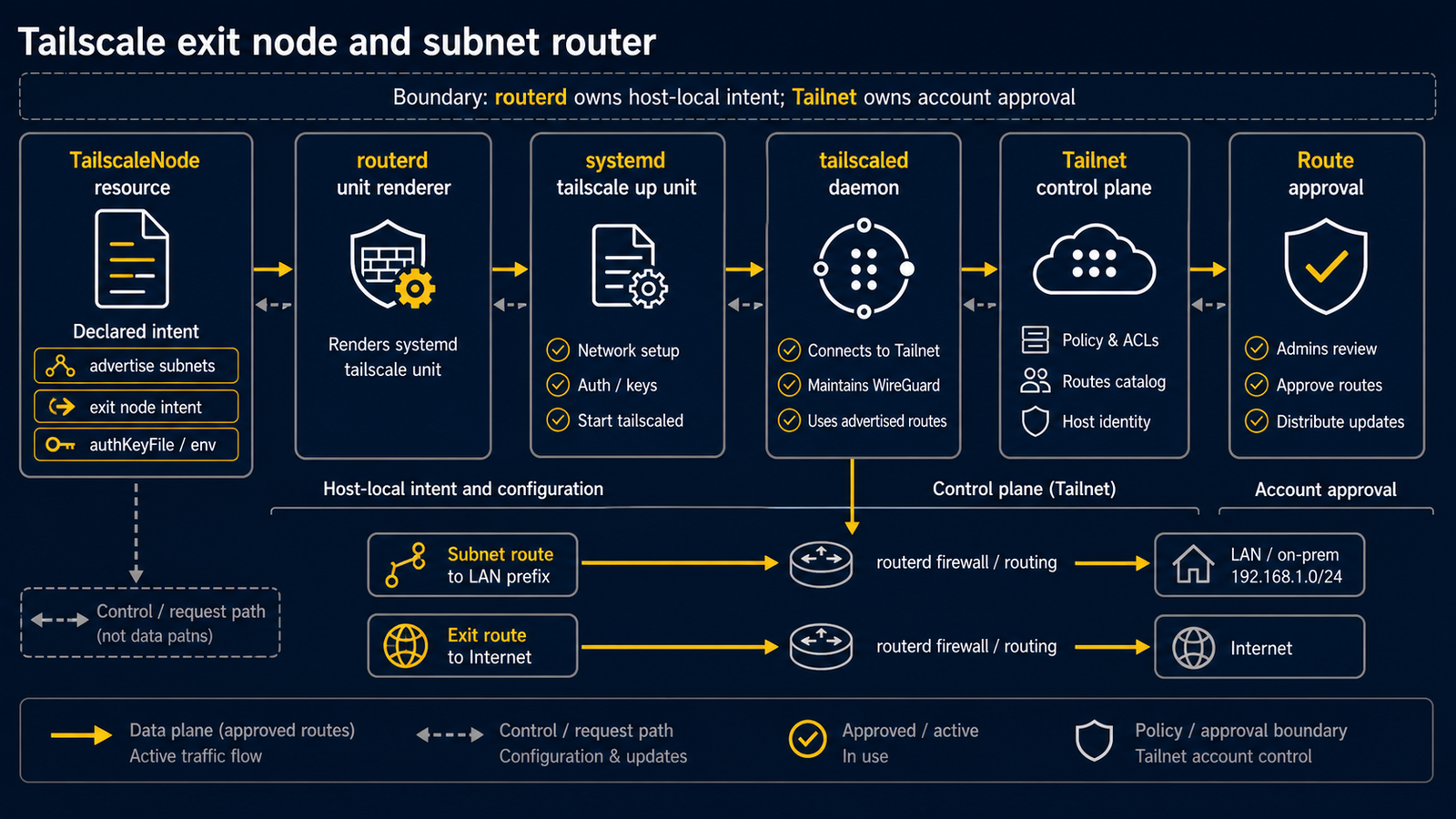
Scenario
Use TailscaleNode when a routerd host should join a tailnet and advertise:
- an exit node (
0.0.0.0/0and::/0) - one or more routed subnets
- both at the same time
routerd does not replace tailscaled. It generates and manages a systemd unit
that runs tailscale up with the declared node options. This keeps the
Tailscale account, control plane, and route approval workflow in Tailscale,
while routerd owns the host-local intent.
Install tailscale
Declare the OS package so the dependency is visible in the router config.
apiVersion: system.routerd.net/v1alpha1
kind: Package
metadata:
  name: router-service-dependencies
spec:
  packages:
    - os: ubuntu
      manager: apt
      names:
        - tailscale
        - tailscale-archive-keyring
    - os: nixos
      manager: nix
      names:
        - tailscale
    - os: freebsd
      manager: pkg
      names:
        - tailscale
      optional: true
On Ubuntu, the Tailscale apt repository must already be available before
Package can install tailscale. Use your normal bootstrap method for that
repository.
Authenticate without committing secrets
For production configs, prefer authKeyEnv plus authKeyFile.
apiVersion: net.routerd.net/v1alpha1
kind: TailscaleNode
metadata:
  name: edge
spec:
  hostname: edge
  advertiseExitNode: true
  advertiseRoutes:
    - 10.0.0.0/8
    - 172.16.0.0/12
    - 192.168.0.0/16
  acceptDNS: false
  acceptRoutes: false
  authKeyEnv: TS_AUTHKEY
  authKeyFile: /usr/local/etc/routerd/secrets/tailscale.env
The environment file is outside the routerd YAML:
sudo install -d -m 0700 /usr/local/etc/routerd/secrets
sudo sh -c 'printf "%s\n" "TS_AUTHKEY=REDACTED" > /usr/local/etc/routerd/secrets/tailscale.env'
sudo chmod 0600 /usr/local/etc/routerd/secrets/tailscale.env
If the node is already logged in, omit authKey, authKeyEnv, and
authKeyFile. routerd will reapply the advertised node options without
embedding a secret in the service unit.
Tailscale listens on UDP/41641 by default. routerd reserves that port when a
TailscaleNode is present and validation rejects any WireGuardInterface that
tries to reuse it.
Advertise private subnets
Advertising all RFC 1918 private address space is useful when the router should be the tailnet path back into home or site networks:
apiVersion: net.routerd.net/v1alpha1
kind: TailscaleNode
metadata:
  name: edge
spec:
  hostname: edge
  advertiseExitNode: true
  advertiseRoutes:
    - 10.0.0.0/8
    - 172.16.0.0/12
    - 192.168.0.0/16
  acceptDNS: false
  acceptRoutes: false
After applying this config, approve the advertised routes in the Tailscale
admin console. Until approval, tailscale debug prefs shows the requested
routes, but tailscale status --self --json may not include them in
Self.AllowedIPs.
Firewall zone placement
Declare tailscale0 as an Interface so it appears in status and in the Web
Console.
apiVersion: net.routerd.net/v1alpha1
kind: Interface
metadata:
  name: tailscale
spec:
  ifname: tailscale0
  mtu: 1280
  managed: false
mtu: 1280 lets derived TCP MSS clamp rules account for the Tailscale source
path without lowering unrelated LAN-to-WAN paths.
For a home router, place tailscale0 in the trust zone rather than the
mgmt zone:
apiVersion: firewall.routerd.net/v1alpha1
kind: FirewallZone
metadata:
  name: lan
spec:
  role: trust
  interfaces:
    - Interface/lan
    - Interface/tailscale

---

apiVersion: firewall.routerd.net/v1alpha1
kind: FirewallZone
metadata:
  name: management
spec:
  role: mgmt
  interfaces:
    - Interface/mgmt
This allows tailnet clients to reach services on the router itself, such as the
routerd Web Console, through the normal trust -> self path. It does not grant
the tailnet broad access to the management VLAN if the firewall policy still
denies trust -> mgmt forwarding.
Use mgmt only when the tailnet should be treated as a full management
network.
Apply and verify
Apply the config:
routerctl validate -f /usr/local/etc/routerd/router.yaml --replace
systemctl restart routerd.service
Check the generated unit:
systemctl cat routerd-tailscale-edge.service
Check Tailscale state:
tailscale status --self --json | jq '.BackendState, .Self.AllowedIPs'
tailscale debug prefs | jq '.AdvertiseRoutes'
Check routerd state:
routerctl get status -o json
routerctl get TailscaleNode/edge -o yaml
routerctl vpn tailscale peers
routerctl vpn tailscale peers -o json reads tailscale status --json and formats
the peer list through routerd's CLI. The Web Console also shows the current
peer list on the TailscaleNode resource, including online state, relay, last
seen time, and allowed routes.
If the Web Console should be reachable over Tailscale, test it through the router's Tailscale address or through an approved routed address:
curl -f http://100.64.0.1:8080/
Replace the address with the actual Tailscale IP of the router.
Notes
acceptDNS: falsekeeps Tailscale from replacing the router's local DNS resolver configuration. routerd's default model is "LAN DNS first":DNSResolver, local zones, DHCP-derived records, and conditional forwarding stay authoritative for LAN clients. Tailscale MagicDNS remains useful from tailnet clients, but it should not take over the router's host resolver.acceptRoutes: falsekeeps the router from importing other peers' advertised routes. This is common for a router that advertises routes outward.- routerd exports Tailscale peer gauges as
routerd.tailscale.peer.countandrouterd.tailscale.last_handshake.seconds. Tailscale status exposes peerLastSeen, so routerd uses that timestamp as the operational handshake-age signal. - Exit-node and subnet-route approval happens in Tailscale, not in routerd.
- Keep auth keys out of examples and Git history. Use
authKeyFilefor local deployments.