DS-Lite home gateway
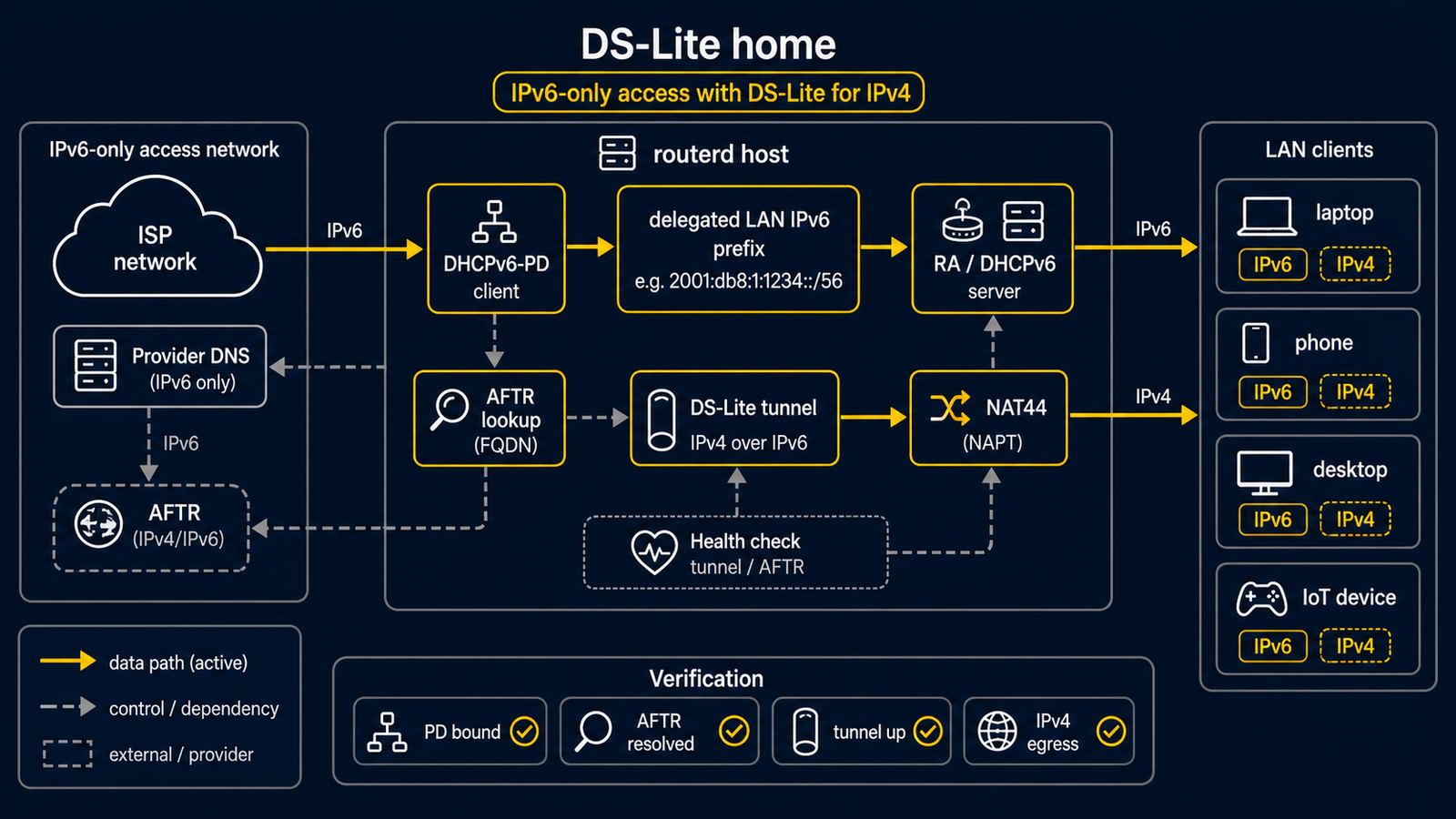
DS-Lite is for an IPv6-first access line where IPv4 packets leave through an ISP tunnel. This is an ISP-specific, advanced example—not a first router tutorial. Test it from a console or independent management path: a wrong WAN, tunnel, or DNS setting can interrupt connectivity.
The complete, validated YAML is
examples/example-dslite-home.yaml.
Its Transix-like AFTR values are placeholders. Replace them with facts from
your own access line.
What the example builds
| Job | Actual resource names in the YAML |
|---|---|
| Receive an IPv6 delegated prefix | DHCPv6PrefixDelegation/wan-pd |
| Give the LAN a derived IPv6 address | IPv6DelegatedAddress/lan-v6 |
| Answer DNS on the LAN | DNSResolver/lan, DNSZone/home |
| Build the IPv4-over-IPv6 tunnel | DSLiteTunnel/transix |
| Give LAN clients IPv4, DNS, and IPv6 router information | DHCPv4Server/lan, IPv6RouterAdvertisement/lan |
lan-v4, lan-v6, lan, and transix are names chosen by this file. They
are not generic names that every routerd configuration must use.
Key configuration
The prefix delegation and derived LAN IPv6 address are connected by name:
- apiVersion: net.routerd.net/v1alpha1
  kind: DHCPv6PrefixDelegation
  metadata:
    name: wan-pd
  spec:
    interface: wan
    profile: ntt-hgw-lan-pd

- apiVersion: net.routerd.net/v1alpha1
  kind: IPv6DelegatedAddress
  metadata:
    name: lan-v6
  spec:
    prefixDelegation: wan-pd
    interface: lan
    subnetID: "0"
    addressSuffix: "::1"
    announce: true
The tunnel then uses that same delegated address:
- apiVersion: net.routerd.net/v1alpha1
  kind: DSLiteTunnel
  metadata:
    name: transix
  spec:
    interface: wan
    tunnelName: ds-transix
    aftrFQDN: gw.transix.jp
    aftrDNSServers: [2404:1a8:7f01:a::3, 2404:1a8:7f01:b::3]
    localAddressSource: delegatedAddress
    localDelegatedAddress: lan-v6
    localAddressSuffix: "::100"
    defaultRoute: true
If your provider requires the WAN Router Advertisement address as the tunnel
source instead, use the provider-approved localAddressSource setting rather
than copying this one blindly.
The same local resource names are used by DNS, DHCPv4, and Router Advertisement:
- kind: DNSResolver
  metadata:
    name: lan
  # Listens on IPv4StaticAddress/lan-v4 and IPv6DelegatedAddress/lan-v6.

- kind: DHCPv4Server
  metadata:
    name: lan
  # Gives clients IPv4StaticAddress/lan-v4 as their gateway and DNS server.

- kind: IPv6RouterAdvertisement
  metadata:
    name: lan
  # Advertises IPv6DelegatedAddress/lan-v6 and DNSZone/home.
Read the complete YAML for the required spec fields; the short excerpts above
only explain how the resource names connect.
Check before a daemon exists
Copy the file, change every ISP-specific value, and run the standalone checks. They do not start a service or apply a network change.
cp examples/example-dslite-home.yaml router.yaml
LAB_DIR="$(mktemp -d)"
sudo routerd validate --config router.yaml
sudo routerd apply --config router.yaml --once --dry-run --skip-service-manager \
  --state-file "$LAB_DIR/state.db" \
  --ledger-file "$LAB_DIR/ledger.db" \
  --status-file "$LAB_DIR/status.json"
Confirm the WAN and LAN interface names, AFTR FQDN, resolver addresses, and management path. Stop if any of them are not yours.
Apply and observe
Only from a console or independent management path, apply the reviewed file and then start or restart the service that owns it. After the service is running:
sudo routerctl get status
sudo routerctl describe DHCPv6PrefixDelegation/wan-pd
sudo routerctl describe IPv6DelegatedAddress/lan-v6
sudo routerctl describe DSLiteTunnel/transix
sudo routerctl describe FirewallZone/wan
ip -6 tunnel show
ip route show default
From a LAN client, check both address families and local DNS:
ip -6 addr
ip route
curl https://1.1.1.1/
dig router.home.example