HA 路由器的 DHCP 租约同步
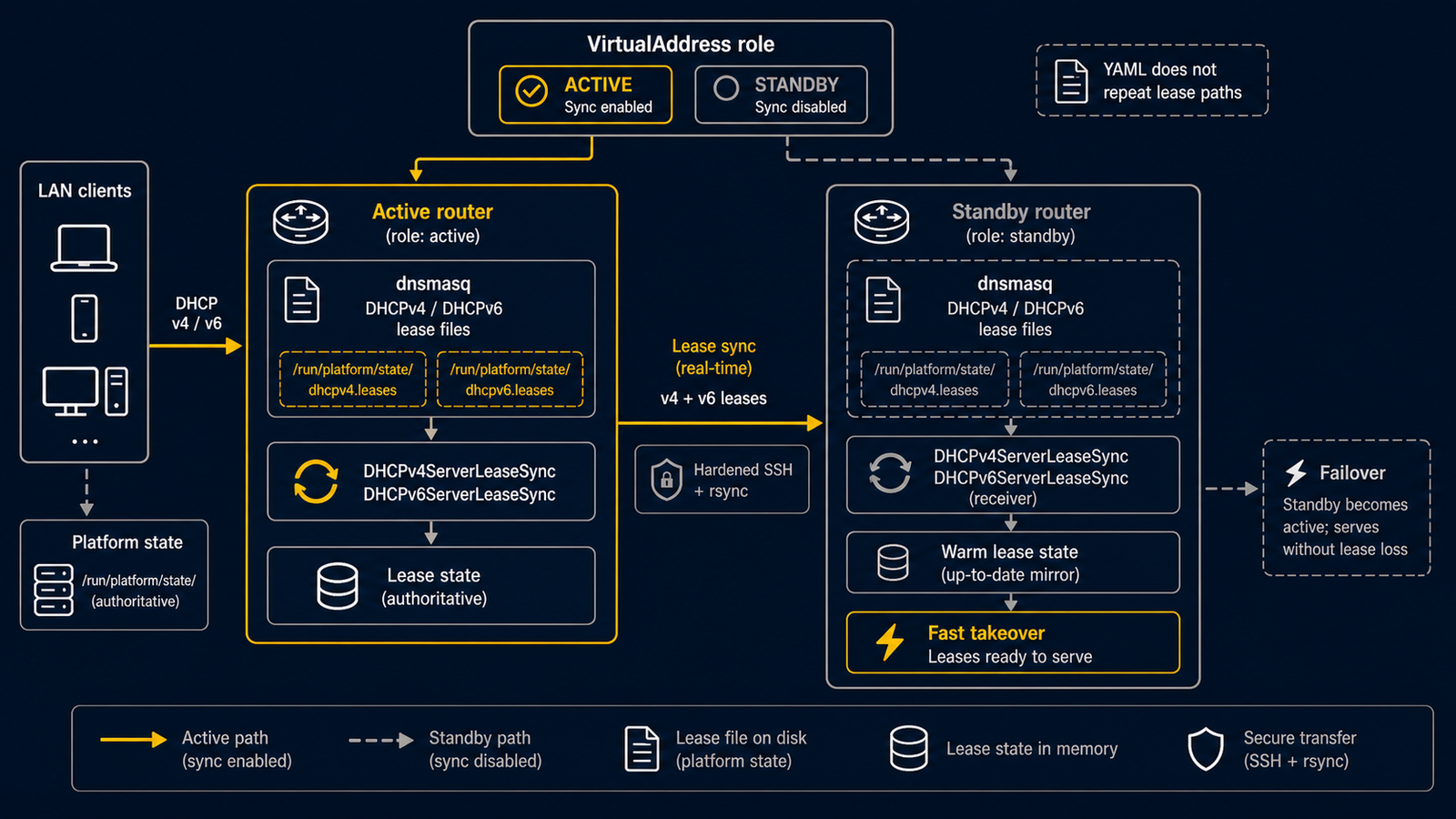
当 2 台 routerd 节点共享 DHCP 角色,且需要将 active 节点的 lease 状态
温备到 standby 节点时,请使用 DHCPv4ServerLeaseSync、
DHCPv6ServerLeaseSync 或 DHCPv6PrefixDelegationLeaseSync。
这些资源假定从 active 同步到 standby。为防止 backup 将旧 lease 写回
active,通常通过 VirtualAddress 的 role 来限制执行。
完整示例请见 examples/dhcp-lease-sync-ha.yaml。
使用默认的持久化设置
routerd 默认将 dnsmasq server lease 放置在平台 state directory 下。 DHCP resource 中不要指定实现层面的 lease path。
- apiVersion: net.routerd.net/v1alpha1
  kind: DHCPv4Server
  metadata:
    name: lan-dhcpv4
  spec:
    interface: lan
    addressPool:
      start: 192.168.30.100
      end: 192.168.30.199

- apiVersion: net.routerd.net/v1alpha1
  kind: DHCPv6Server
  metadata:
    name: lan-dhcpv6
  spec:
    interface: lan
    mode: stateful
    addressPool:
      start: fd00:30::100
      end: fd00:30::1ff
sync resource 从 source kind 导出实际的文件路径,因此配置中无需重复 实现层面的路径。
仅从 active 节点同步
通过本地 VirtualAddress status 来限制 lease sync。仅当 VIP role 为
master 时同步。
- apiVersion: net.routerd.net/v1alpha1
  kind: DHCPv4ServerLeaseSync
  metadata:
    name: lan-v4-leases
  spec:
    source:
      resource: DHCPv4Server/lan-dhcpv4
    interval: 30s
    targets:
      - name: standby
        host: routerd-standby.lan.example
        user: routerd
    when:
      state:
        VirtualAddress/lan-vip.role:
          equals: master
对于 stateful DHCPv6 server,在 DHCPv6ServerLeaseSync 中指定
source.resource: DHCPv6Server/<name>。对于 WAN 侧的 prefix delegation,
在 DHCPv6PrefixDelegationLeaseSync 中指定
source.resource: DHCPv6PrefixDelegation/<name>。
- apiVersion: net.routerd.net/v1alpha1
  kind: DHCPv6PrefixDelegationLeaseSync
  metadata:
    name: wan-pd-lease
  spec:
    source:
      resource: DHCPv6PrefixDelegation/wan-pd
    targets:
      - name: standby
        host: routerd-standby.lan.example
        user: routerd
    when:
      state:
        VirtualAddress/lan-vip.role:
          equals: master
standby 升级时,可以从最后一次同步的 lease 状态开始,而非空数据库。
SSH 前提条件
lease sync 使用基于 SSH 的 rsync。在启用资源之前,请准备好非交互式
SSH。
- 为 active 节点上 routerd 运行用户创建或部署 SSH key。
- 将公钥加入 standby 节点
target.user的authorized_keys。 - 预先管理
target.host的known_hosts。BatchMode=yes下无法进行 交互式 host-key 确认。 - target user 需要能创建导出的同步目标目录并写入 lease 文件。
如果 target.sshOptions 未覆盖相同的键,routerd 会附加以下 SSH
默认值:
-o BatchMode=yes -o ConnectTimeout=10
同时附加 rsync --timeout=60,并在 controller 的 context deadline 内
执行每个 sync 命令。SSH option 可通过 target.sshOptions 覆盖,
rsync timeout 可通过 target.options 覆盖。
targets:
  - host: routerd-standby.lan.example
    user: routerd
    sshOptions:
      - -o
      - ConnectTimeout=5
    options:
      - --timeout=30
确认
routerctl validate -f examples/dhcp-lease-sync-ha.yaml --replace
routerctl plan -f examples/dhcp-lease-sync-ha.yaml --replace
routerctl describe VirtualAddress/lan-vip
routerctl describe DHCPv4ServerLeaseSync/lan-v4-leases
当节点不是 master 时,routerd serve 会根据 spec.when 排除此
resource。当节点是 master 且 lease 文件存在时,status 会进入 Synced。
如果 lease 文件尚不存在,则保持 Pending 直到 dnsmasq 创建。