HA 路由器的 DHCP 租約同步
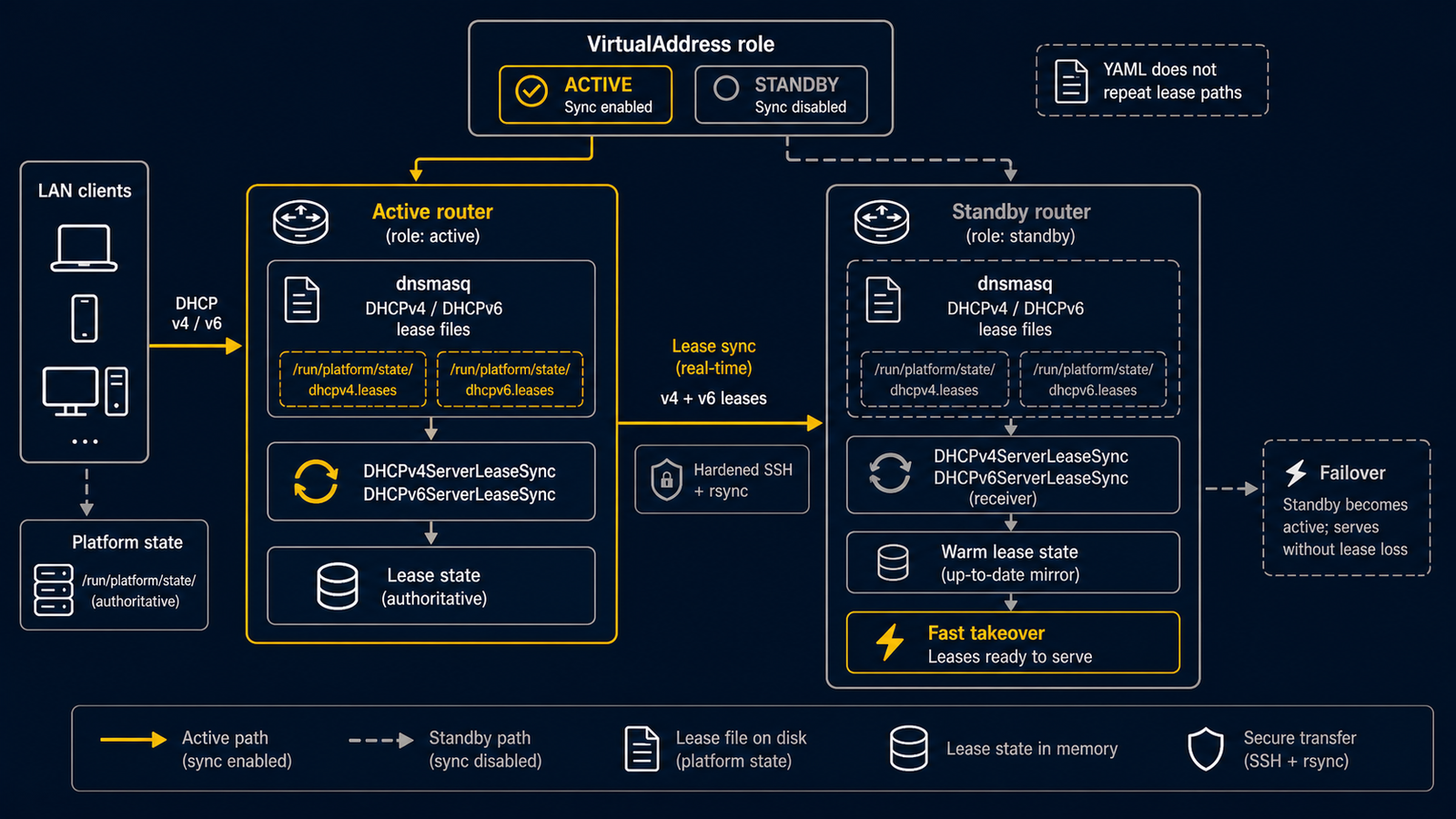
當 2 台 routerd 節點共享 DHCP 角色,且需要將 active 節點的 lease 狀態
溫備到 standby 節點時,請使用 DHCPv4ServerLeaseSync、
DHCPv6ServerLeaseSync 或 DHCPv6PrefixDelegationLeaseSync。
這些資源假定從 active 同步到 standby。為防止 backup 將舊 lease 寫回
active,通常透過 VirtualAddress 的 role 來限制執行。
完整範例請見 examples/dhcp-lease-sync-ha.yaml。
使用預設的持久化設定
routerd 預設將 dnsmasq server lease 放置在平台 state directory 下。 DHCP resource 中不要指定實作層面的 lease path。
- apiVersion: net.routerd.net/v1alpha1
  kind: DHCPv4Server
  metadata:
    name: lan-dhcpv4
  spec:
    interface: lan
    addressPool:
      start: 192.168.30.100
      end: 192.168.30.199

- apiVersion: net.routerd.net/v1alpha1
  kind: DHCPv6Server
  metadata:
    name: lan-dhcpv6
  spec:
    interface: lan
    mode: stateful
    addressPool:
      start: fd00:30::100
      end: fd00:30::1ff
sync resource 從 source kind 導出實際的檔案路徑,因此組態中無需重複 實作層面的路徑。
僅從 active 節點同步
透過本機 VirtualAddress status 來限制 lease sync。僅當 VIP role 為
master 時同步。
- apiVersion: net.routerd.net/v1alpha1
  kind: DHCPv4ServerLeaseSync
  metadata:
    name: lan-v4-leases
  spec:
    source:
      resource: DHCPv4Server/lan-dhcpv4
    interval: 30s
    targets:
      - name: standby
        host: routerd-standby.lan.example
        user: routerd
    when:
      state:
        VirtualAddress/lan-vip.role:
          equals: master
對於 stateful DHCPv6 server,在 DHCPv6ServerLeaseSync 中指定
source.resource: DHCPv6Server/<name>。對於 WAN 側的 prefix delegation,
在 DHCPv6PrefixDelegationLeaseSync 中指定
source.resource: DHCPv6PrefixDelegation/<name>。
- apiVersion: net.routerd.net/v1alpha1
  kind: DHCPv6PrefixDelegationLeaseSync
  metadata:
    name: wan-pd-lease
  spec:
    source:
      resource: DHCPv6PrefixDelegation/wan-pd
    targets:
      - name: standby
        host: routerd-standby.lan.example
        user: routerd
    when:
      state:
        VirtualAddress/lan-vip.role:
          equals: master
standby 升級時,可以從最後一次同步的 lease 狀態開始,而非空資料庫。
SSH 前提條件
lease sync 使用基於 SSH 的 rsync。在啟用資源之前,請準備好非互動式
SSH。
- 為 active 節點上 routerd 執行使用者建立或部署 SSH key。
- 將公鑰加入 standby 節點
target.user的authorized_keys。 - 預先管理
target.host的known_hosts。BatchMode=yes下無法進行 互動式 host-key 確認。 - target user 需要能建立導出的同步目標目錄並寫入 lease 檔案。
如果 target.sshOptions 未覆寫相同的鍵,routerd 會附加以下 SSH
預設值:
-o BatchMode=yes -o ConnectTimeout=10
同時附加 rsync --timeout=60,並在 controller 的 context deadline 內
執行每個 sync 命令。SSH option 可透過 target.sshOptions 覆寫,
rsync timeout 可透過 target.options 覆寫。
targets:
  - host: routerd-standby.lan.example
    user: routerd
    sshOptions:
      - -o
      - ConnectTimeout=5
    options:
      - --timeout=30
確認
routerctl validate -f examples/dhcp-lease-sync-ha.yaml --replace
routerctl plan -f examples/dhcp-lease-sync-ha.yaml --replace
routerctl describe VirtualAddress/lan-vip
routerctl describe DHCPv4ServerLeaseSync/lan-v4-leases
當節點不是 master 時,routerd serve 會根據 spec.when 排除此
resource。當節點是 master 且 lease 檔案存在時,status 會進入 Synced。
如果 lease 檔案尚不存在,則保持 Pending 直到 dnsmasq 建立。