以宣告式方式進行路由器主機的啟動設定
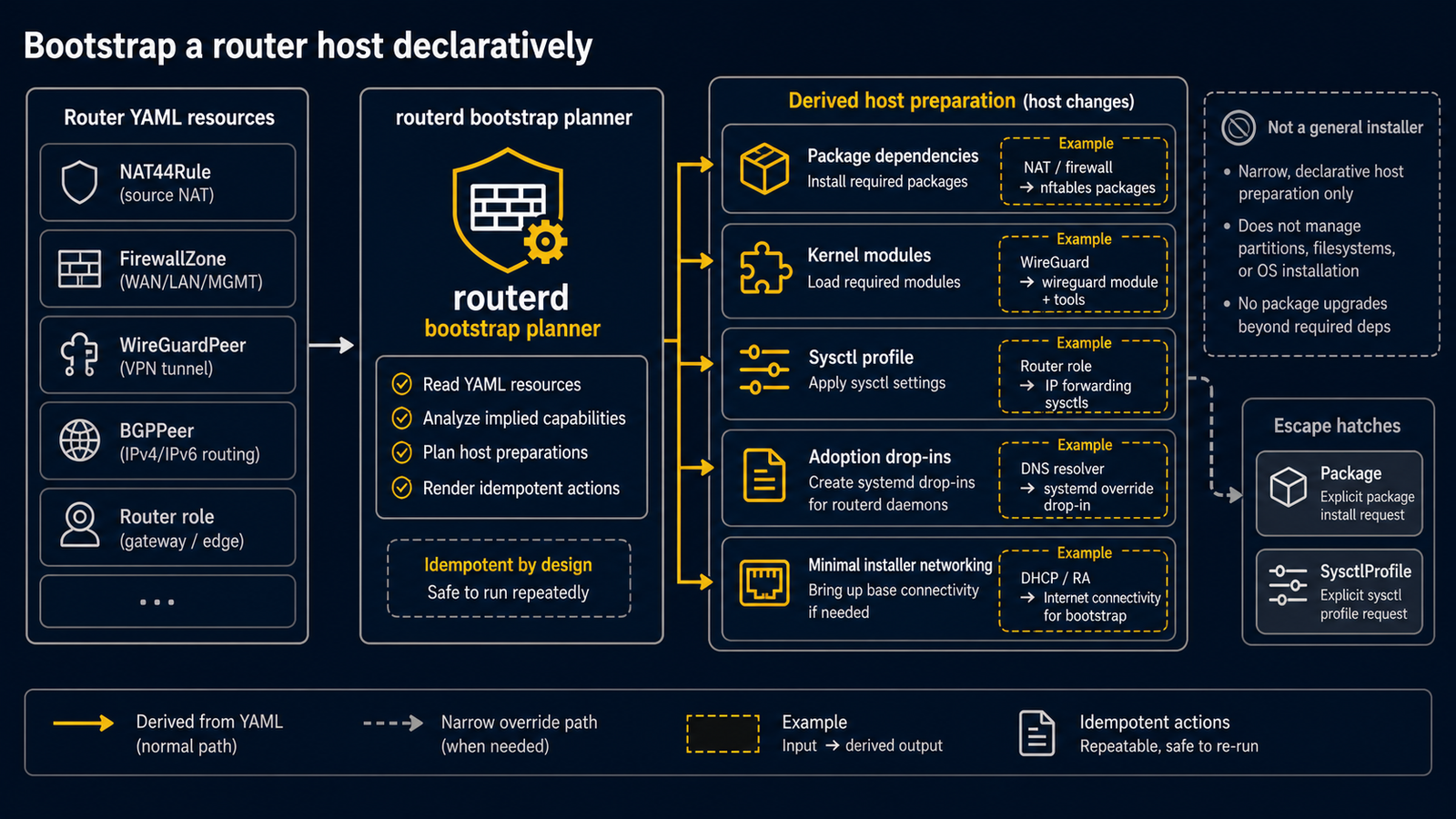
routerd 能將初次建置時容易變成手動作業的主機準備工作,整合至 YAML 管理。 這不是安裝程式的替代方案,而是將路由器特有的差異以設定檔保留,而非散落在 shell 歷史記錄中的功能。
套件
routerd 會從設定內的資源自動推導一般 OS 套件相依。
Package 作為窄範圍的覆寫,僅用於補充尚無法自動推導的相依套件。
apiVersion: system.routerd.net/v1alpha1
kind: Package
metadata:
  name: router-service-dependencies
spec:
  packages:
    - os: ubuntu
      manager: apt
      names:
        - dnsmasq
        - nftables
        - conntrack
        - kmod
        - wireguard-tools
        - tailscale
    - os: freebsd
      manager: pkg
      names:
        - dnsmasq
        - wireguard-tools
        - mpd5
核心模組
Linux 的核心模組會從 NAT、防火牆記錄、流量記錄、WireGuard 等資源自動推導。
KernelModule 不是使用者直接撰寫的設定 Kind。
Sysctl
routerd 會從路由器資源自動推導 forwarding、conntrack accounting、reverse path filter、redirect、TCP、RA 等 sysctl 設定。
通常不需要在設定中撰寫 SysctlProfile。
SysctlProfile 僅作為窄範圍的逃生出口,用於補充 routerd 尚無法推導的平台特定核心設定。
請只在 overrides 中指定差異部分。
apiVersion: system.routerd.net/v1alpha1
kind: SysctlProfile
metadata:
  name: router-runtime
spec:
  profile: router-linux
  runtime: true
  persistent: true
  overrides:
    net.netfilter.nf_conntrack_udp_timeout: "60"
接手現有主機設定
systemd-networkd 與 systemd-resolved 的接手用 drop-in 會從 Interface、DHCP、DNS、RA 等資源自動推導。
DHCP、DNS、PPPoE、healthcheck、Tailscale 等 routerd 受管 unit 也從各自的資源 Kind 產生,
請勿重複定義。
在 Ubuntu 26.04 LTS 上,依 RA 狀態不同,即使安裝程式寫入的 netplan 設定了 dhcp6: false,
systemd-networkd 仍可能在介面上開啟 DHCPv6 用戶端 socket。
對於 routerd 所管理的 WAN/LAN 連結,請在 OS 啟動設定(bootstrap)階段明確加入 accept-ra: false,
並在安裝程式的 netplan 層中僅保留 IPv6 link-local。
這樣可確保 routerd-dhcpv6-client 能使用 UDP port 546,
避免 OS 初始網路設定與 routerd 的 DHCPv6-PD 及 RA/DHCPv6 產生競合。
管理用 DHCP 請保留在獨立的管理介面上。
network:
  version: 2
  renderer: networkd
  ethernets:
    wan0:
      dhcp4: false
      dhcp6: false
      accept-ra: false
      link-local: [ipv6]
      optional: true
    lan0:
      dhcp4: false
      dhcp6: false
      accept-ra: false
      link-local: [ipv6]
      optional: true
    mgmt0:
      dhcp4: true
      dhcp6: false
      accept-ra: false
      link-local: [ipv6]
      optional: true
若需要 WAN 連結上來自 RA 的 IPv6 預設路由(例如用於解析 ISP DNS 或 AFTR), 請宣告該 WAN 介面與 DHCPv6 / RA 的資源。 routerd 會推導所需的 systemd-networkd drop-in,並避免 systemd-networkd DHCP 用戶端產生競合。