安裝 routerd
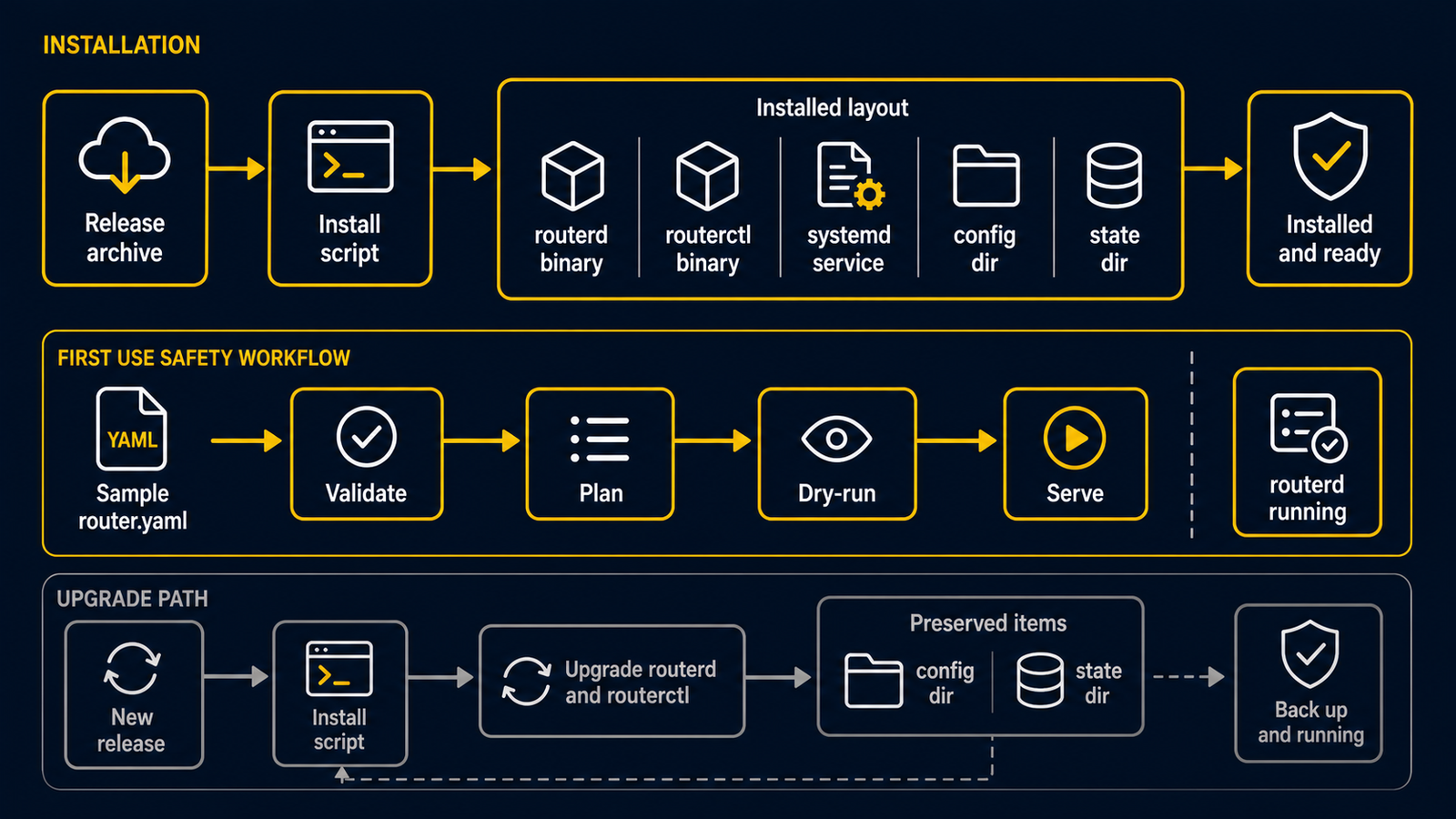
最快的入門方式是在隔離的 Ubuntu Server VM 使用發布封存檔。路由器主機不需要 Go、Makefile 或原始碼樹。以下使用目前建議的穩定里程碑 v20260707.1514。
RELEASE=v20260707.1514
curl -fLO https://github.com/imksoo/routerd/releases/download/${RELEASE}/routerd-linux-amd64.tar.gz
curl -fLO https://github.com/imksoo/routerd/releases/download/${RELEASE}/routerd-linux-amd64.tar.gz.sha256
sha256sum -c routerd-linux-amd64.tar.gz.sha256
tar -xzf routerd-linux-amd64.tar.gz
sudo ./install.sh
arm64 主機請使用 routerd-linux-arm64.tar.gz。安裝腳本會放入執行檔與 systemd 範本、建立設定樣本,但不會覆寫既有 /usr/local/etc/routerd/router.yaml。
routerd --version
安裝後先完成兩件事
- 編輯自己的設定。
- 先用
routerd檢查檔案,不要先用routerctl。
sudo install -d -m 0755 /usr/local/etc/routerd
sudo install -m 0600 /usr/local/etc/routerd/router.yaml.sample /usr/local/etc/routerd/router.yaml
sudoedit /usr/local/etc/routerd/router.yaml
sudo routerd validate --config /usr/local/etc/routerd/router.yaml
接著用暫存目錄執行 dry-run:
LAB_DIR="$(mktemp -d)"
sudo routerd apply --config /usr/local/etc/routerd/router.yaml --once --dry-run --skip-service-manager \
  --state-file "$LAB_DIR/state.db" \
  --ledger-file "$LAB_DIR/ledger.db" \
  --status-file "$LAB_DIR/status.json" \
  --netplan-file "$LAB_DIR/50-routerd.yaml" \
  --dnsmasq-file "$LAB_DIR/dnsmasq.conf" \
  --dnsmasq-service-file "$LAB_DIR/routerd-dnsmasq.service" \
  --nftables-file "$LAB_DIR/routerd-nat.nft"
--skip-service-manager 會略過服務管理器操作;所有狀態和產生的檔案都留在暫存目錄。
只有在主控台或獨立管理路徑可用,而且已經看過輸出後,才啟動服務:
sudo systemctl enable --now routerd
sudo routerctl get status
現在 routerctl 能運作,是因為 routerd serve 已經作為 systemd 服務執行。它不是離線 YAML 驗證器。
平台範圍
本教學針對 Ubuntu Server + systemd。FreeBSD 與 NixOS 的支援仍在不同階段,不能直接照搬這裡的服務和 nftables 指令;請先看支援的平台。
升級、相依套件清單、Live ISO 與解除安裝請見安裝與升級。