從 FreeBSD 開始
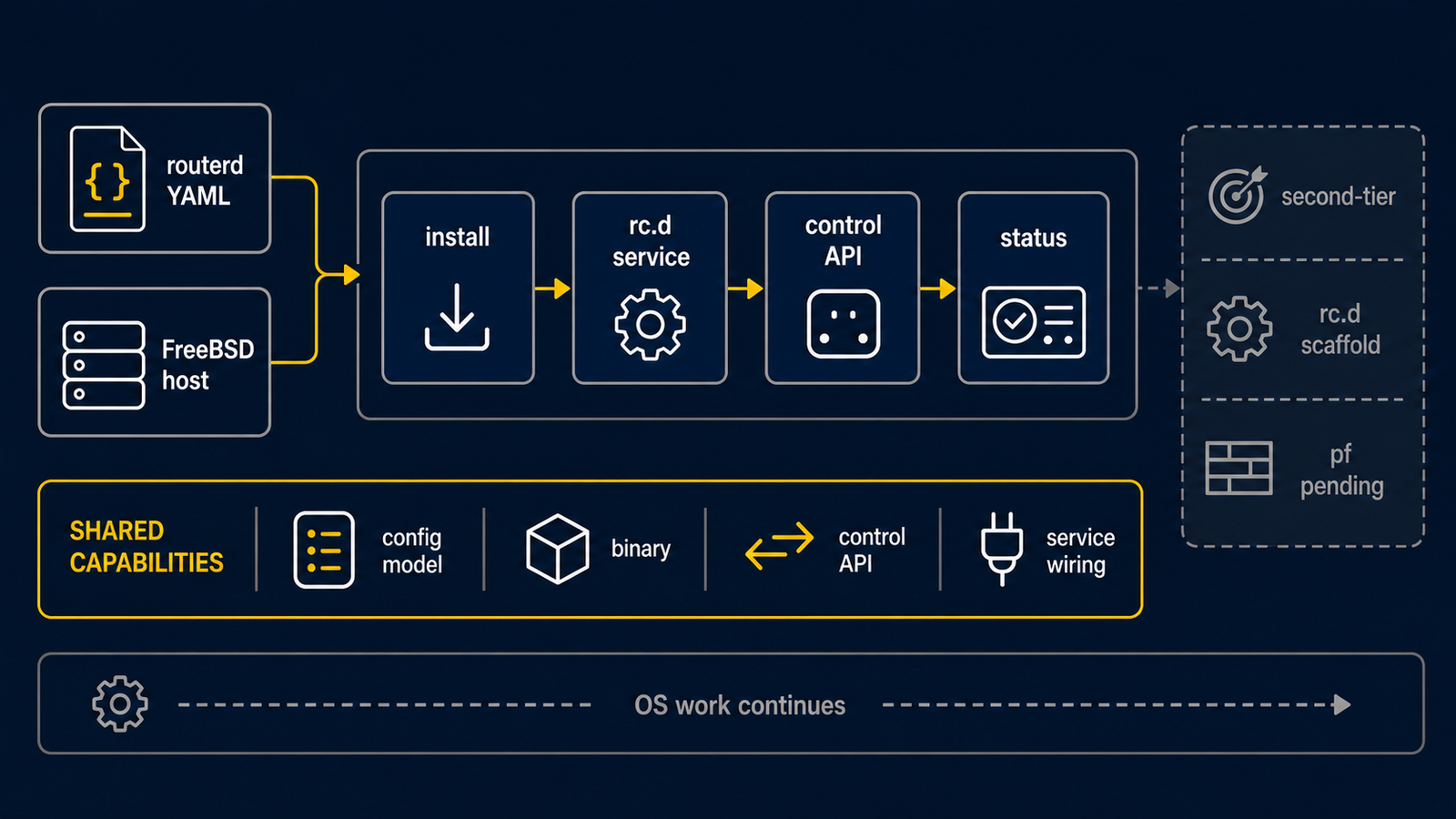
FreeBSD 使用與 Ubuntu 相同的 routerd 資源模型,但不是與 Ubuntu 初次實驗相同的
支援範圍;它是具有部分原生整合的第二目標。第一次請在可使用主控台的隔離測試主機操作。
產生的主機成果物對應 FreeBSD 的機制。
routerd 負責處理 rc.conf.d、rc.d script、pf.conf、dhclient.conf、
dnsmasq 設定、mpd5.conf,以及 DS-Lite 用的動態 ifconfig gif 操作。
本教學以 FreeBSD 14 系為前提。
發布安裝程式的安裝位置為 /usr/local 之下。
參考設定請使用 examples/freebsd-edge.yaml。
1. 從發布封存檔安裝
從 GitHub Releases 取得 FreeBSD 用的 封存檔,並在路由器上執行隨附的安裝程式。
fetch https://github.com/imksoo/routerd/releases/download/v20260707.1514/routerd-freebsd-amd64.tar.gz
fetch https://github.com/imksoo/routerd/releases/download/v20260707.1514/routerd-freebsd-amd64.tar.gz.sha256
cat routerd-freebsd-amd64.tar.gz.sha256
sha256 routerd-freebsd-amd64.tar.gz
tar -xzf routerd-freebsd-amd64.tar.gz
sudo ./install.sh
install.sh 會安裝 FreeBSD 通常所需的套件。
對象為 ca_root_nss、curl、dnsmasq、wireguard-tools、mpd5、
bind-tools、tcpdump、jq、chrony、strongswan。
同時安裝 Tailscale 時,使用 sudo ./install.sh --with-tailscale。
FreeBSD 的 base system 包含 ifconfig、route、sysctl、service、sysrc、
pfctl、pflog0、netstat、sockstat、ping、traceroute。
相依套件清單可透過 ./install.sh --list-deps 確認。
2. 放置路由器設定
sudo install -d -m 0755 /usr/local/etc/routerd
sudo install -m 0600 examples/freebsd-edge.yaml /usr/local/etc/routerd/router.yaml
套用前,請編輯介面名稱、位址與密碼。 初次操作時,請將管理用 SSH 放置於獨立介面,或事先準備 hypervisor 主控台。
3. 驗證並確認產生的檔案
首先驗證設定。
sudo routerd validate --config /usr/local/etc/routerd/router.yaml
接著將 FreeBSD 用的成果物產生至暫存目錄。
render_dir=$(mktemp -d)
sudo routerd render freebsd \
  --config /usr/local/etc/routerd/router.yaml \
  --out-dir "$render_dir"
主要輸出如下。
rc.conf.d-routerddhclient.confmpd5.confpf.confdnsmasq.confinstall-packages.shrc.d-*
套用至實際主機前,請先確認內容。
sudo less "$render_dir/rc.conf.d-routerd"
sudo less "$render_dir/pf.conf"
sudo less "$render_dir/dnsmasq.conf"
4. 了解 FreeBSD 側的角色
routerd 將資源對應至以下 FreeBSD 機制。
| 機制 | 角色 |
|---|---|
rc.conf.d-routerd | 介面別名、轉送、複製介面、靜態路由、pf、pflog、mpd5 的啟用 |
rc.d-* script | dnsmasq、防火牆日誌記錄器、healthcheck、Tailscale、DHCP client 等受管理常駐程式 |
pf.conf | zone 過濾、受管理服務的開口、NAT、防火牆日誌 |
pflog0 | routerd-firewall-logger 讀取的防火牆日誌 |
dnsmasq.conf | DHCPv4、DHCPv6、DHCP relay、RA |
dhclient.conf | 接管的上游介面的 DHCPv4 client 行為 |
mpd5.conf | PPPoE 的 bundle、link、認證、MTU/MRU、預設路由 |
ifconfig gif | 靜態 rc.conf 不足時的動態 DS-Lite tunnel 套用 |
5. 先 dry-run,再從主控台套用
使用一次性的 state 檔案進行不變更網路的預覽。
workdir=$(mktemp -d)
sudo routerd apply --config /usr/local/etc/routerd/router.yaml --once --dry-run --skip-service-manager \
  --state-file "$workdir/state.db" \
  --ledger-file "$workdir/ledger.db" \
  --status-file "$workdir/status.json"
只有在產生的檔案與 dry-run 都符合預期時,才從主控台或獨立管理路徑套用。下列命令會 變更主機。
sudo routerd apply --config /usr/local/etc/routerd/router.yaml --once
routerd 在載入 pf.conf 前以 pfctl -nf 驗證。
dnsmasq 也在重新啟動前以 dnsmasq --test 驗證設定。
one-shot apply 成功後再啟動 rc.d 服務:
sudo sysrc routerd_enable=YES
sudo service routerd start
6. 確認狀態與日誌
確認 routerd 狀態。
sudo routerctl get status
sudo routerctl get events --limit 20
追蹤系統日誌。
tail -f /var/log/routerd.log
確認 pf 狀態。
sudo pfctl -ss -v
透過 pflog0 確認防火牆日誌。
sudo tcpdump -n -e -ttt -i pflog0
啟用 FirewallEventLog 後,routerd 會匯入 pflog0 的內容。
匯入的日誌可透過 routerctl 與 Web 管理介面確認。