Getting started on FreeBSD
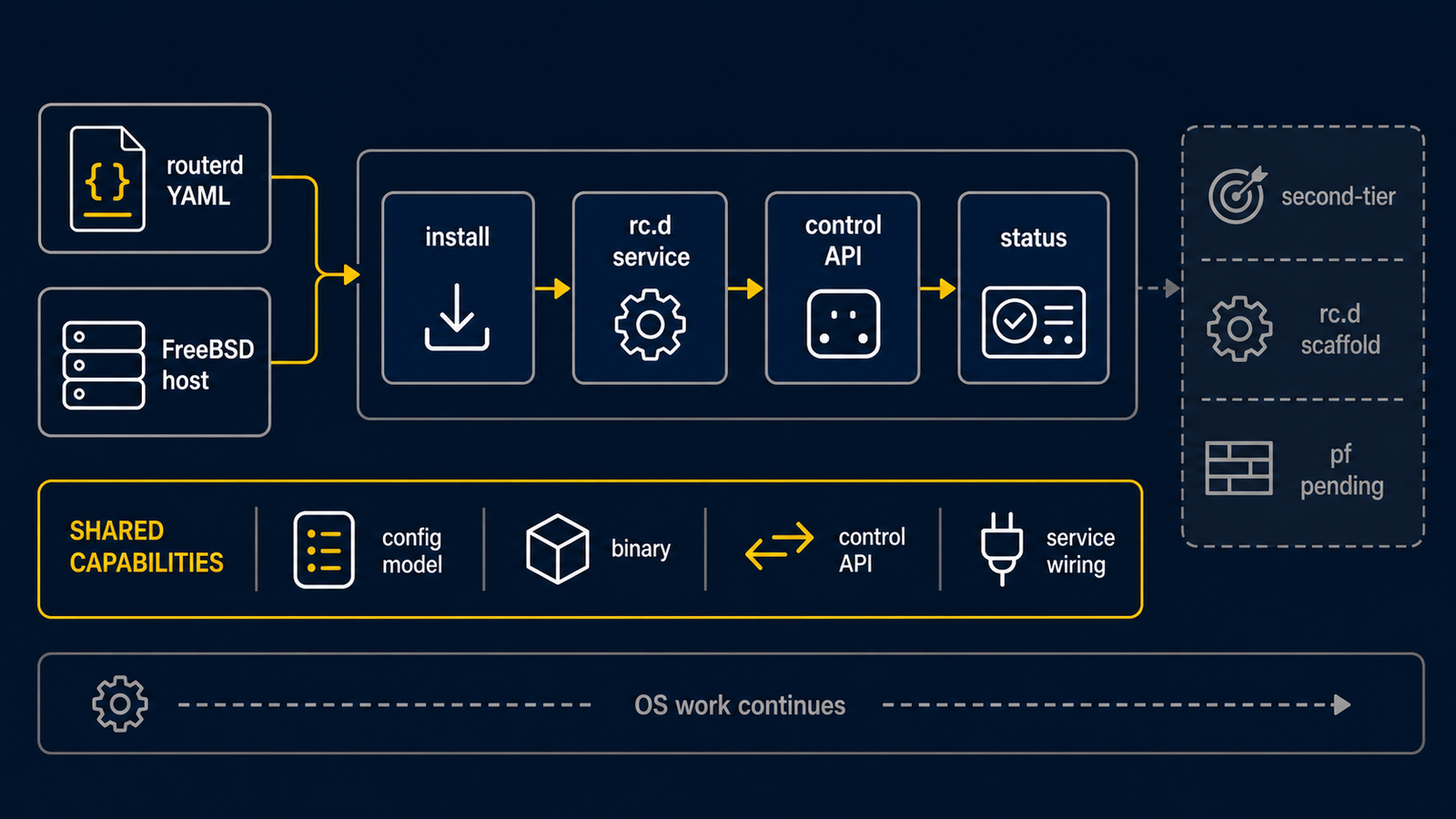
FreeBSD uses the same routerd resource model as Ubuntu, but it is a second-tier
target with selected native integration paths rather than first-lab parity.
Start on an isolated test host with a console. routerd renders rc.conf.d, rc.d scripts,
pf.conf, dhclient.conf, dnsmasq configuration, mpd5.conf, and dynamic
ifconfig gif operations for DS-Lite.
This tutorial assumes FreeBSD 14.x and a release install under /usr/local.
Use examples/freebsd-edge.yaml as the reference configuration.
1. Install from a release archive
Download the FreeBSD archive from the GitHub Releases page, then run the bundled installer on the router.
fetch https://github.com/imksoo/routerd/releases/download/v20260707.1514/routerd-freebsd-amd64.tar.gz
fetch https://github.com/imksoo/routerd/releases/download/v20260707.1514/routerd-freebsd-amd64.tar.gz.sha256
cat routerd-freebsd-amd64.tar.gz.sha256
sha256 routerd-freebsd-amd64.tar.gz
tar -xzf routerd-freebsd-amd64.tar.gz
sudo ./install.sh
install.sh installs the FreeBSD packages routerd normally needs:
ca_root_nss, curl, dnsmasq, wireguard-tools, mpd5, bind-tools,
tcpdump, jq, chrony, and strongswan.
Tailscale is optional; include it with sudo ./install.sh --with-tailscale.
The FreeBSD base system already provides ifconfig, route, sysctl, service,
sysrc, pfctl, pflog0, netstat, sockstat, ping, and traceroute.
Use ./install.sh --list-deps to inspect the package and command list.
2. Place the router configuration
sudo install -d -m 0755 /usr/local/etc/routerd
sudo install -m 0600 examples/freebsd-edge.yaml /usr/local/etc/routerd/router.yaml
Edit interface names, addresses, and secrets before applying. Keep management SSH on a separate interface or use a hypervisor console during the first run.
3. Validate and review generated files
Validate the configuration:
sudo routerd validate --config /usr/local/etc/routerd/router.yaml
Render FreeBSD artifacts into a temporary directory:
render_dir=$(mktemp -d)
sudo routerd render freebsd \
  --config /usr/local/etc/routerd/router.yaml \
  --out-dir "$render_dir"
Expected files include:
rc.conf.d-routerddhclient.confmpd5.confpf.confdnsmasq.confinstall-packages.shrc.d-*
Review the output before touching the live host:
sudo less "$render_dir/rc.conf.d-routerd"
sudo less "$render_dir/pf.conf"
sudo less "$render_dir/dnsmasq.conf"
4. Understand the FreeBSD host surfaces
routerd maps resources to these FreeBSD components:
| Component | Responsibility |
|---|---|
rc.conf.d-routerd | Interface aliases, forwarding, cloned interfaces, static routes, pf, pflog, and mpd5 enablement |
rc.d-* scripts | routerd-managed daemons such as dnsmasq, firewall logger, healthcheck, Tailscale, and DHCP clients |
pf.conf | Zone filtering, service holes, NAT, and firewall logging |
pflog0 | Firewall log source for routerd-firewall-logger |
dnsmasq.conf | DHCPv4, DHCPv6, DHCP relay, and Router Advertisement |
dhclient.conf | FreeBSD DHCPv4 client behavior for adopted uplinks |
mpd5.conf | PPPoE bundle, link, authentication, MTU/MRU, and default-route behavior |
ifconfig gif | Dynamic DS-Lite tunnel application when static rc.conf is not enough |
5. Dry-run, then apply from the console
Use temporary state files to perform a non-destructive preview:
workdir=$(mktemp -d)
sudo routerd apply --config /usr/local/etc/routerd/router.yaml --once --dry-run --skip-service-manager \
  --state-file "$workdir/state.db" \
  --ledger-file "$workdir/ledger.db" \
  --status-file "$workdir/status.json"
rm -rf "$workdir"
Apply only when the rendered files and dry-run are expected. This changes the host; use a console or separate management network:
sudo routerd apply --config /usr/local/etc/routerd/router.yaml --once
routerd validates pf.conf with pfctl -nf before loading it. It validates
dnsmasq with dnsmasq --test before restarting the service. Start the rc.d
service after the one-shot apply:
sudo sysrc routerd_enable=YES
sudo service routerd start
6. Inspect status and logs
Read routerctl get status:
sudo routerctl get status
sudo routerctl get events --limit 20
Follow the system log:
tail -f /var/log/routerd.log
Check pf state:
sudo pfctl -ss -v
Check firewall logging through pflog0:
sudo tcpdump -n -e -ttt -i pflog0
If FirewallEventLog is enabled, routerd also imports pflog0 entries into the
firewall log store for routerctl and the Web Console.