从 FreeBSD 开始
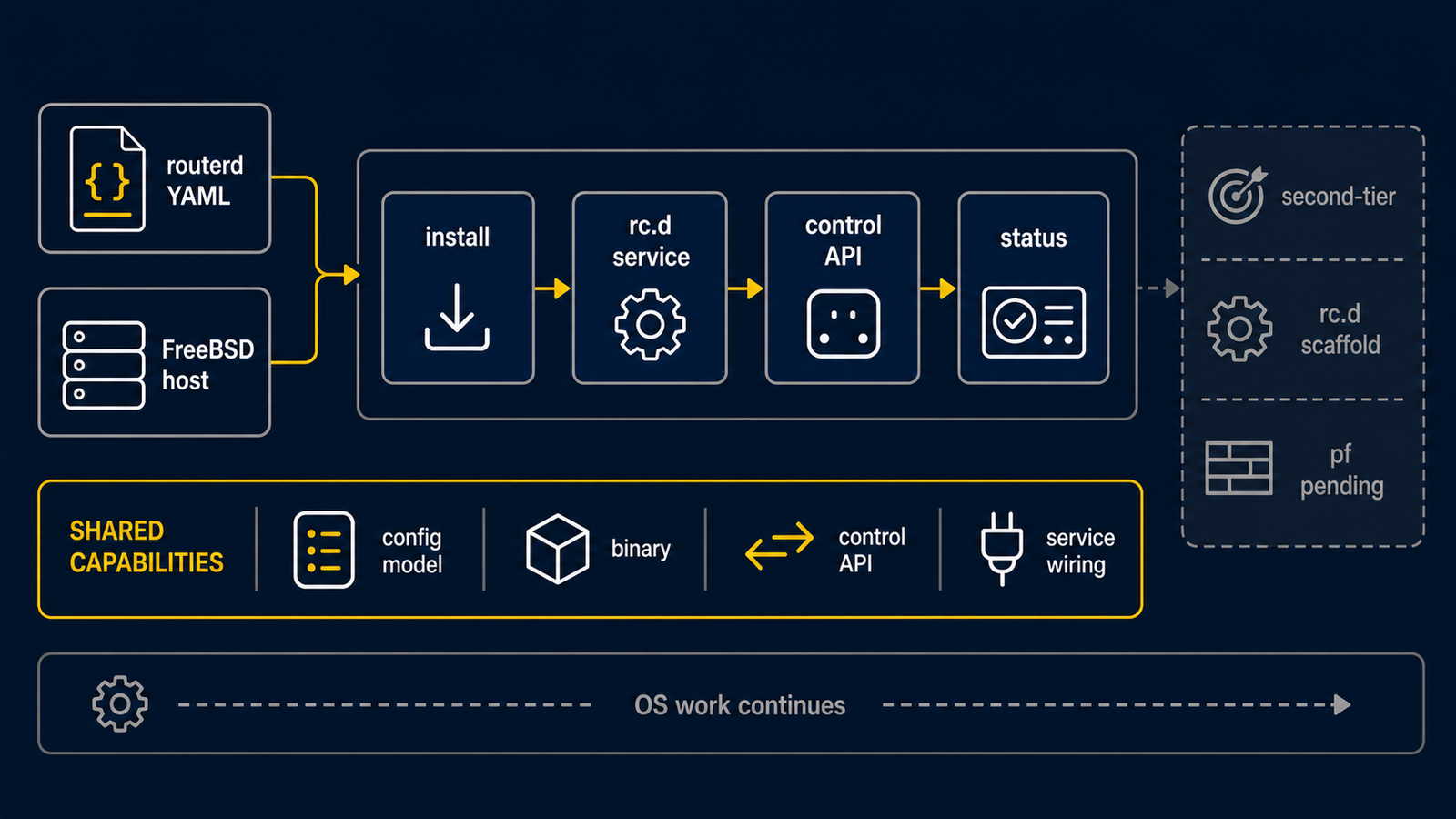
FreeBSD 使用与 Ubuntu 相同的 routerd 资源模型,但它不是与 Ubuntu 首次实验相同的
支持范围;它是具有部分原生集成的第二目标。第一次请在可使用控制台的隔离测试主机上操作。
生成的主机产物对应 FreeBSD 的机制。
routerd 负责处理 rc.conf.d、rc.d script、pf.conf、dhclient.conf、
dnsmasq 配置、mpd5.conf,以及 DS-Lite 用的动态 ifconfig gif 操作。
本教程以 FreeBSD 14 系为前提。
发布安装程序的安装位置为 /usr/local 之下。
参考配置请使用 examples/freebsd-edge.yaml。
1. 从发布归档文件安装
从 GitHub Releases 获取 FreeBSD 用的 归档文件,并在路由器上执行随附的安装程序。
fetch https://github.com/imksoo/routerd/releases/download/v20260707.1514/routerd-freebsd-amd64.tar.gz
fetch https://github.com/imksoo/routerd/releases/download/v20260707.1514/routerd-freebsd-amd64.tar.gz.sha256
cat routerd-freebsd-amd64.tar.gz.sha256
sha256 routerd-freebsd-amd64.tar.gz
tar -xzf routerd-freebsd-amd64.tar.gz
sudo ./install.sh
install.sh 会安装 FreeBSD 通常所需的软件包。
对象为 ca_root_nss、curl、dnsmasq、wireguard-tools、mpd5、
bind-tools、tcpdump、jq、chrony、strongswan。
同时安装 Tailscale 时,使用 sudo ./install.sh --with-tailscale。
FreeBSD 的 base system 包含 ifconfig、route、sysctl、service、sysrc、
pfctl、pflog0、netstat、sockstat、ping、traceroute。
依赖软件包清单可通过 ./install.sh --list-deps 确认。
2. 放置路由器配置
sudo install -d -m 0755 /usr/local/etc/routerd
sudo install -m 0600 examples/freebsd-edge.yaml /usr/local/etc/routerd/router.yaml
应用前,请编辑接口名称、地址与密码。 初次操作时,请将管理用 SSH 放置于独立接口,或事先准备 hypervisor 控制台。
3. 验证并确认生成的文件
首先验证配置。
sudo routerd validate --config /usr/local/etc/routerd/router.yaml
接着将 FreeBSD 用的产物生成至临时目录。
render_dir=$(mktemp -d)
sudo routerd render freebsd \
  --config /usr/local/etc/routerd/router.yaml \
  --out-dir "$render_dir"
主要输出如下。
rc.conf.d-routerddhclient.confmpd5.confpf.confdnsmasq.confinstall-packages.shrc.d-*
应用至实际主机前,请先确认内容。
sudo less "$render_dir/rc.conf.d-routerd"
sudo less "$render_dir/pf.conf"
sudo less "$render_dir/dnsmasq.conf"
4. 了解 FreeBSD 侧的角色
routerd 将资源对应至以下 FreeBSD 机制。
| 机制 | 角色 |
|---|---|
rc.conf.d-routerd | 接口别名、转发、克隆接口、静态路由、pf、pflog、mpd5 的启用 |
rc.d-* script | dnsmasq、防火墙日志记录器、healthcheck、Tailscale、DHCP client 等受管理守护进程 |
pf.conf | zone 过滤、受管理服务的开口、NAT、防火墙日志 |
pflog0 | routerd-firewall-logger 读取的防火墙日志 |
dnsmasq.conf | DHCPv4、DHCPv6、DHCP relay、RA |
dhclient.conf | 接管的上游接口的 DHCPv4 client 行为 |
mpd5.conf | PPPoE 的 bundle、link、认证、MTU/MRU、默认路由 |
ifconfig gif | 静态 rc.conf 不足时的动态 DS-Lite tunnel 应用 |
5. 先 dry-run,再从控制台应用
使用一次性的 state 文件进行不变更网络的预览。
workdir=$(mktemp -d)
sudo routerd apply --config /usr/local/etc/routerd/router.yaml --once --dry-run --skip-service-manager \
  --state-file "$workdir/state.db" \
  --ledger-file "$workdir/ledger.db" \
  --status-file "$workdir/status.json"
只有在生成的文件与 dry-run 都符合预期时,才从控制台或独立管理路径应用。以下命令会 变更主机。
sudo routerd apply --config /usr/local/etc/routerd/router.yaml --once
routerd 在加载 pf.conf 前以 pfctl -nf 验证。
dnsmasq 也在重新启动前以 dnsmasq --test 验证配置。
one-shot apply 成功后再启动 rc.d 服务:
sudo sysrc routerd_enable=YES
sudo service routerd start
6. 确认状态与日志
确认 routerd 状态。
sudo routerctl get status
sudo routerctl get events --limit 20
追踪系统日志。
tail -f /var/log/routerd.log
确认 pf 状态。
sudo pfctl -ss -v
通过 pflog0 确认防火墙日志。
sudo tcpdump -n -e -ttt -i pflog0
启用 FirewallEventLog 后,routerd 会导入 pflog0 的内容。
导入的日志可通过 routerctl 与 Web 管理界面确认。