启动第一台实验路由器
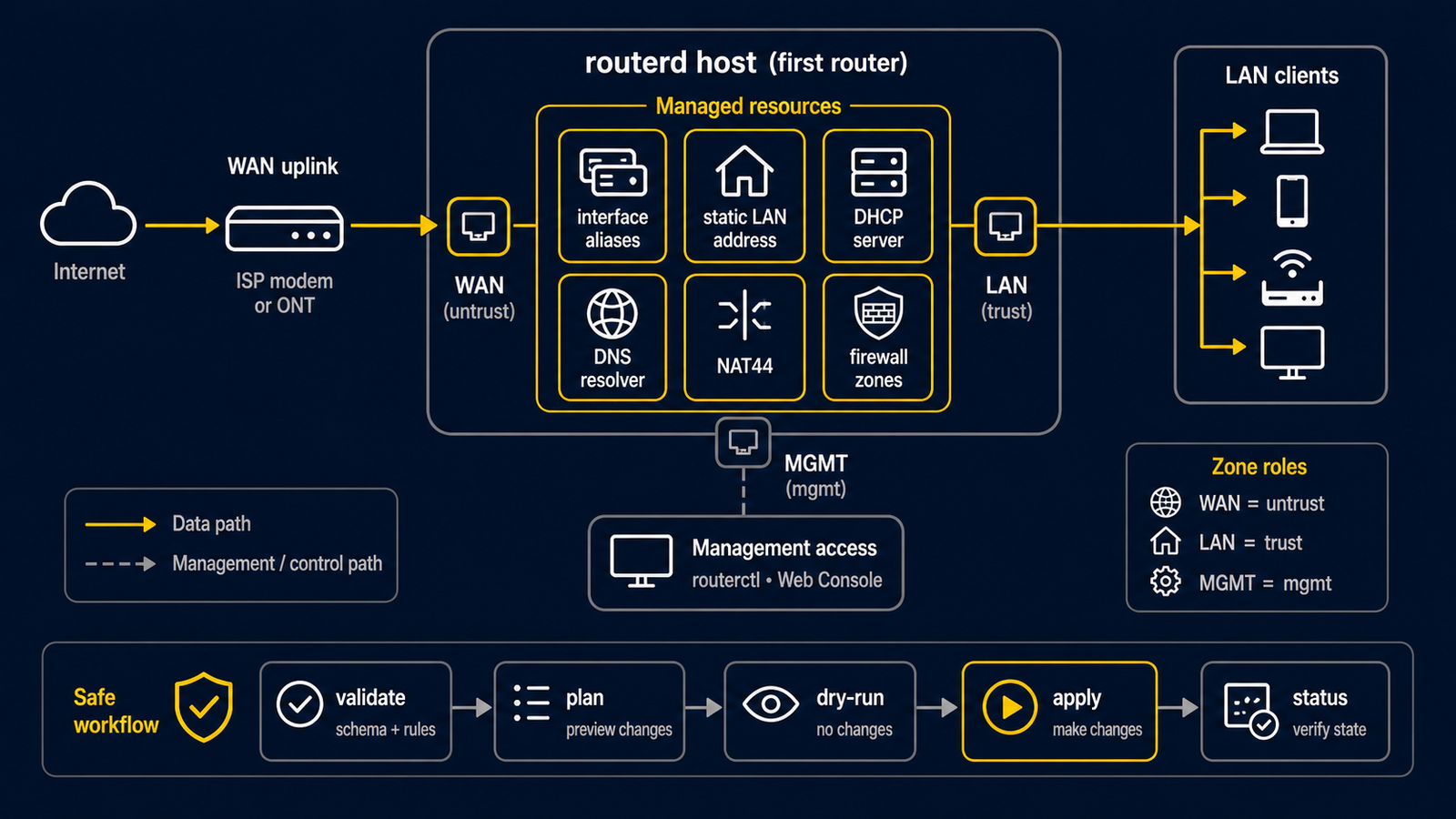
本教程让隔离 LAN 上的测试客户端取得私有 IPv4 地址和网关,并通过 IPv4 连到上游网络。
它使用完整示例
examples/example-basic-ipv4-nat.yaml。
这是实验教程,不是可以直接粘贴到家用路由器上的配置。
请使用 VM 控制台、串口控制台或另一张管理网卡。下面的 ens18 和 ens19 只是示例。
先用 ip -br link 查看真实接口名,绝不要猜测哪张接口正在承载管理连接。示例的
192.168.10.0/24 若与上游、VPN、学校或管理网络重叠,请换成未使用的私有网段。
成功时会看到什么
上游网络 -- WAN -- routerd 主机 -- LAN -- 测试客户端
                              DHCP + NAT
- 上游通过 DHCP 把 IPv4 地址交给 WAN。
- 路由器把
192.168.10.100到192.168.10.199的地址交给 LAN 测试客户端。 - 测试客户端使用
192.168.10.1作为网关。 - NAT 让客户端的 IPv4 流量共用一个上游地址向外发送。
如果 DHCP、网关或 NAT 是新词,请先阅读网络基础。
1. 获取完整实验文件并调整
# 已安装的 release 只有 router.yaml.sample,不包含所有 repository 示例。
# 从与已安装 routerd 相同的 release 获取这个示例。
ROUTERD_VERSION="$(sudo routerd version | awk '{print $2}')"
curl --fail --location --output first-router.yaml \
  "https://raw.githubusercontent.com/imksoo/routerd/${ROUTERD_VERSION}/examples/example-basic-ipv4-nat.yaml"
若你已有相同 release tag 的 source checkout,也可以改为复制该 checkout 的
examples/example-basic-ipv4-nat.yaml。
第一次 preview 前,只调整 first-router.yaml 中下列值。
Interface/wan.spec.ifname: 实验 WAN 的接口名。Interface/lan.spec.ifname: 隔离 LAN 的接口名。192.168.10.0/24: 仅当它与已连接网络重叠时才修改。- 公共 DNS 服务器: 仅当实验必须使用其他 resolver 时才修改。
这个文件让 WAN 保持由外部管理,并让 routerd 管理 LAN。它包含 DHCPv4 服务器、NAT44 规则和基本 zone 资源。
routerd 的 firewall 资源只是功能基础,不是安全认证。不要只依靠这个示例就把路由器公开到 互联网。第一次实验应放在隔离的虚拟交换机或物理实验网络内。
2. 在 daemon 运行前先验证和 preview
sudo routerd validate --config first-router.yaml

LAB_DIR="$(mktemp -d)"
sudo routerd apply --config first-router.yaml --once --dry-run --skip-service-manager \
  --state-file "$LAB_DIR/state.db" \
  --ledger-file "$LAB_DIR/ledger.db" \
  --status-file "$LAB_DIR/status.json"
rm -rf "$LAB_DIR"
这两个命令不会变更主机网络。验证失败时,请修改 YAML,而不是尝试 live apply。请确认 dry-run 显示的管理接口、路由和将生成的文件都符合预期。
3. 从控制台应用
只有当 preview 显示预期的接口和生成物时,才从控制台或独立管理路径应用变更。
sudo routerd apply --config first-router.yaml --once
若要让实验路由器持续运行,请将确认过的文件放到标准位置并启动服务。
sudo install -d -m 0755 /usr/local/etc/routerd
sudo install -m 0600 first-router.yaml /usr/local/etc/routerd/router.yaml
sudo systemctl enable --now routerd.service
4. 完整检查这条小路径
在路由器上运行:
sudo routerctl get status
sudo routerctl describe DHCPv4Client/wan-dhcpv4
sudo routerctl describe DHCPv4Server/lan-dhcpv4
sudo routerctl describe NAT44Rule/lan-to-wan
在只连接到隔离 LAN 的客户端更新 DHCP 租约,再运行:
ip route
ping 192.168.10.1
curl -I https://example.com/
如果最后一个命令失败,请分开找原因:先确认客户端是否取得地址和网关,再确认 WAN 是否有 租约,最后才检查 DNS。原因不明时,不要反复应用文件。
下一步
- 基本 IPv4 NAT 网关 — 用图和 YAML 对照说明这个文件
- LAN 侧服务 — IPv4 正常后再添加本地 DNS 和 IPv6
- 基本 NAT 与 firewall policy — 当前 firewall 的范围和更安全的下一步