安全起步:先檢查,不先斷線
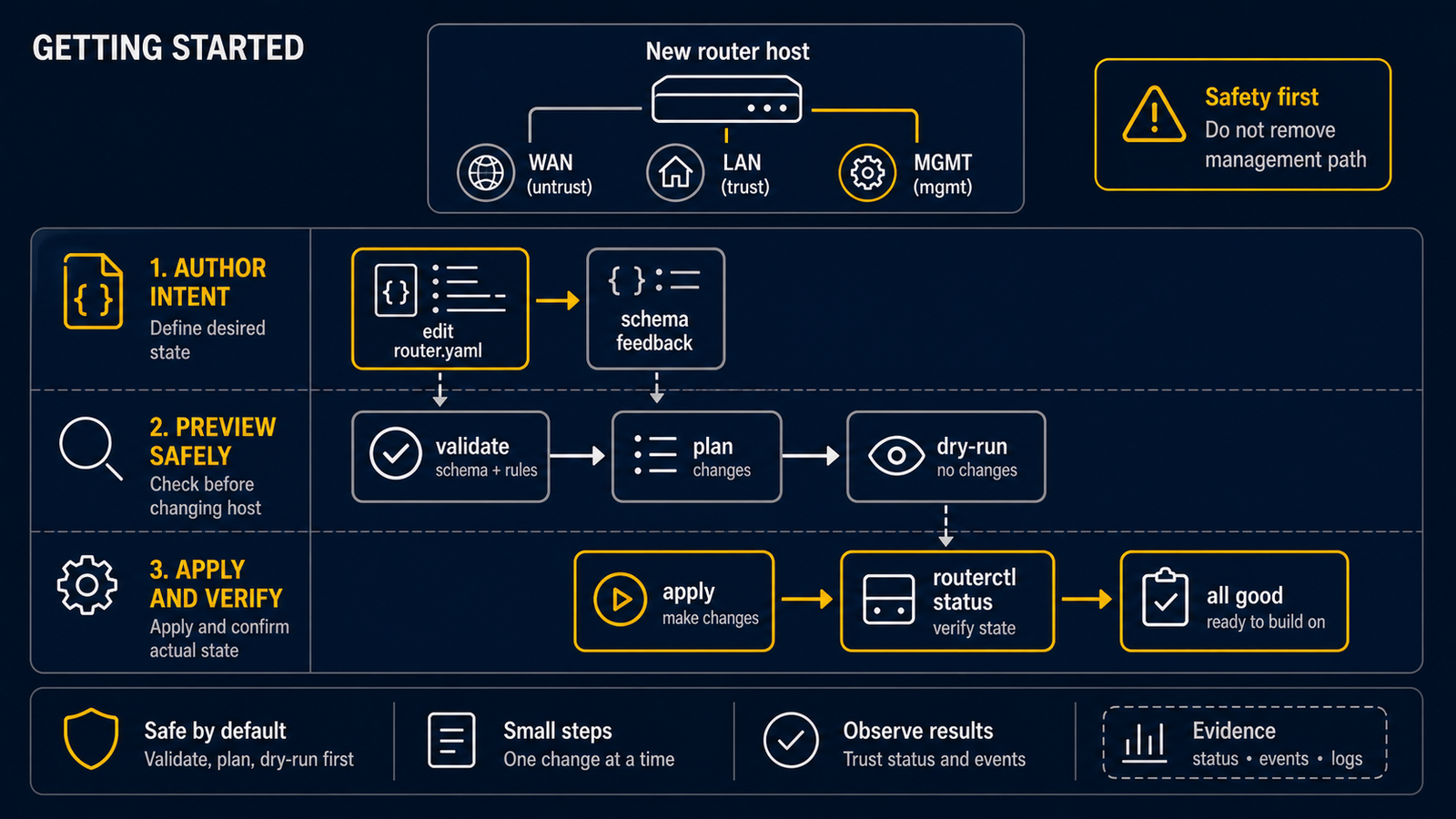
本教學的目的不是立刻把機器變成家用閘道,而是安全完成第一輪:寫一份很小的設定、檢查它、再在不提交網路變更的情況下跑一次。請使用隔離的 Ubuntu Server VM 或備用電腦,並保留主控台。
1. 找出介面名稱
ip -br link
範例將 ens18 當 WAN、ens19 當 LAN。你的主機可能顯示 enp1s0、eth0 或其他名稱,務必以輸出為準。不要透過即將由 routerd 接管的唯一網路介面遠端 SSH 後進行實驗。
2. 建立最小設定
將下列內容存成 first-router.yaml。它目前只宣告兩個介面,尚未提供 DHCP、NAT 或網際網路分享。
apiVersion: routerd.net/v1alpha1
kind: Router
metadata:
  name: first-router
spec:
  resources:
    - apiVersion: net.routerd.net/v1alpha1
      kind: Interface
      metadata:
        name: wan
      spec:
        ifname: ens18
        adminUp: true
        managed: false
        owner: external

    - apiVersion: net.routerd.net/v1alpha1
      kind: Interface
      metadata:
        name: lan
      spec:
        ifname: ens19
        adminUp: true
        managed: true
        owner: routerd
metadata.name 是設定內部使用的名稱;spec.ifname 才是 Linux 看到的實體介面名稱。將 WAN 標為 external 是保守的第一步:一開始不要讓 routerd 直接接管上游連線。
3. 離線驗證檔案
routerd validate --config first-router.yaml
這是獨立命令,不需要 routerd serve 已經啟動,也不會寫入網路設定。若出現錯誤,先修正 YAML 或介面名稱,別急著做真實套用。
4. 在暫存路徑做一次 dry-run
workdir=$(mktemp -d)
routerd apply --once --dry-run --skip-service-manager --config first-router.yaml --status-file "$workdir/status.json" --state-file "$workdir/state.db" --ledger-file "$workdir/ledger.db" --netplan-file "$workdir/50-routerd.yaml" --dnsmasq-file "$workdir/dnsmasq.conf" --dnsmasq-service-file "$workdir/routerd-dnsmasq.service" --nftables-file "$workdir/routerd-nat.nft"
--dry-run 會計算相依關係、計畫和產生意圖,但不會提交主機網路變更。暫存目錄也讓狀態報告與輸出不會落入 /run、/etc 或 /var/lib。請閱讀輸出,尤其是介面名、資源參照與管理路徑警告。
不要把 dry-run 當作連通性或安全測試:它不會替你測量真實 ISP、交換器 VLAN 或完整的防火牆暴露面。
5. 準備好後再運行 daemon
不帶 --dry-run 的 routerd apply --once 和 routerd serve 都可能變更網路。確認已有主控台或獨立管理網路後,再把檔案安裝到預設位置並啟動服務:
sudo install -m 0600 first-router.yaml /usr/local/etc/routerd/router.yaml
sudo systemctl enable --now routerd
sudo routerctl get status
最後一行放在這裡,是因為此時 routerd serve 已由 systemd 運行。routerctl 透過執行中的 daemon 讀取狀態;服務未啟動時,不能以它取代 routerd validate。