Web 管理介面
Connections 按 DS-Lite 顯示完整 conntrack snapshot 的本機 IPv4 SNAT 總計/TCP/UDP/其他
項目數,不受顯示上限和篩選影響。按觀測到的 innerLocalIPv4 對應;共用位址顯示合計,
未取得不等於零。這不是 AFTR 端件數或連接埠容量。直接存取和自動更新都會取得隧道狀態。
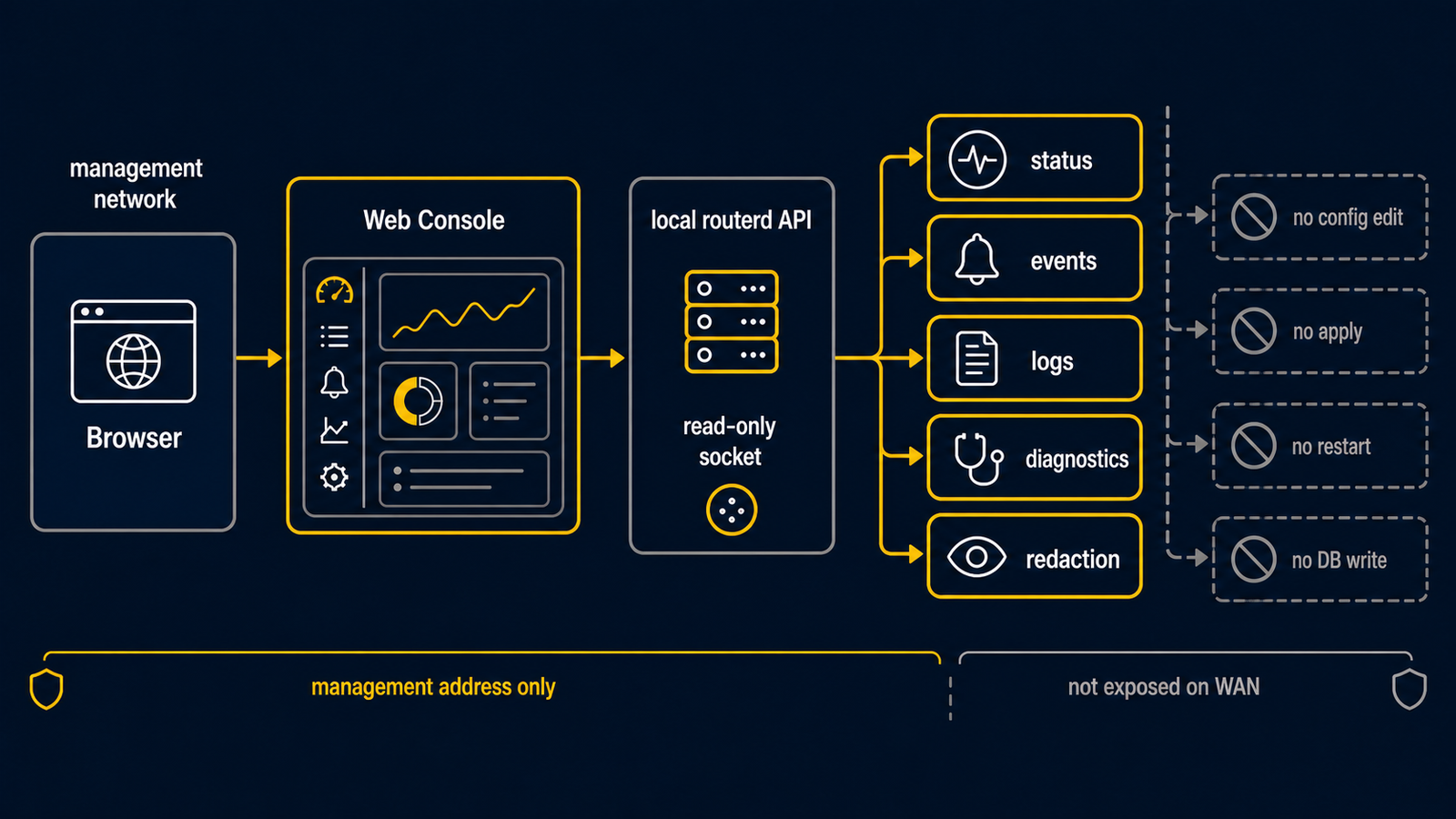
WebConsole 是用來讀取 routerd 狀態的 HTTP 畫面。
設計上以管理網路的本地運用為前提。
不執行設定變更、服務重新啟動、資源套用或狀態資料庫的編輯。
設定的變更僅限於 YAML 檔案和 routerctl 命令。
瀏覽器僅作為觀測用途。
apiVersion: system.routerd.net/v1alpha1
kind: WebConsole
metadata:
  name: mgmt
spec:
  enabled: true
  listenAddressFrom:
    resource: Interface/mgmt
    field: ipv4Addresses
  port: 8080
  title: edge-router
請將監聽位址限定於管理位址。
請勿在 untrust 的 WAN 介面上公開。
若管理位址由作業系統或 IPAM 提供,請使用 listenAddressFrom。
routerd 會在啟動時從資源狀態解析其值。
若需要固定的備用位址,也可以同時使用 listenAddress。
讀取的資訊
Web 管理介面會讀取以下資訊。
- routerd 常駐程式狀態
- SQLite 狀態資料庫中的資源狀態
- SQLite 事件表格中的匯流排事件
- 從 conntrack 或 pf 狀態取得的連線觀測值
dns-queries.db的 DNS 查詢記錄traffic-flows.db的連線流量記錄firewall-logs.db的防火牆拒絕記錄- 目前 dnsmasq 的 DHCP 租約檔案,顯示裝置名稱、MAC 位址及本地廠商候選名稱
- 目前的 YAML 設定,以唯讀方式顯示,secret 欄位已 redact
目前的畫面
目前的 Fluent UI 版 Web 應用程式顯示以下內容。
- PD、DS-Lite、DNS、NAT、路由、健康檢查、VPN、套件、sysctl、 systemd 單元、記錄資源的狀態摘要
- 階段或觀測值發生變化的資源高亮顯示
- 所選事件的詳細面板,不因龐大的屬性而破壞事件表格版面
- DHCP 租約事件的詳細資訊,顯示 MAC 位址、IP 位址、主機名稱及資源名稱
- 依位址族與協定分類的 Connections 畫面, 支援篩選、排序、分頁及列數選擇
- 基於獨立記錄資料庫的 DNS 查詢、連線流量、防火牆記錄畫面
/bgp、/vrrp、/ingress專屬的 BGP、VRRP、IngressService 運維頁面。 這些頁面透過 Server-Sent Events 更新資源表格,並在瀏覽器端保留 5/15/60 分鐘的輕量 SVG 趨勢圖,以及僅顯示相關資源的事件記錄- Firewall 列彙整顯示防火牆記錄、DNS 回應、DHCP 租約、 MAC 廠商候選,以及目前 conntrack 的回程 tuple, 方便判斷被拒絕的封包究竟是不必要的對外連線,還是接近現有 NAT 轉換的另一路徑回應
- 具有結構化摺疊樹與原始 YAML 顯示的唯讀 Config 畫面
連線列基本上顯示去程方向。 conntrack 雖然會以雙向回報同一連線,但不會將回程作為主要列重疊顯示。
API 邊界
Web 管理介面 API 為唯讀。
JSON 端點位於 /api/v1 下,SSE 串流也可透過短名稱
/api/events/stream 存取。
| 路徑 | 內容 |
|---|---|
/api/v1/summary | 狀態、資源階段、最近事件、連線摘要 |
/api/v1/resources | 狀態資料庫中的資源狀態 |
/api/v1/events?limit=200&resourceKind=&resourceName=&q= | 含任意篩選條件的最近匯流排事件 |
/api/v1/events/stream 或 /api/events/stream | routerd.* 匯流排事件的 Server-Sent Events 串流 |
/api/v1/connections | 從 conntrack 或 pf 狀態取得的連線觀測值 |
/api/v1/dns-queries?since=1h&client=&qname=&limit=100 | DNS 查詢記錄列 |
/api/v1/traffic-flows?since=1h&client=&peer=&limit=100 | 含 DNS 來源主機名稱的連線流量記錄列 |
/api/v1/firewall-logs?since=24h&action=drop&src=&limit=100 | 防火牆記錄列 |
/api/v1/bgp、/api/v1/vrrp、/api/v1/ingress | Kubernetes edge 路由 / VIP 資源的運維狀態 |
/api/v1/config | 目前的 YAML 設定(已 redact) |
/api/v1/generations?limit=100 | 已完成的套用世代及 YAML 快照的有無 |
/api/v1/generations/<id>/config | 某一套用世代儲存的 YAML(已 redact) |
/api/v1/generations/<from>/diff/<to> | 兩個 YAML 世代的差異(unified diff,已 redact) |
Secrets redaction
回傳 config 的端點 —— /api/v1/config、
/api/v1/generations/<id>/config、
/api/v1/generations/<from>/diff/<to> —— 會在序列化前 redact secrets。
WireGuard privateKey / preSharedKey、Tailscale authKey、
BGP/PPPoE/IPsec password、WebConsole initialPassword,以及
bearer / token / API key 類欄位,會被取代為標記值(***REDACTED***);
鍵保留,UI 結構不受影響。
唯讀 Web Console 不會洩漏原始 secret。特權本地路徑(routerd 的 control
socket、routerctl describe)刻意保持不變,並在適當時顯示原始 intent。請
透過本地 socket 權限與 routerd 群組成員資格保護這些路徑。