設定範例集
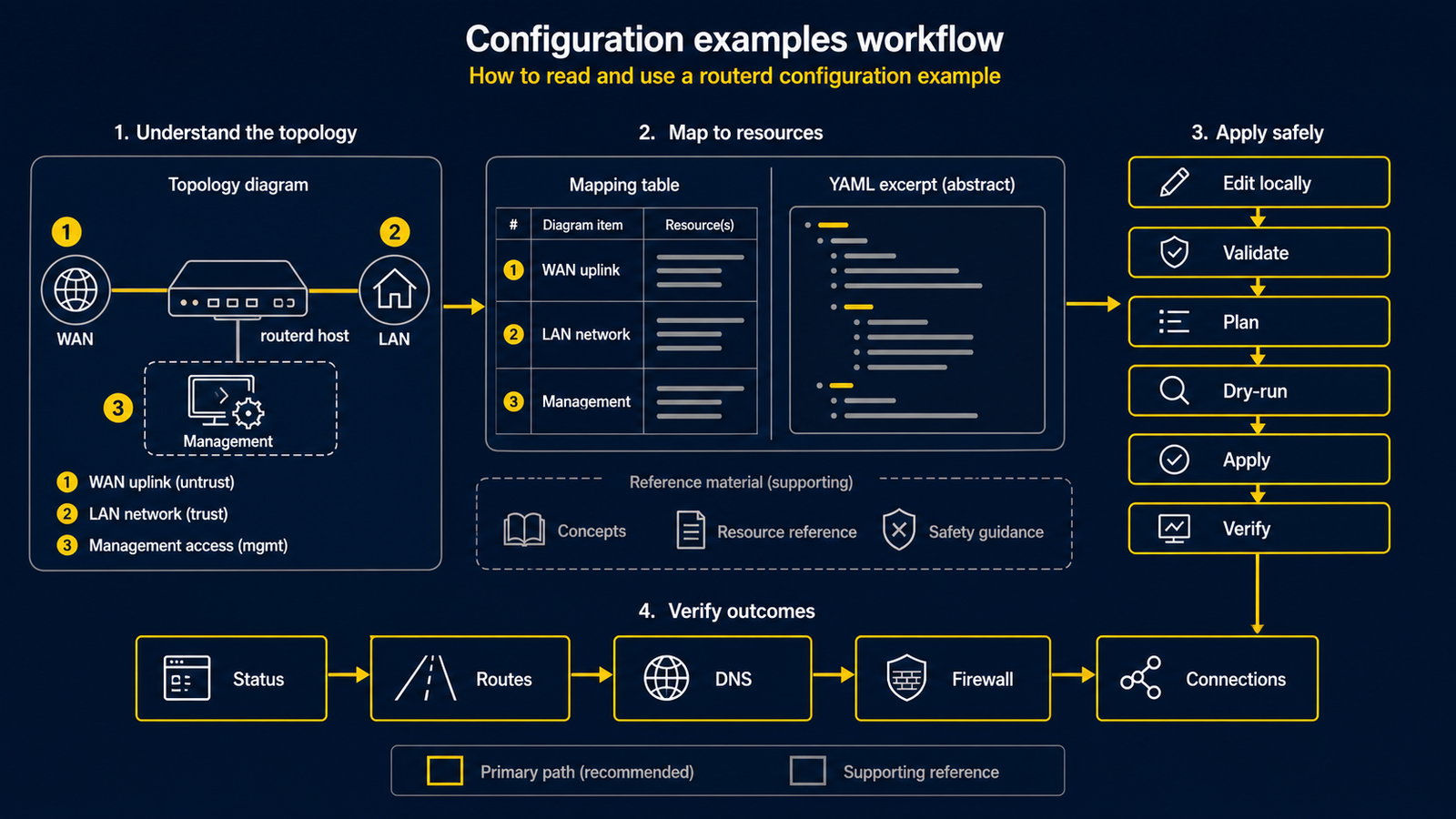
本節彙整了一系列易於參考的路由器設定模式。 相較於設計文件,本節更接近設備廠商的設定範例集格式。 每個頁面皆以構成圖開頭,說明目前 routerd 可管理的範圍,並附上最小化的 YAML 設定。
這裡的設定是出發點。投入正式環境之前,請務必依照您的實際環境調整介面名稱、位址範圍、 ISP 專屬值及管理存取路徑。
第一次使用 routerd 時,請從基本 IPv4 NAT 路由器開始,並使用有
主控台的隔離 Ubuntu Server VM。不要把
examples/home-router-mgmt-protected.yaml
當成所有家庭都可直接套用的安全預設值:它假定三張網路介面、NTT profile、Transix 的
AFTR/DNS 與 PPPoE 認證資料。了解小型實驗後,再依自己的線路與管理路徑逐項設計進階設定。
閱讀方式
每個範例均依照相同的流程說明:
- 構成圖:實體構成或邏輯構成。
- 圖示對應表:說明圖中各編號所代表的含義。
- 設定範例:完整 YAML 置於
examples/目錄,頁面內以編號摘錄要點。 - 檢查步驟:先以獨立的
routerd validate和隔離的 dry-run 檢查 YAML。 - 確認方式:服務啟動後用於確認收斂狀態的指令。
構成圖中的 [1] 與 YAML 註解中的 # [1] 指向同一個對象。
透過對照圖示,可以追蹤每個資源管理的位置。
可立即試用的範例
| 範例 | 狀態 | 適用情境 |
|---|---|---|
| 基本 IPv4 NAT 路由器 | 目前實作可用 | WAN 使用 DHCPv4,LAN 使用私有 IPv4 與 DHCPv4。 |
| LAN DHCP 與本地 DNS | 目前實作可用 | 在單一 LAN 上提供 DHCPv4、本地 DNS 區域及 DHCP 衍生名稱。 |
| DS-Lite 家用路由器 | 填入 ISP 專屬值後可用 | 以 IPv6 為主線路,IPv4 流量通過 DS-Lite 通道。 |
| PPPoE IPv4 NAT 路由器 | 填入 ISP 認證資訊後可用 | 在 Ethernet WAN 上建立 PPPoE 連線以存取 IPv4 網際網路。 |
| 內部 Web 伺服器的連接埠轉送 | 確認 WAN 位址後可用 | 公開一台內部 HTTPS 伺服器,並讓 LAN 端也能以相同公開名稱存取。 |
| 帶有 BGP 的 Kubernetes API VIP | 搭配 routerd-bgp GoBGP 與 keepalived 可用 | 由 routerd 持有 Kubernetes API VIP、對 control plane 進行健康檢查,並透過 BGP 接收 Service 前綴。 |
| 訪客 / IoT 端點隔離 | 路由器 policy 範例;不能取代 VLAN、SSID、交換器或 AP 的隔離 | 以路由器上的 MAC 條件規則限制部分端點的外連與 LAN 存取。 |
| 防火牆速率限制與 ICMP 規則 | firewall 功能基礎;不可視為唯一安全邊界 | 開放多個連接埠、比對 ICMP type,以及緩解 SSH 暴力破解。 |
| 多 WAN IPv4 容錯 | 目前實作可用,健康檢查需謹慎調整 | 從多個 IPv4 出口中選出正常的預設路由。 |
| 將公共 DNS 重新導向至本地解析器 | Linux nftables 可用 | 將 LAN 用戶端對外的明文 DNS 查詢集中導向路由器的 DNS。 |
| Tailscale 子網 / exit node | 可使用 Tailscale 的環境可用 | 將 LAN 路由及 exit node 廣播至 tailnet。 |
| WireGuard hub & spoke 範本 | 替換金鑰與 peer 路由的範本 | 需要一個路由式 WireGuard hub 的出發點。 |
| 將 telemetry 匯出至 OTLP collector | 有 collector 即可用 | 將 routerd 的 logs、metrics、traces 傳送至可觀測性基礎設施。 |
尚未標示為可直接執行的範例
對於初次接觸者而言這些內容很重要,但在對應的產生(render)與操作指引完備之前, 不作為可直接套用的 YAML 提供。
| 模式 | 現況 |
|---|---|
| MAP-E / v6plus 類 IPv4 over IPv6 | 尚未作為一級資源實作。 |
| OSPF 等 BGP 以外的動態路由 | 未實作。Kubernetes 風格的 Service 前綴匯入可使用 routerd-bgp GoBGP。 |
| IPsec site-to-site cookbook | IPsec 基礎已備,但正式環境的產生(render)尚未達到同等水準。 |
安全檢查
在正式使用中的路由器套用之前,請務必確認以下事項:
- 保留可從主控台或 hypervisor 進入的路徑。
- 確認管理通訊經由哪個介面傳輸。
- 先執行獨立的
routerd validate和隔離的 dry-run。 - 確認 dry-run 結果中的管理介面位址、路由與預期產生的主機檔案均符合預期。
- 使用路由器上已安裝的 release 二進位檔執行 apply,勿從其他開發目錄執行。
下列指令假定你是可執行 sudo 的本機使用者。安裝程式會建立 routerd 群組;若管理員選擇透過該群組授予本機 socket 存取權,加入後必須重新登入才會生效。第一次使用時,請對 routerctl、nft 與主機 ip 檢查保留 sudo。
LAB_DIR="$(mktemp -d)"
sudo routerd validate --config router.yaml
sudo routerd apply --config router.yaml --once --dry-run --skip-service-manager \
  --state-file "$LAB_DIR/state.db" \
  --ledger-file "$LAB_DIR/ledger.db" \
  --status-file "$LAB_DIR/status.json"
rm -rf "$LAB_DIR"
routerctl validate、routerctl plan 和 routerctl apply 都會向運行中的 daemon 提交請求,不能取代上述首次檢查。只有啟動 routerd.service 後,才可執行 sudo routerctl get status;live apply 前仍須確認有主控台或獨立管理路徑。