LAN DHCP 與本地 DNS
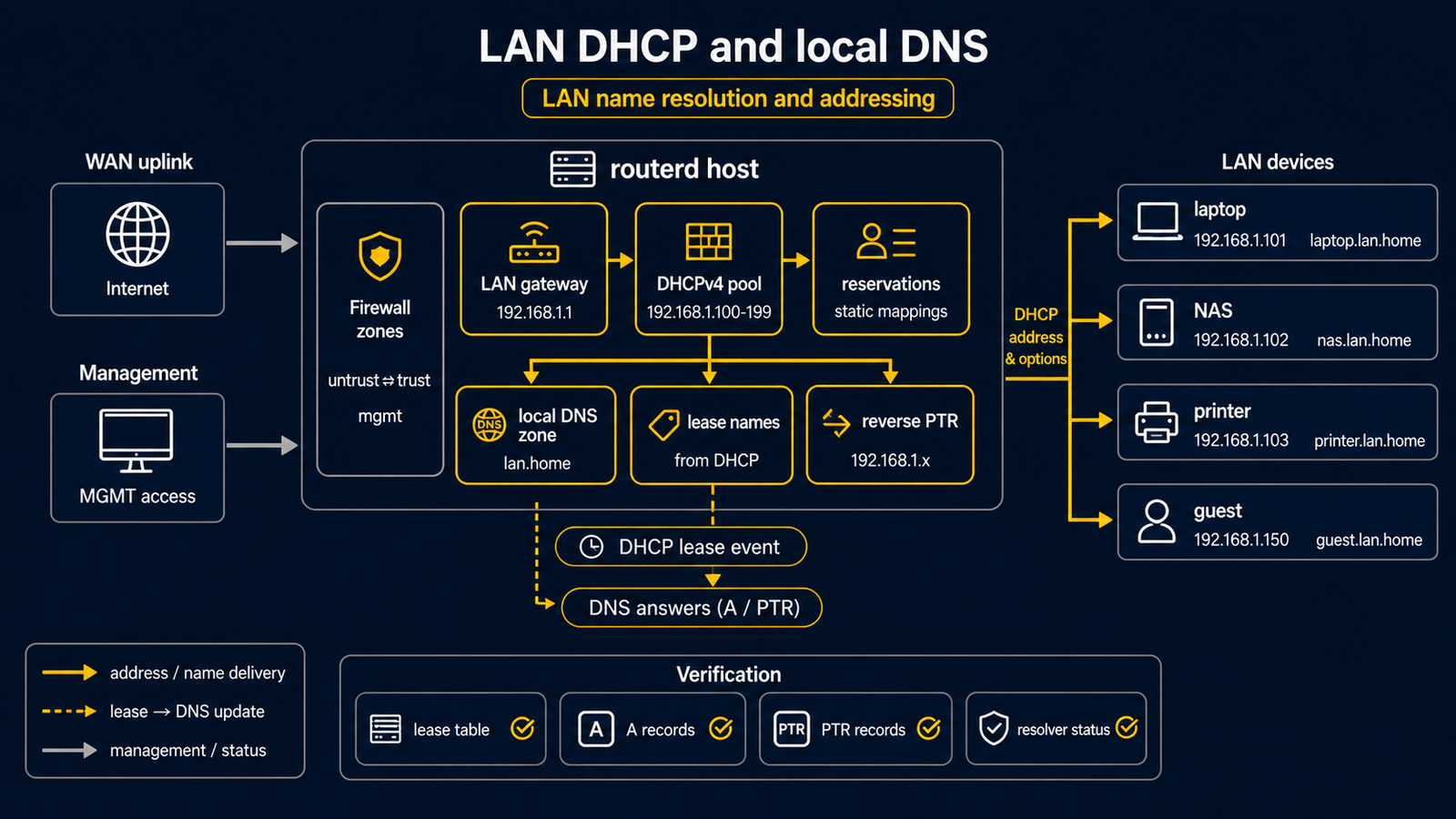
將單一 LAN 介面作為小型家用 LAN 或驗證用 LAN 服務區段的範例。 routerd 管理 LAN 位址、DHCPv4、本地 DNS 區域,以及 DHCP 租約衍生的名稱。
完整 YAML 位於 examples/example-lan-dns-dhcp.yaml。
構成圖
圖示對應表
| 編號 | 含義 | 主要資源 |
|---|---|---|
| [1] | 同時負責 LAN DNS 監聽的路由器位址。 | IPv4StaticAddress/lan-base, DNSResolver/lan-resolver |
| [2] | 作為 DHCP search domain 發送的本地 DNS 區域。 | DNSZone/home |
| [3] | 接收位址與 DNS 設定的動態用戶端。 | DHCPv4Server/lan-dhcpv4 |
| [4] | 具有固定租約與名稱的基礎設施主機。 | DHCPv4Reservation/nas, DNSZone/home |
本範例管理的項目
| 領域 | routerd 資源 |
|---|---|
| LAN 位址 | Interface/lan, IPv4StaticAddress/lan-base |
| 本地名稱 | DNSZone/home |
| 解析器 | DNSResolver/lan-resolver |
| DHCPv4 | DHCPv4Server/lan-dhcpv4, DHCPv4Reservation/nas |
要點
# [2] router.home.example 或 nas.home.example 的本地區域。
- kind: DNSZone
  metadata:
    name: home
  spec:
    zone: home.example
    dhcpDerived:
      sources:
        - DHCPv4Server/lan-dhcpv4
      ddns: true

# [3] 透過 DHCP 將 router address 作為 gateway / DNS 發放。
- kind: DHCPv4Server
  metadata:
    name: lan-dhcpv4
  spec:
    gatewayFrom:
      resource: IPv4StaticAddress/lan-base
      field: address
    dnsServerFrom:
      - resource: IPv4StaticAddress/lan-base
        field: address
    domainFrom:
      resource: DNSZone/home
      field: zone
確認
先在 daemon 尚未啟動時進行獨立檢查。下列指令需要具有 sudo 權限的本機使用者,但不會套用網路變更。
LAB_DIR="$(mktemp -d)"
sudo routerd validate --config examples/example-lan-dns-dhcp.yaml
sudo routerd apply --config examples/example-lan-dns-dhcp.yaml --once --dry-run --skip-service-manager \
  --state-file "$LAB_DIR/state.db" \
  --ledger-file "$LAB_DIR/ledger.db" \
  --status-file "$LAB_DIR/status.json"
rm -rf "$LAB_DIR"
服務啟動後,才在路由器上執行 sudo routerctl describe DNSZone/home 與
sudo routerctl describe DHCPv4Server/lan-dhcpv4。從 LAN 用戶端執行
dig @192.168.30.1 router.home.example 驗證本地名稱。
常見調整項目
- 將
home.example改為您自己的 search domain。 - NAS、印表機、基礎設施設備請加入
DHCPv4Reservation。 - 若需將部分網域轉送至私有上游,請新增
DNSForwarder與DNSUpstream。