疑難排解
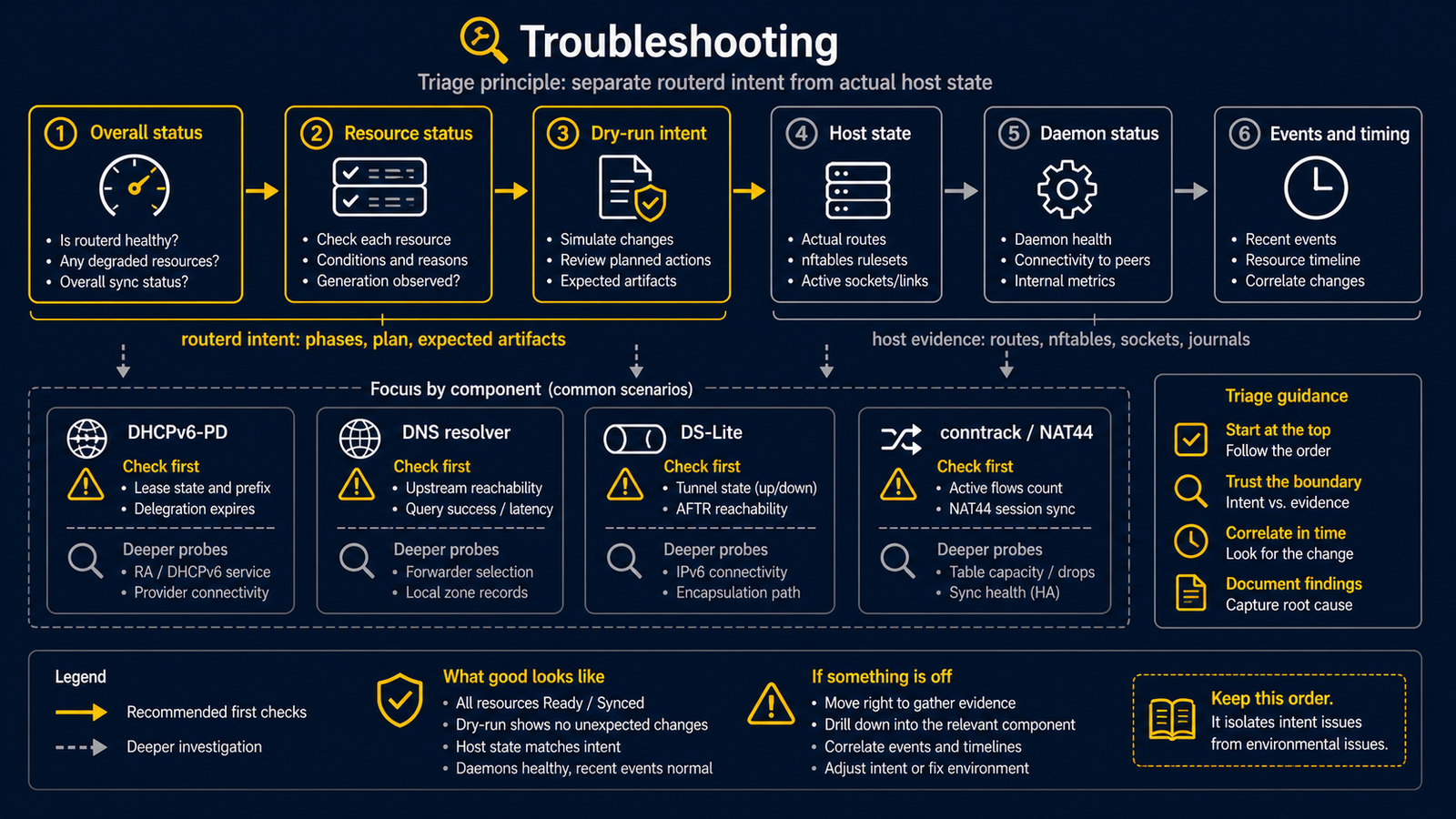
排查 routerd 問題時,請先區分 routerd 的意圖 與 主機的實際狀態。 確認 routerd 意圖達成什麼之後,再與 OS 的實際狀態進行比對。
基本排查順序
routerctl get status— 綜覽全局routerctl describe <kind>/<name>— 深入查看目標資源routerctl plan— 確認下次套用將會發生什麼變更- OS 指令(
ip、nft、ss、journalctl)— 確認實際狀態 - 對應常駐程式的
/v1/status與事件日誌
DHCPv6-PD
curl --unix-socket /run/routerd/dhcpv6-client/wan-pd.sock http://unix/v1/status
tail -n 20 /var/lib/routerd/dhcpv6-client/wan-pd/events.jsonl
確認以下項目:
phase是否為Bound;未過期的租約在 Renew/Rebind 交換期間對外仍保持Boundobserved.leaseState是否顯示詳細交換狀態(renewing或rebinding),且租約仍可用時LeaseReadycondition 是否為 truecurrentPrefix是否已填入renewAt是否為未來時刻- 事件日誌中是否記錄了
Reply或Renew
若非 Bound 狀態,或 LeaseReady 變為 false,LAN 側的 IPv6 RA、AAAA 記錄及 DHCPv6 應停止
運作。routerd 的安全約定是在更新期間維持尚未過期的前綴,但在該前綴不再可用後停止派發。
DHCPv4
curl --unix-socket /run/routerd/dhcpv4-client/wan.sock http://unix/v1/status
確認 DHCPv4Client 是否處於 Bound 狀態。
若需要立即更新,可透過 POST /v1/commands/renew 發出請求。
dnsmasq
目前的 routerd 中,dnsmasq 專責 DHCPv4、DHCPv6、DHCP 中繼及 Router Advertisement。
DNS 回應與轉送由 routerd-dns-resolver 負責。
請確認產生的 dnsmasq 設定是否符合以下條件:
- 包含預期的
dhcp-range - 設定為
port=0(停用 DNS 功能;DNS 是routerd-dns-resolver的職責) - 包含
dhcp-script=/usr/local/libexec/routerd/dhcp-event-relay(將租約變更通知 routerd 的路徑) - 依需求加入
enable-ra
DNS resolver
sudo curl --unix-socket /run/routerd/dns-resolver/<resource>.sock http://unix/v1/healthz
dig @<lan-ip> router.lan.example.org A
dig @<lan-ip> example.com A
依序確認以下項目:
- 監聽位址與連接埠是否符合預期(
ss -lnup) - 本地權威區域是否正常回應(
DNSZone的手動記錄與 DHCP 產生的記錄) - 條件式轉送是否送達指定的上游(
dig @<lan-ip> <forwarded-domain>) - 預設上游是以 DoH / DoT / TCP / 明文 UDP 哪種方式回應(查看解析器 status 及上游 health)
DS-Lite
ip -6 tunnel show
ip route show default
nft list table ip routerd_nat
若 AFTR 的 FQDN 無法解析,請確認 DNSResolver 的 forward source 設定。
特定存取網路的 AFTR 記錄,通常無法透過公開 DNS 解析。
conntrack
依環境不同,/proc/net/nf_conntrack 可能不存在。
此時 routerd 會退回使用 sysctl 來源的彙總統計。
即使詳細流量清單為空,也不一定代表 NAT 已損壞。請查看 routerctl get connections 的摘要。
排查時應避免的事項
- 請勿在生產環境的 WAN 上,同時執行舊有的 DHCP 用戶端或手動測試用常駐程式與 routerd 並行。從同一介面同時發出多個 DHCPv6-PD 用戶端,可能會破壞上游的租約狀態。
- 更換路由時,請勿 flush
nf_conntrack。routerd 刻意不進行 flush,強制 flush 會中斷已建立的連線階段。 - 請勿在同一主機上編輯
/usr/local/etc/routerd/router.yaml的同時,在其他位置放置臨時的 YAML 覆寫檔。每台主機保持單一設定檔,可維持調和(reconcile)的可預測性。