资源拥有权与反映模型
routerd 将主机上的构成物与资源对应管理。 通过记录哪个资源创建了哪些构成物,使差异确认、删除与故障排查更加便利。
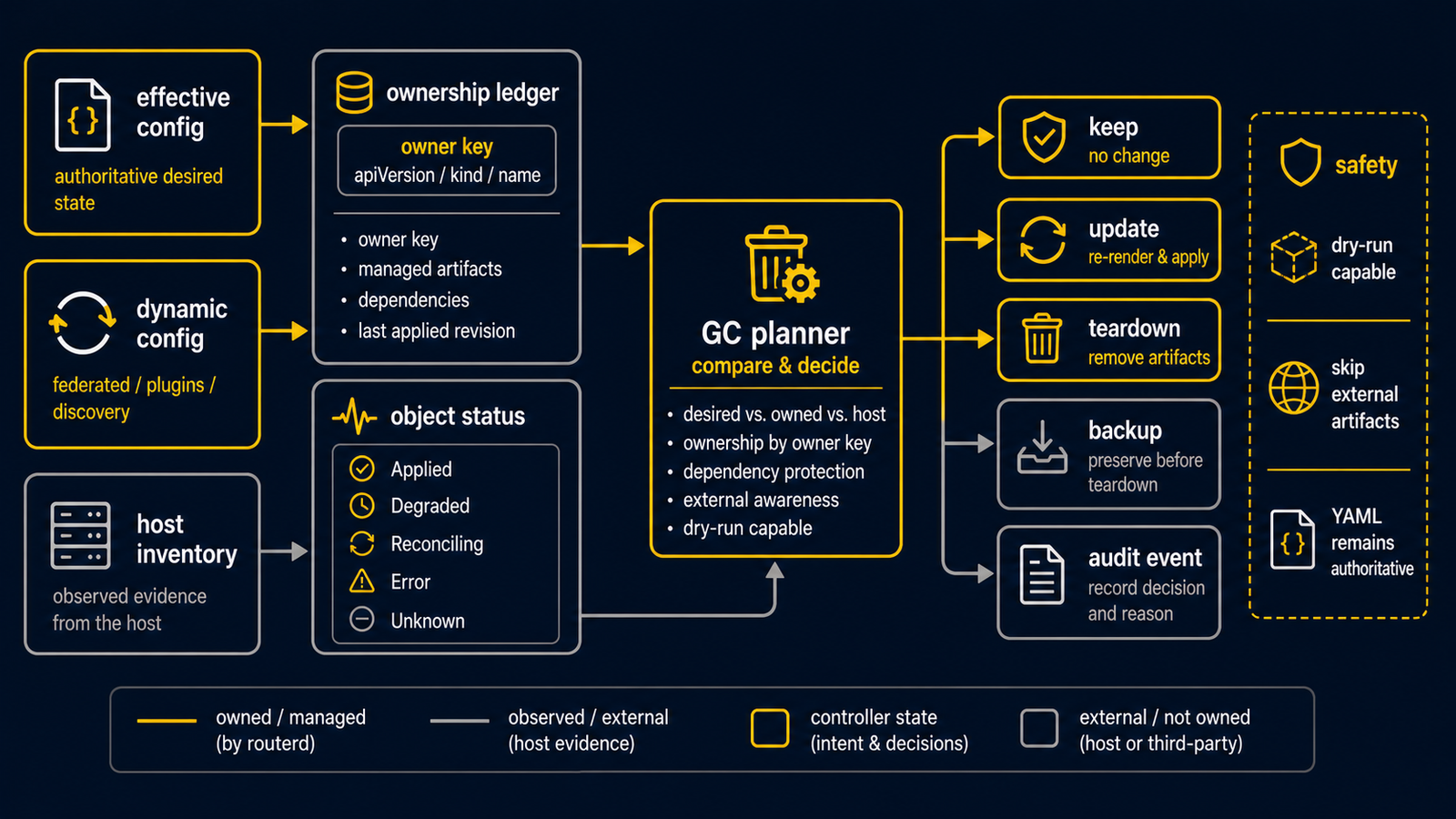
拥有权种类
| 种类 | 意义 |
|---|---|
| 创建 | routerd 新建构成物。 |
| 接管 | 将现有构成物纳入 routerd 的管理范围。 |
| 观测 | routerd 仅观测状态,不做变更。 |
稳定的 owner identity 是 apiVersion/kind/name。apply generation 不属于 owner key:
同一个资源即使跨越不同世代,也以同一拥有者身份替换或删除其生成的 artifact。
object status 也记录 owner metadata 与 lifecycle class,使 stale status cleanup 能与
apply path 作出相同判断。
主要构成物
| 资源 | 主机端构成物 |
|---|---|
Interface | OS 的接口名称与管理状态 |
DHCPv6PrefixDelegation | routerd-dhcpv6-client 的 socket、租约、事件 |
DHCPv4Client | routerd-dhcpv4-client 的 socket、租约、事件 |
PPPoESession | routerd-pppoe-client 的 socket、状态、pppd/ppp 配置 |
HealthCheck | routerd-healthcheck 的 socket、状态、事件 |
DHCPv4Server / DHCPv6Server / IPv6RouterAdvertisement | 受管理的 dnsmasq 配置 |
DNSZone | routerd-dns-resolver 的本机权威区域 |
DNSResolver | routerd-dns-resolver 的 socket、状态、事件、监听配置 |
DNSForwarder | routerd-dns-resolver 的转发规则,以解析器配置的形式生成(render) |
DNSUpstream | routerd-dns-resolver 的上游端点,以转发规则的形式生成(render) |
DSLiteTunnel | Linux 的 ip6tnl 接口 |
TunnelInterface | Linux ipip / gre tunnel device;FOU/GUE mode 也会确保对应的 ip fou listener port |
SAMTransportProfile | 包含生成的 TunnelInterface、endpoint /32 IPv4Route 与 BGPPeer 的 DynamicConfigPart |
MobilityPool | 动态 SAM capture/control-plane resource、BGP /32 advertisement、provider action plan 与 ownership observation |
IPAddressSet | Linux 生成器引用的 nftables IPv4/IPv6 named set |
IPv4Route | 内核路由 |
ClusterNetworkRoute | 将 Pod / Service CIDR 通过指定 next hop 路由的已生成 IPv4StaticRoute 意图 |
NAT44Rule | nftables 的 routerd_nat 数据表 |
PortForward / IngressService | Linux 上为 nftables routerd_nat / routerd_filter 的 DNAT 及可选的 hairpin SNAT;FreeBSD 上为 pf.conf 的 rdr pass 及可选的 NAT reflection 规则 |
BGPRouter / BGPPeer | 通过本机 GoBGP gRPC 控制的长寿命 routerd-bgp 守护进程状态。学习到的 IPv4 最优路径由 routerd 以其拥有的 protocol/metric 写入内核 FIB |
BFD | Linux FRR bfdd session 配置,以及所引用 GoBGP peer 的 BFD 观测状态 |
VirtualAddress | 通过 ip addr / ifconfig 配置的静态 VIP,或 Linux 的 keepalived / FreeBSD 的 CARP 所管理的 VRRP/VRRPv3 VIP 拥有权 |
ObservabilityPipeline | 进程内 routerd 事件导出器,以及受管理单元的 OpenTelemetry 环境变量 |
RouterdCluster | spec.leasePath 的文件租约。只有 leader 才执行 apply 与控制器变更 |
WireGuardInterface / WireGuardPeer | WireGuard 配置 |
TailscaleNode | routerd-tailscale-<name> 的服务单元 / script 与 tailscale up 参数 |
VRF | Linux 的 VRF 设备与路由表 |
VXLANTunnel | VXLAN 设备 |
Package | 软件包覆盖配置。一般主机软件包的意图会从 router 资源自动推导 |
Sysctl | sysctl 值 |
SysctlProfile | 多个 sysctl 值 |
| 衍生主机运行期 | 从 router 资源推导的内核模块加载状态,以及 systemd-networkd / resolved 的 drop-in |
generated service artifacts | systemd 单元、FreeBSD rc.d script,及其启用状态 |
NTPClient | NTP 客户端配置 |
lifecycle contract
所有 config resource kind 都在 lifecycle registry 中声明。声明记录 resource class, 并且必须具有下列 teardown contract 之一:
ArtifactKinds: resource 将具体 host artifact 记录到 ownership ledger,而 generic artifact teardown registry 知道如何删除这些 artifact kind。TeardownLifecycle: resource: 从 object status 运行 resource 专用 teardown,例如 kernel route 删除、WireGuard adopted/external 保护、SAM proxy-ARP cleanup。NoHostTeardownReason: renderer input、external policy、dynamic source 等不拥有 单独 host artifact 的资源,需要明确说明原因。
CI 会检查所有 config kind 都有明确 contract,并检查 ArtifactKinds 中写入的
artifact kind 存在于 teardown registry。这用于防止新资源静默绕过 cleanup。
删除时的思路
routerd 不会主动删除未知的构成物。 即使 YAML 中的资源消失,也只能删除 routerd 创建或明确接管的构成物。
GC planner 会比较 current effective resource set、ownership ledger、object status 与 host inventory,并生成可 dry-run 的 plan。plan 可包含 artifact removal、 resource-specific teardown、ledger forget、stale status deletion、state backup 与 audit event。
desired set 使用与 apply/serve 相同的 effective view:FilterRouterByWhen、dynamic SAM
resource 以及 DynamicConfigPart merge 之后的结果。因此 when: false 的资源不会被当成
active cleanup target,仍由 profile 生成的 SAM tunnel/BGP/route resource 也不会被误判为 orphan。
删除 SAMTransportProfile 时,profile 的 dynamic part 会变成空的 active part。
生成的 TunnelInterface / BGPPeer / endpoint route 随即从 effective config 消失,
并由各生成资源的 owner 触发 cleanup。
破坏性 cleanup 需要 state backup 并记录 event。不支持的 OS integration 会被跳过而不执行破坏操作。 adopted 或 externally managed object status 不会由 resource lifecycle GC teardown。
目前不以完整回滚功能为目标。 特别是对正式网络有影响的变更,请遵循下列顺序:
- 验证。
- 确认计划。
- 试运行(dry-run)。
- 确认管理连接不会中断。
- 应用(apply)。
- 确认状态与连通性。
旧配置的处理
Phase 4 中已移除旧 DHCPv6 实验软件包与旧生成器。
当前的 DHCPv6-PD 由 routerd-dhcpv6-client 拥有。
过去关于 dhcpcd 或 dhcp6c 路由的说明,不适用于当前的配置示例。