VS Code YAML schema
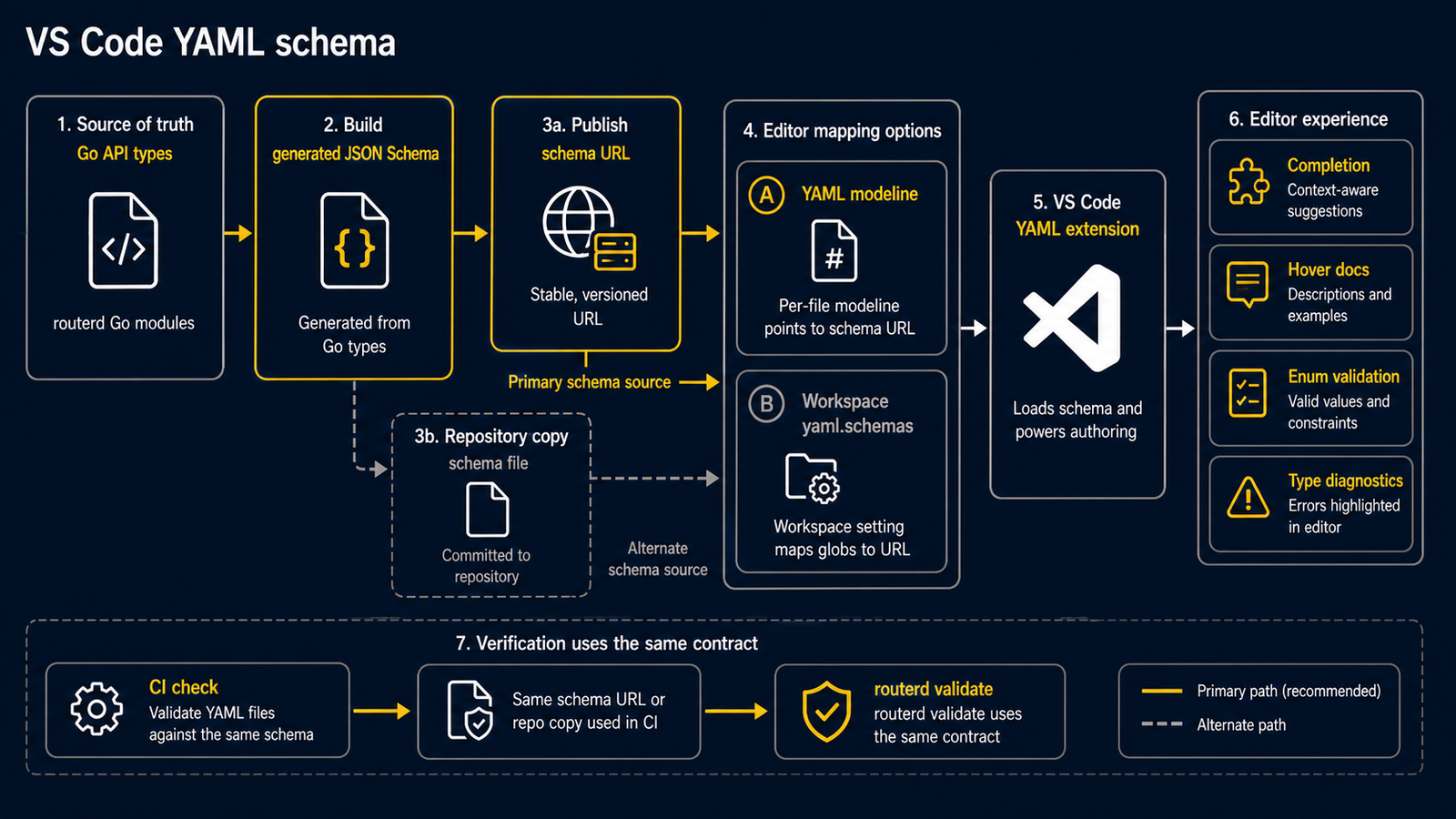
routerd 在以下 URL 发布生成的 config schema:
https://routerd.net/schemas/routerd-config-v1alpha1.schema.json
每个文件的 modeline
在任意 routerd config 文件开头放置此注释:
# yaml-language-server: $schema=https://routerd.net/schemas/routerd-config-v1alpha1.schema.json
apiVersion: routerd.net/v1alpha1
kind: Router
VS Code 与 YAML extension 会读取该 modeline,并为该文件启用补全、hover、 enum 校验和类型诊断。
workspace mapping
本仓库包含 .vscode/settings.json,其中为 router config 文件设置了
yaml.schemas mapping:
examples/*.yamlexamples/cloudedge-mobility-demo/*.yamlexamples/event-federation/*.yamlwebsite/fixtures/wizard/**/*.yamlrouterd/**/*.yaml*.routerd.yaml**/routerd.yaml**/router.yaml
在其他 workspace 中,可将相同 mapping 复制到该 workspace 的 settings 文件:
{
  "yaml.schemas": {
    "https://routerd.net/schemas/routerd-config-v1alpha1.schema.json": [
      "examples/*.yaml",
      "examples/cloudedge-mobility-demo/*.yaml",
      "examples/event-federation/*.yaml",
      "website/fixtures/wizard/**/*.yaml",
      "routerd/**/*.yaml",
      "*.routerd.yaml",
      "**/routerd.yaml",
      "**/router.yaml"
    ]
  }
}
对于不匹配这些 pattern 的任意 YAML 文件,请使用 modeline。
检查
schema 从 Go API types 生成。CI 会检查仓库中的 schema 与 website 发布副本保持同步,
因此 editor feedback 会跟随 routerctl validate 使用的同一份契约。