以 MAC 地址隔离访客设备
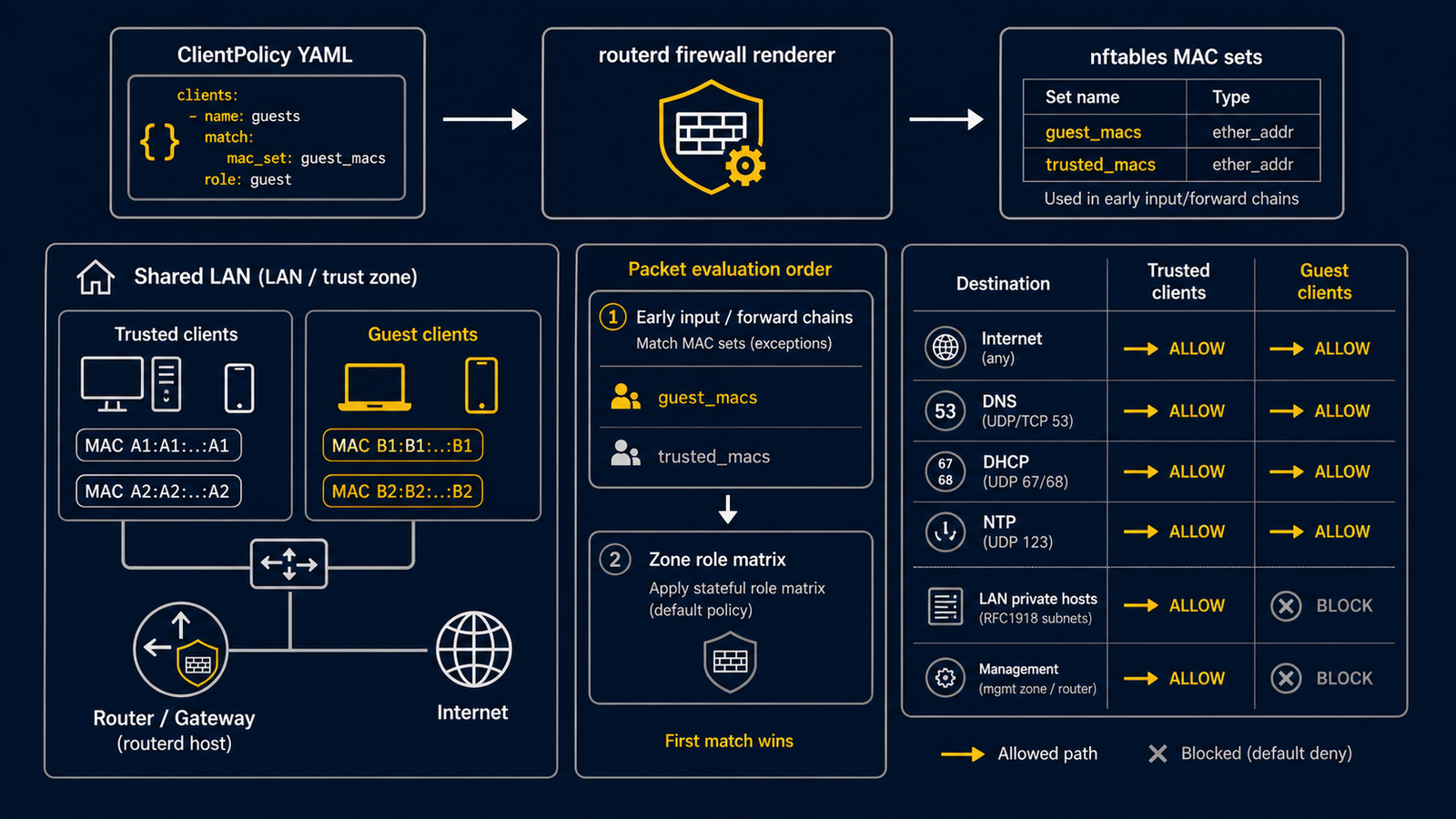
ClientPolicy 是 routerd 的访客模式。
它依 MAC 地址对同一 LAN 上的设备进行分类,并在一般区域间防火墙矩阵之前,优先应用更严格的转发策略。
即使尚未划分 VLAN,也能在受信任的设备与仅需使用互联网的设备之间,建立明确的界线。
使用场景
常见用途如下:
- 在家庭环境中,不希望来访者的智能手机、游戏机、家电或外带笔记本电脑能访问管理网络或家用服务器。
- 在集合住宅或合租住宅中,默认将所有设备视为访客,只有明确指定的设备才视为受信任。
- 隔离摄像头、HEMS、电视、音箱等 IoT 设备。允许其使用 DNS、DHCP、NTP 及互联网,但阻止横向通信。
- 在小型办公室的访客网络中,共用物理 LAN,但封锁 RFC 1918 及 ULA 目的地的流量。
完整示例请参阅 examples/guest-mode.yaml。
运作原理
在 Linux 上,routerd 将 ClientPolicy 生成至 nftables 的 inet routerd_filter 数据表。
每条策略会生成以下规则:
- 类似
client_policy_guest_devices的 nftablesether_addrset。 mode: include使用ether saddr @set匹配。mode: exclude使用ether saddr != @set匹配。- 允许访客设备访问路由器上特定服务的 self 向许可规则。
- 封锁私有 IPv4 及 ULA IPv6 目的地的转发拒绝规则。
- 优先于拒绝规则的可选许可规则。
生成的规则会插入 input 链与 forward 链的较前位置。
因此,即使在角色矩阵下本可被 trust -> self 或 trust -> trust 允许的通信,访客设备的流量也会更早被过滤。
ClientPolicy 并非 FirewallZone 的替代方案,一般模型照常使用:
FirewallZone决定接口的一般角色。FirewallPolicy决定拒绝记录等通用行为。FirewallRule新增明确的例外。ClientPolicy在 LAN 内叠加以设备为单位的限制。
MAC 匹配直接查看 Ethernet 源地址,因此不需要 DHCP 租约。
不过,搭配 DHCPv4Reservation 使用,可让设备的 IPv4 地址、名称及 Web 管理界面中的显示更加稳定。
规格说明
ClientPolicy 属于 firewall.routerd.net/v1alpha1。
- apiVersion: firewall.routerd.net/v1alpha1
  kind: ClientPolicy
  metadata:
    name: guest-devices
  spec:
    mode: include
    macs:
      - "18:ec:e7:33:12:6c"
    isolation:
      lanInternet: allow
      lanLAN: deny
      lanMgmt: deny
      mDNSBroadcast: deny
| 字段 | 必填 | 说明 |
|---|---|---|
mode | 是 | include 或 exclude。 |
interfaces | 否 | 应用策略的 LAN 侧 Interface 参照。Interface/lan 与 lan 指向相同接口。省略时应用至所有属于 trust FirewallZone 的接口。 |
macs | 否 | 缩短格式的 MAC 列表。include 模式视为访客,exclude 模式视为受信任。 |
isolation | 否 | 表达访客的意图。可在 lanInternet、lanLAN、lanMgmt、mDNSBroadcast 指定 allow 或 deny。 |
classification | 否 | 结构化的客户端分类条目。 |
classification[].mode | 是 | trusted、guest 或 isolated 之一。 |
classification[].match.macs | 否 | 设备的 MAC 地址,routerd 在生成前会进行规范化。 |
classification[].match.ouiPrefixes | 否 | 厂商 OUI 前缀,例如 18:ec:e7。 |
classification[].match.hostnamePatterns | 否 | 针对观测到的 DHCP 主机名的 glob 模式。 |
classification[].match.dhcpFingerprints | 否 | routerd 观测到的 DHCP 指纹标签。 |
classification[].name | 否 | 供人阅读的设备名称,目前为说明用途。 |
classification[].ipv4Reservation | 否 | DHCPv4Reservation 的名称,写 aiseg2 而非 DHCPv4Reservation/aiseg2。 |
guestServices | 否 | 允许访客设备访问的路由器服务。默认为 dhcp、dns、ntp。可指定 dhcp、dns、ntp、mdns、ssdp。 |
guestEgressDeny | 否 | 封锁访客设备转发目的地的 CIDR。省略时封锁 RFC 1918 与 ULA。 |
guestEgressAllow | 否 | 优先于拒绝规则的许可 CIDR。 |
默认的 guestEgressDeny 如下:
10.0.0.0/8172.16.0.0/12192.168.0.0/16fc00::/7
指定 isolation.mDNSBroadcast: deny 时,也会拒绝访客发出的 mDNS、SSDP、NetBIOS 探索数据包的转发,防止访客设备通过多播或广播探索 LAN 内的其他设备。
许可规则在拒绝规则之前生成,适合为打印机或 captive portal 辅助服务器等建立窄范围的例外。
示例 1:最小 include 模式
将单一 MAC 地址视为访客。
- apiVersion: firewall.routerd.net/v1alpha1
  kind: ClientPolicy
  metadata:
    name: guest-devices
  spec:
    mode: include
    interfaces:
      - Interface/lan
    classification:
      - mode: guest
        match:
          macs:
            - "18:ec:e7:33:12:6c"
        name: aiseg2
示例 2:多设备 include 模式
可将多台设备应用相同的访客规则。
- apiVersion: firewall.routerd.net/v1alpha1
  kind: ClientPolicy
  metadata:
    name: household-guests
  spec:
    mode: include
    interfaces:
      - Interface/lan
    classification:
      - mode: guest
        match:
          macs:
            - "18:ec:e7:33:12:6c"
        name: aiseg2
        ipv4Reservation: aiseg2
      - mode: guest
        match:
          macs:
            - "7c:2f:80:11:22:33"
        name: guest-phone
      - mode: guest
        match:
          macs:
            - "90:09:d0:44:55:66"
        name: smart-tv
示例 3:BYOD 用的 exclude 模式
将目标接口上的所有设备默认视为访客,仅将列表中的 MAC 地址视为受信任。
- apiVersion: firewall.routerd.net/v1alpha1
  kind: ClientPolicy
  metadata:
    name: byod-default-guest
  spec:
    mode: exclude
    interfaces:
      - Interface/lan
    classification:
      - mode: trusted
        match:
          macs:
            - "bc:24:11:e0:8e:3a"
        name: admin-laptop
      - mode: trusted
        match:
          macs:
            - "4e:20:15:aa:e0:67"
        name: owner-phone
示例 4:自定义拒绝与许可 CIDR
保留默认的私有目的地封锁,同时允许单台打印机。
- apiVersion: firewall.routerd.net/v1alpha1
  kind: ClientPolicy
  metadata:
    name: guest-with-printer
  spec:
    mode: include
    interfaces:
      - Interface/lan
    guestEgressAllow:
      - 172.18.20.10/32
    guestEgressDeny:
      - 10.0.0.0/8
      - 172.16.0.0/12
      - 192.168.0.0/16
      - fc00::/7
    classification:
      - mode: guest
        match:
          macs:
            - "7c:2f:80:11:22:33"
        name: guest-phone
示例 5:本机探索服务
默认允许访客设备使用 DHCP、DNS、NTP。
若路由器上有运行本机探索的 proxy 或中继,可明确新增 mdns 或 ssdp。
- apiVersion: firewall.routerd.net/v1alpha1
  kind: ClientPolicy
  metadata:
    name: media-guests
  spec:
    mode: include
    interfaces:
      - Interface/lan
    guestServices:
      - dhcp
      - dns
      - ntp
      - mdns
      - ssdp
    classification:
      - mode: guest
        match:
          macs:
            - "90:09:d0:44:55:66"
        name: smart-tv
启用探索服务前,请先了解所公开的信息范围。 mDNS 与 SSDP 虽然便利,但可能泄露设备名称与服务信息。
示例 6:IoT 隔离与固定分配
固定分配可让排查问题更容易,也能让 Web 管理界面的设备列表及 DNS 记录更清晰。
- apiVersion: net.routerd.net/v1alpha1
  kind: DHCPv4Reservation
  metadata:
    name: thermostat
  spec:
    server: lan-v4
    macAddress: "02:11:22:33:44:55"
    hostname: thermostat
    ipAddress: 172.18.0.151

- apiVersion: firewall.routerd.net/v1alpha1
  kind: ClientPolicy
  metadata:
    name: iot-isolation
  spec:
    mode: include
    interfaces:
      - Interface/lan
    classification:
      - mode: guest
        match:
          macs:
            - "02:11:22:33:44:55"
        name: thermostat
        ipv4Reservation: thermostat
与 DHCPv4Reservation 的搭配
classification[].ipv4Reservation 用于验证参照。
routerd 会确认指定的 DHCPv4Reservation 存在。
防火墙匹配使用 MAC 地址,而非租约的 IP 地址。
此分离是刻意设计的:
- MAC 匹配让设备分类在 IP 层判断之前进行。
- IPv4 固定租约让 DNS 与 Web 管理界面的显示更稳定。
- 即使设备的 IP 地址改变,访客隔离仍会跟踪 MAC 地址。
若设备使用随机 MAC 地址,请登记该 SSID 或有线区段中路由器实际观测到的 MAC 地址。
确认生成的规则
生成配置,或确认运行中的 nftables 数据表:
routerd render nftables --config /usr/local/etc/routerd/router.yaml
sudo nft list table inet routerd_filter
确认是否有类似以下的规则:
set client_policy_guest_devices {
  type ether_addr
  elements = { 18:ec:e7:33:12:6c }
}

iifname "ens19" ether saddr @client_policy_guest_devices udp dport 53 counter accept
iifname "ens19" ether saddr @client_policy_guest_devices ip daddr 10.0.0.0/8 counter log prefix "routerd client-policy guest-devices deny " drop
从访客设备验证
从访客设备执行以下确认:
curl -4 https://www.google.com/generate_204
curl -4 --connect-timeout 3 http://192.168.1.1/
curl -4 --connect-timeout 3 http://172.18.0.1:8080/
预期结果如下:
- 互联网通信成功。
- 私有目的地超时或失败。
- DNS、DHCP、NTP 继续正常运作。
在路由器侧,使用 tcpdump 确认数据包路径:
sudo tcpdump -ni ens19 ether host 18:ec:e7:33:12:6c
sudo nft list chain inet routerd_filter forward
当私有目的地被拒绝时,生成的 ClientPolicy 规则计数器会增加。
故障排查
MAC 地址不匹配
确认路由器所看到的 MAC 地址:
ip neigh show dev ens19
sudo tcpdump -eni ens19
无线设备可能在不同 SSID 使用不同的 MAC 地址。 智能手机与笔记本电脑也可能使用随机 MAC 地址。 请使用路由器在 LAN 侧实际观测到的地址,而非印在设备上的地址。
访客设备仍能访问私有网络
请确认以下几点:
- 策略是否参照了正确的
Interface。 - 数据包是否确实从该接口进入。
routerctl apply是否已应用最新的 nftables 数据表。guestEgressAllow中是否包含了宽范围的私有前缀。- 设备侧是否有 VPN 客户端等绕过路由器的路径。
访客设备无法连上互联网
ClientPolicy 只限制私有目的地与 self 目的地的访问。
若互联网连接失败,请检查路由策略、NAT44、DS-Lite、DNS 及 IP forwarding:
routerctl get status
sysctl net.ipv4.ip_forward
sudo nft list table ip routerd_nat
guestServices 的作用
guestServices 仅控制对路由器本机服务的访问,并非允许转发至私有子网。
转发的例外请通过 guestEgressAllow 表达。
安全注意事项
以 MAC 地址进行隔离是实用的方式,但并非密码学意义上的识别。 恶意用户若能控制设备,即可伪造受信任的 MAC 地址。
ClientPolicy 适合作为家庭或小型办公室的实用管控手段,
不应作为对抗恶意用户的唯一防线。
更强固的设计包括:
- VLAN 或 SSID 隔离。
- WPA3 Enterprise 或 802.1X。
- 交换机的 port 隔离。
- 各设备的专属证书。
- 专用的访客 bridge 或 VRF。
即使结合上述措施,ClientPolicy 仍有其价值,
因为它能在 routerd 的资源模型中保留设备分类的意图。
OS 支持
支持 Linux 的 nftables。
FreeBSD 的 pf 在 routerd 用于 FirewallZone 与 FirewallRule 的路由式过滤路径中,
没有等效的 MAC 式分类模型,因此 routerd 在 FreeBSD 上明确将 ClientPolicy 标示为不支持,
不会以无作用的 no-op 策略静默应用。
未来 FreeBSD 的支持方向可能是 bridge 层级的过滤器或专用的第二层隔离资源, 但由于与路由式 pf 规则不等价,应视为独立设计。
相关资源
FirewallZone:将接口分配至trust、untrust、mgmt。FirewallPolicy:启用拒绝记录等通用行为。FirewallRule:表达与 MAC 分类无关的例外。DHCPv4Reservation:为已分类的设备提供稳定的 IPv4 地址与主机名。- 从隧道自动推导的 TCP MSS clamp,也适用于防火墙区域与隧道路径相符的访客转发。访客隔离不会绕过 MSS clamp。