Hardware compatibility
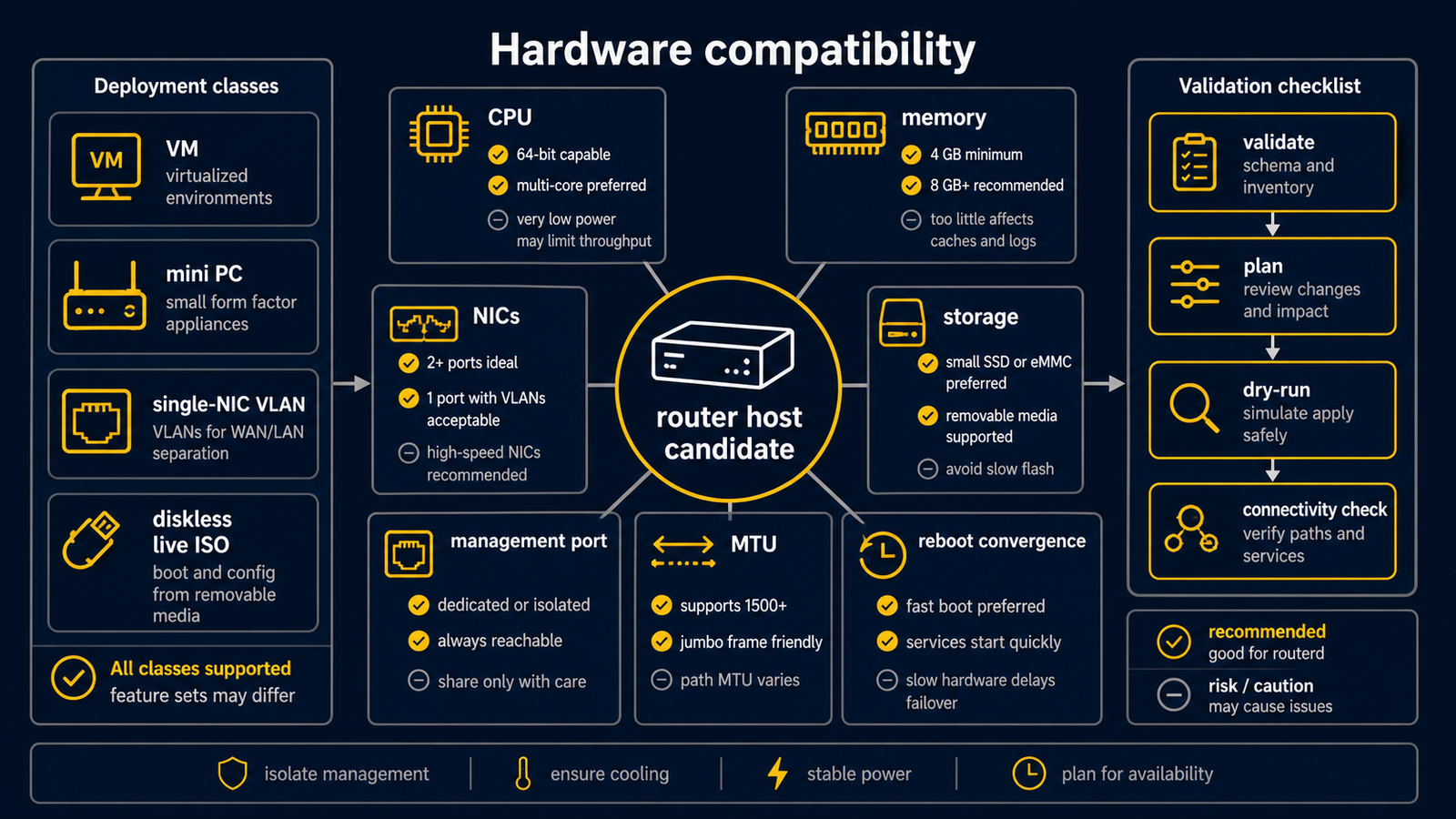
routerd can run on any supported OS that exposes the needed kernel and userland features. The practical question is whether the hardware has enough network interfaces, CPU, memory, and storage endurance for router duty.
Recommended classes
| Class | Fit | Notes |
|---|---|---|
| Intel NUC | Good lab router | Usually reliable, but many models have only one Ethernet port. Use USB Ethernet or VLAN trunks with care. |
| Intel N100 mini PC | Strong home router | Good performance per watt. Prefer models with Intel i226/i225 NICs and enough cooling. |
| Raspberry Pi 5 | Useful edge or demo router | Works best with a high-quality power supply and supported USB/NVMe storage. Network throughput depends on adapters. |
Candidate hardware
This list is a starting point. Unless the status says "verified", treat it as an expected fit and validate the NICs, MTU, and reboot convergence before using it as a router.
| Hardware | Expected fit | Status | Notes |
|---|---|---|---|
| Intel NUC with USB Ethernet | Proxmox lab router or live ISO demo | Expected | Prefer known-good USB Ethernet adapters. Keep management on a separate VLAN or interface while testing. |
| N100 4-port 2.5GbE mini PC | Home router, DS-Lite, PPPoE fallback, VPN overlay | Expected | The best first target for a diskless routerd appliance. Choose Intel i226/i225 NIC models and check cooling. |
| N100 6-port 2.5GbE mini PC | Multi-LAN home lab, guest network, management separation | Expected | Useful when WAN, LAN, guest, and management should be physical ports. Validate BIOS power recovery. |
| Raspberry Pi 5 with USB or PCIe NIC | Demo, edge router, low-power lab | Expected | Use a strong power supply. Throughput depends heavily on the NIC and storage path. |
| Old thin client with Intel NIC | Secondary router or lab node | Expected | Good for testing, but check AES, thermal behavior, and storage health. |
| Virtual machine on Proxmox | SDN/VNET routing, CI-style lab, integration test | Verified in lab | routerd is especially useful when the same resources later move to a physical mini PC. |
CPU and memory
For a normal home or small office router:
- 2 CPU cores are enough for basic routing, DHCP, DNS, NAT, and Web Console.
- 4 CPU cores give more room for encrypted DNS, OpenTelemetry, and log indexing.
- 1 GiB RAM is a practical lower bound.
- 2 GiB or more is recommended for the live ISO and log buffering.
Network interfaces
Prefer at least two physical interfaces:
- WAN or untrust
- LAN or trust
A third management interface is useful when testing firewall changes. It lets you keep SSH and Web Console access independent from WAN and LAN policy.
Single-NIC VLAN routers are possible, but they raise the risk of management lockout during early setup. Validate the plan before applying.
Storage
For installed routers, use SSD or NVMe storage when possible. For diskless mini PCs, use the live ISO with USB persistence:
- configuration is saved to the USB device
- logs are buffered under
/run/routerd/logson tmpfs - a daily flush job can copy compressed logs and state snapshots to USB
This reduces write pressure on low-end flash media.
Live ISO and USB persistence
The live ISO is meant for both quick evaluation and diskless operation:
- boot from ISO
- run the text wizard on the video console or serial console
- save
router.yamland selected state to USB - buffer logs on tmpfs
- flush compressed log and state snapshots to USB once per day
Without USB persistence, the live ISO is an ephemeral demo router. With USB persistence, the same mini PC can reboot into the saved router configuration.
NIC notes
| NIC type | Recommendation |
|---|---|
| Intel i210/i211 | Conservative and reliable. |
| Intel i225/i226 | Good 2.5GbE choice. Keep firmware and OS drivers current. |
| Realtek 2.5GbE | Often works, but test under load before relying on it. |
| USB Ethernet | Useful for demos and NUCs. Avoid no-name adapters for production routers. |
Platform notes
Ubuntu Server is the primary target. NixOS and FreeBSD are supported through their platform-specific renderers and service integrations. Check Platforms before relying on a feature on a non-Linux host.
Validation checklist
Before putting hardware into service:
- Boot the target OS or live ISO.
- Confirm all NICs have stable names.
- Run
routerctl validateandrouterctl plan. - Apply with management access on a separate path when possible.
- Check DHCP, DNS, NAT, firewall, and route policy.
- Run a throughput test.
- Watch CPU temperature and packet drops.
- Reboot and confirm the router converges without manual commands.