USB persistence
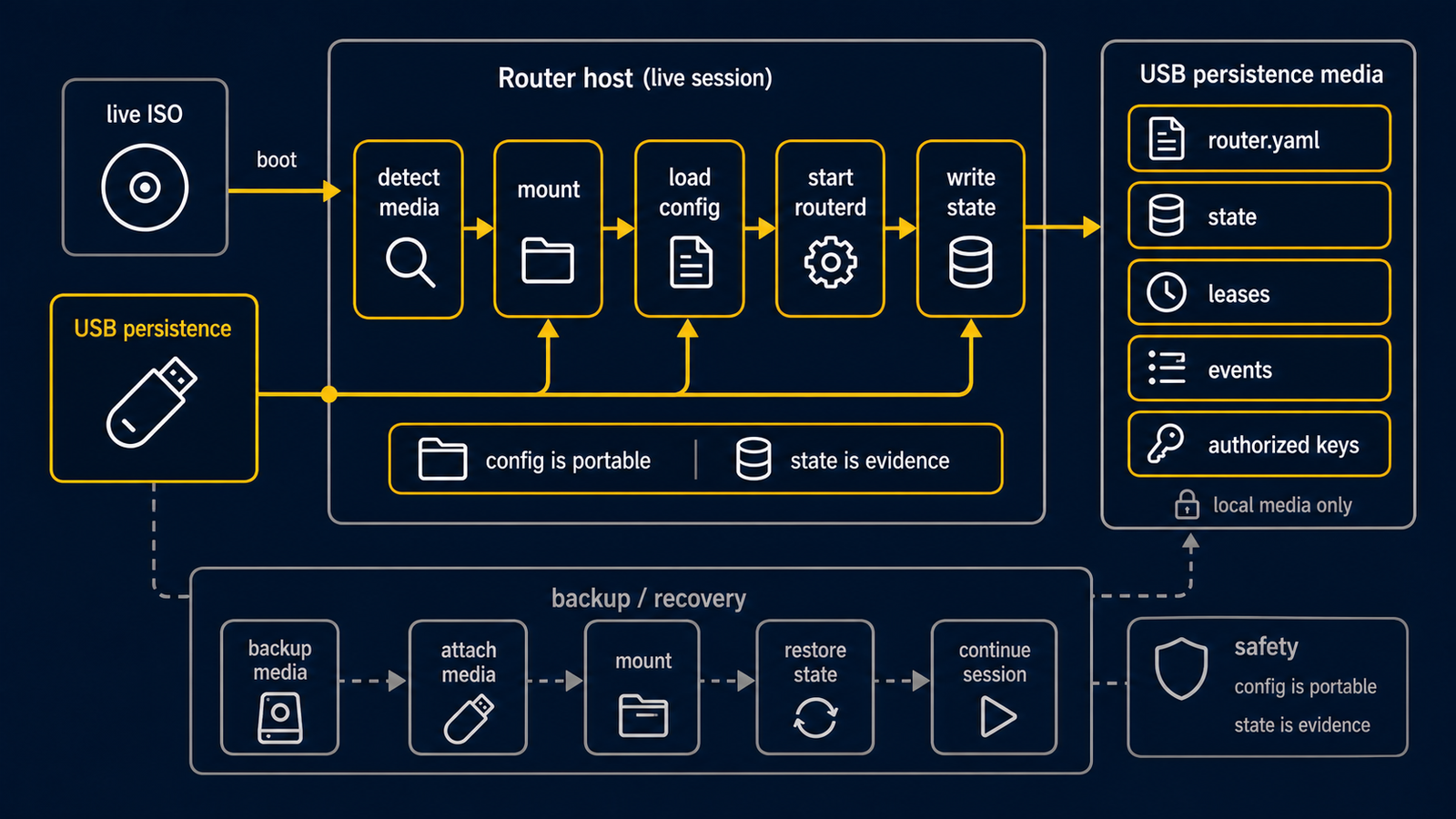
The routerd live ISO can run as a diskless router. In that mode, the ISO keeps the active system in RAM and stores only the selected router state on a USB device.
This is intended for mini PCs that boot from removable media. It avoids a permanent internal disk while still preserving the router configuration across reboots.
Layout
When USB persistence is enabled, routerd uses this layout on the selected partition:
routerd/
  router.yaml
  usb-device
  usb-flush-enabled
  log-limit
  secrets/
  logs/
  state/
At boot, /usr/share/routerd/live-persistence.sh init tries to find config
media. It first checks the remembered device, then routerd.usb= on the kernel
command line, then devices labeled ROUTERD_CONFIG or ROUTERD. Writable
partitions are used for persistence. Read-only ISO9660/UDF CD-ROM media, such
as a Proxmox media=cdrom config ISO, are accepted for config import only.
The selected partition is mounted at /media/routerd-usb. The helper looks for
host-specific configs first, then a generic config:
/media/routerd-usb/routerd/hosts/<hostname>.yaml/media/routerd-usb/routerd/hosts/<mac>.yamlwith either colon-separated or compact lowercase MAC address/media/routerd-usb/routerd/router.yaml
If a config is found, it is copied to /usr/local/etc/routerd/router.yaml and
applied by the live ISO startup path. The source and SHA256 are recorded in
/run/routerd/live-config-source and /run/routerd/live-config-sha256 for
acceptance tests and troubleshooting.
Secrets are restored before apply. The helper accepts these layouts, in order:
routerd/hosts/<hostname>/secrets/routerd/hosts/<mac>/secrets/with either colon-separated or compact lowercase MAC addressrouterd/secrets/
Files are installed under /usr/local/etc/routerd/secrets with mode 0600.
If no saved config is found and /usr/local/etc/routerd/router.yaml is still
missing, the ISO starts the configure wizard.
Filesystems
The live helper detects the filesystem with blkid and mounts it with
filesystem-specific options.
| Filesystem | Default mount options | Notes |
|---|---|---|
ext4 | rw,async,noatime | Best choice for persistent router use. |
vfat | rw,async,noatime,utf8,shortname=mixed | Useful for simple removable media. No Unix permissions. |
exfat | rw,async,noatime | Useful for larger USB sticks shared with desktop OSes. |
iso9660 / udf | ro,noatime | Read-only config import media. Persistence flush is disabled. |
FAT32 normally appears as vfat in blkid output. The live helper does not
force a FAT32 mount first; it detects the filesystem type and then chooses
the matching options.
async,noatime is the default because it reduces write pressure on USB flash.
For debugging or very conservative flush behavior, pass this kernel parameter:
routerd.usb_mount=sync
Use routerd.usb_mount=async to force the default explicitly.
Log buffering
Runtime logs are buffered in tmpfs:
/run/routerd/logs
The default buffer limit is 100 MiB. When the buffer grows beyond the limit, the oldest files are removed first.
If the daily flush job is enabled, /etc/periodic/daily/routerd-usb-flush
copies these artifacts to USB:
- current
router.yaml - files under
/usr/local/etc/routerd/secrets - state archive from
/var/lib/routerd - state archive from
/var/db/routerd - compressed log archive from
/run/routerd/logs
You can flush manually:
/usr/share/routerd/live-persistence.sh flush
Safe removal
Do not pull the USB device while the persistence mount is active. Ask the live helper to flush and unmount it first:
/usr/share/routerd/live-persistence.sh flush
/usr/share/routerd/live-persistence.sh umount
Check the current state with:
/usr/share/routerd/live-persistence.sh status
If the device is removed unexpectedly, routerd keeps running from RAM. The live helper logs a warning and stops treating the USB path as durable until the device is reinserted and mounted again.
Alpine lbu
The ISO includes Alpine lbu. The live helper adds routerd paths to the lbu
include list:
/usr/local/etc/routerd
/var/lib/routerd
/var/db/routerd
/etc/periodic/daily/routerd-usb-flush
The helper runs lbu commit after saving config or flushing state. You normally
do not need to run lbu directly.
Useful commands
List candidate devices:
/usr/share/routerd/live-persistence.sh list-devices
Save a config to USB:
/usr/share/routerd/live-persistence.sh save-config /dev/sdb1 /usr/local/etc/routerd/router.yaml yes 100M
save-config also copies /usr/local/etc/routerd/secrets to
routerd/secrets/ on the persistence device when that directory exists. Use
root-owned secret files and avoid vfat/exfat for long-lived secret storage when
you need Unix permissions on the removable device itself.
Restore happens automatically at boot. To force the boot-time logic from a shell:
/usr/share/routerd/live-persistence.sh init