WireGuard ハブ&スポークのテンプレート
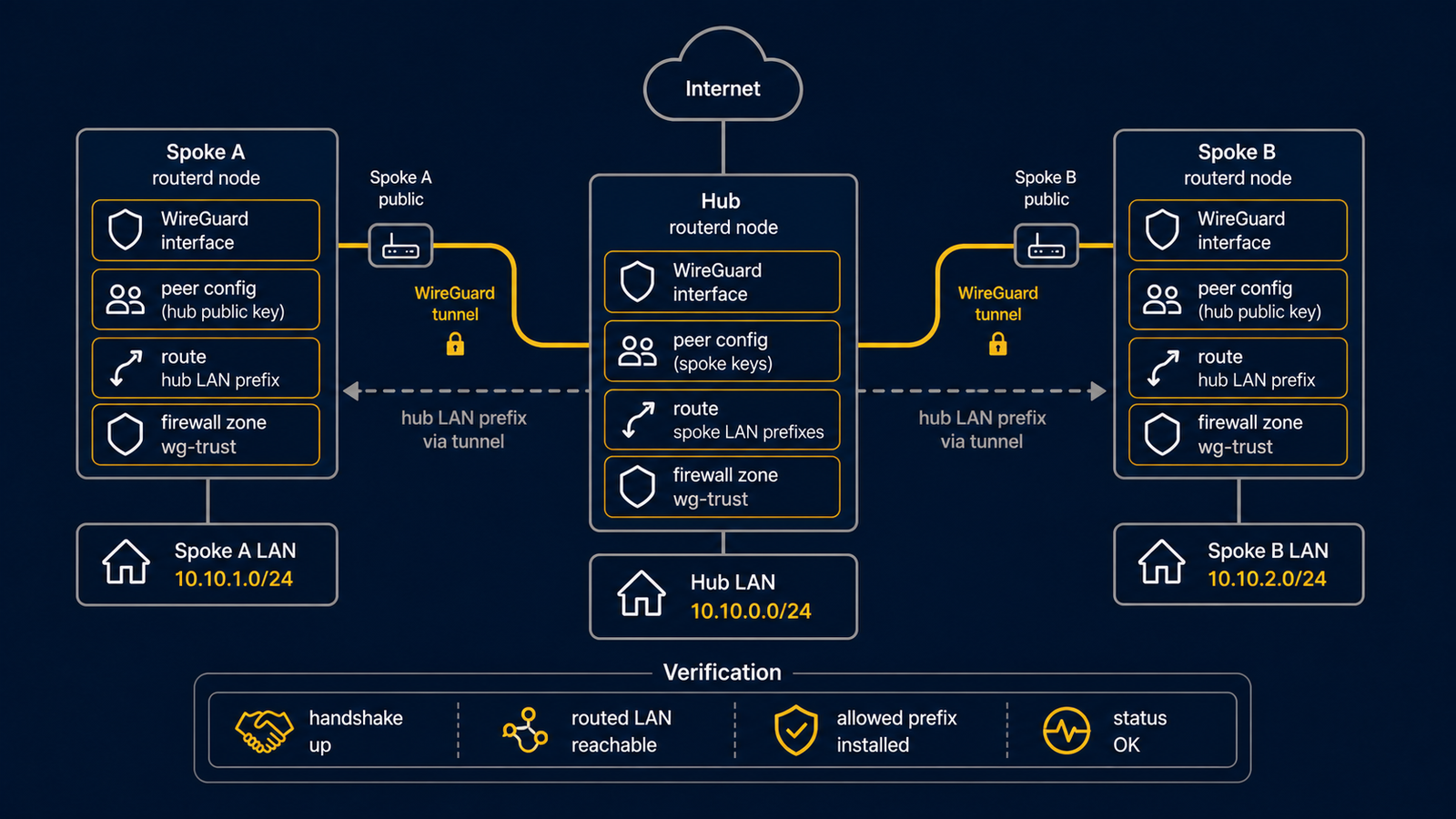
2 つの spoke を持つ routed WireGuard hub のテンプレートです。 実際に使う前に、鍵、エンドポイント、広告するプレフィックスを置き換えてください。
WAN から到達できることは別の前提条件
この template は WireGuard interface と peer を設定しますが、上流の Internet port-forward、 cloud security group、UDP 51820 の WAN firewall ルールを作ったり検証したりはしません。 remote peer が接続できると期待する前に、それらを安全に用意し、秘密鍵を YAML repository に 入れないでください。
完全な YAML は examples/wireguard-hub-spoke.yaml にあります。
構成図
図の対応表
| 番号 | 意味 | 主なリソース |
|---|---|---|
| [1] | spoke A のトンネルアドレスとルーティング対象 LAN プレフィックス。 | WireGuardPeer/spoke-a |
| [2] | spoke B のトンネルアドレスとルーティング対象 LAN プレフィックス。 | WireGuardPeer/spoke-b |
| [3] | ハブ側の WireGuard インターフェースとアドレス。 | WireGuardInterface/wg-hub, IPv4StaticAddress/wg-hub-ipv4 |
この例で管理するもの
| 領域 | routerd リソース |
|---|---|
| WireGuard デバイス | WireGuardInterface/wg-hub |
| ハブのアドレス | IPv4StaticAddress/wg-hub-ipv4 |
| ピアの経路 | WireGuardPeer/spoke-a, WireGuardPeer/spoke-b |
設定の要点
# [3] ハブ側の WireGuard インターフェースと listen port。
- kind: WireGuardInterface
  metadata:
    name: wg-hub
  spec:
    privateKeyFile: /usr/local/etc/routerd/secrets/wg-hub.key
    listenPort: 51820
    mtu: 1420

# [1] spoke A のトンネルアドレスとルーティング対象 LAN プレフィックス。
- kind: WireGuardPeer
  metadata:
    name: spoke-a
  spec:
    interface: wg-hub
    publicKey: REPLACE_WITH_SPOKE_A_PUBLIC_KEY
    allowedIPs:
      - 10.44.0.11/32
      - 172.30.11.0/24
daemon の前に確認する
以下は sudo を実行できる通常ユーザーを想定します。まだサービスを起動していないため、
routerctl ではなく routerd を使い、dry-run の状態ファイルは一時ディレクトリへ隔離します。
LAB_DIR="$(mktemp -d)"
sudo routerd validate --config examples/wireguard-hub-spoke.yaml
sudo routerd apply --config examples/wireguard-hub-spoke.yaml --once --dry-run --skip-service-manager \
  --state-file "$LAB_DIR/state.db" \
  --ledger-file "$LAB_DIR/ledger.db" \
  --status-file "$LAB_DIR/status.json"
sudo sed -n "1,160p" "$LAB_DIR/status.json"
サービス起動後に確認する
レビュー済みの設定を適用して routerd.service を起動した後で、ルーター上で次を実行します。
sudo routerctl describe WireGuardInterface/wg-hub
sudo wg show
よく変えるところ
- 秘密鍵はパーミッションを絞ったファイルに置きます。
privateKeyFileが設定され、 ファイルが存在しない場合、非 dry-run apply は mode0600で鍵ファイルを生成します。 既存の非空鍵は上書きしません。 - ピアごとにトンネルアドレス
/32とルーティング対象 LAN プレフィックスを明示します。 - WAN のファイアウォールを routerd で管理している場合は、UDP の listen port の許可も足します。