SSH remote management on the live ISO
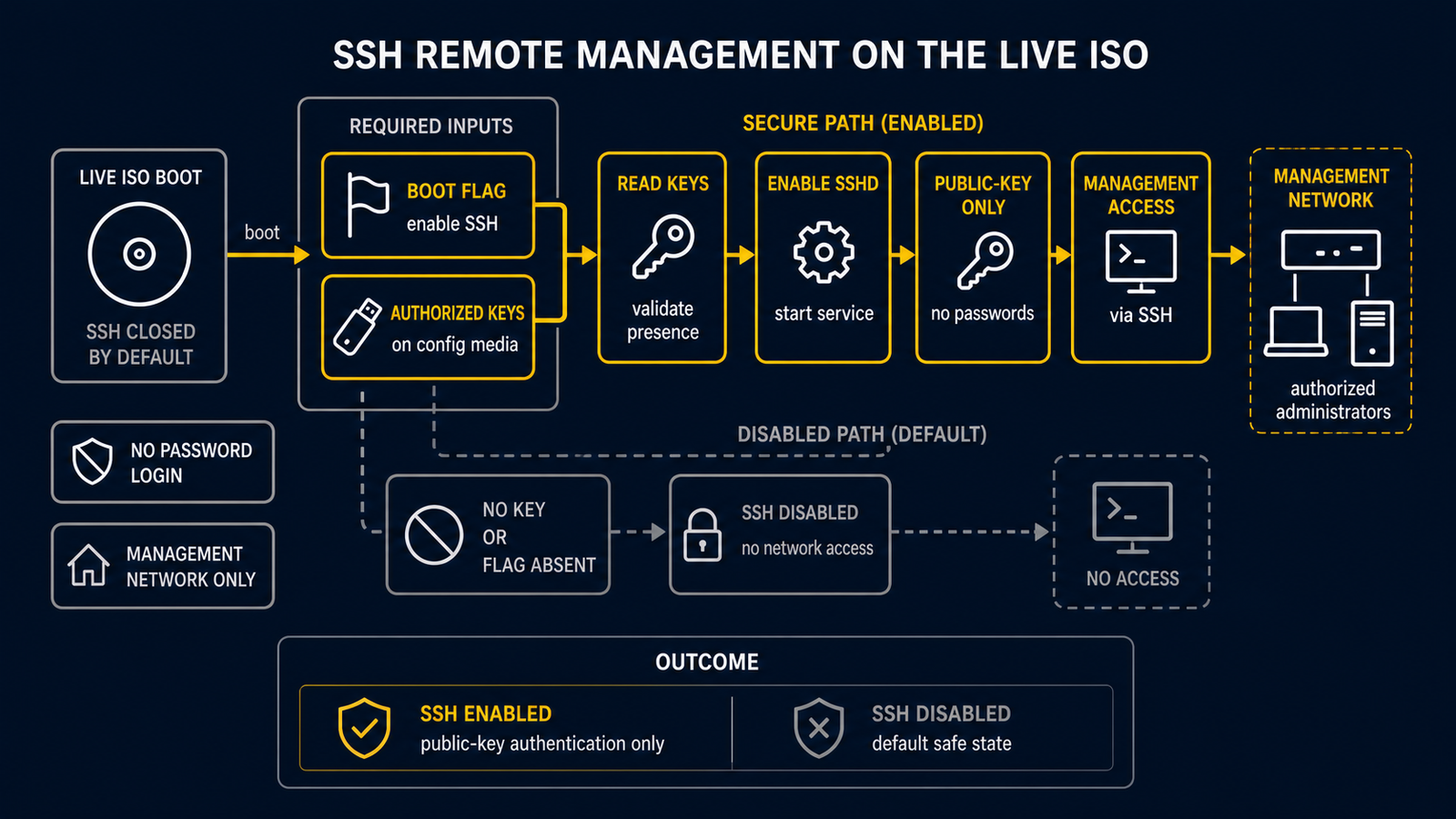
The routerd live ISO does not run an SSH daemon by default. The default posture
is closed: only the local and serial consoles are available (tty1, tty2,
ttyS0). This keeps passwordless-root access off the network.
For appliances running as hypervisor VMs (Proxmox VE, KVM, etc.) where serial console access is inconvenient, an opt-in SSH mode can be enabled without baking credentials into the ISO image.
Prerequisites
- A config disk (labeled
ROUTERD_CONFIGorROUTERD, or passed withrouterd.usb=) containing anauthorized_keysfile. - The ability to set kernel parameters at boot (edit the GRUB entry or set the VM's kernel arguments from the hypervisor).
Enabling SSH
Step 1 — place your public key on the config disk
On the config disk (e.g. the Proxmox VM disk that holds router.yaml), create
the authorized_keys file inside the routerd/ directory:
routerd/
  router.yaml
  authorized_keys       ← add this file
The file follows standard OpenSSH authorized_keys format:
ssh-ed25519 AAAA...yourkey... user@host
Host-specific key files are also supported (looked up before the generic file):
routerd/hosts/<hostname>/authorized_keys
routerd/hosts/<mac>/authorized_keys   (colon-separated or compact lowercase)
Step 2 — boot with routerd.ssh=1
Add the routerd.ssh=1 parameter to the kernel command line.
GRUB (live ISO boot menu — press e to edit):
linux /boot/vmlinuz-lts ... routerd.ssh=1
Proxmox VE — set boot args on the VM:
qm set <vmid> --args "-append routerd.ssh=1"
Or set it once in the VM's GRUB entry so it persists across reboots.
What happens at boot
live-persistence.sh initmounts the config disk and restoresrouter.yaml.live-autostart.shinstalls dependencies (includingopensshif not already present).live-ssh.shchecks forrouterd.ssh=1on the kernel command line.- If the flag is set, it looks for
authorized_keyson the mounted config disk. - If found, the key(s) are installed to
/root/.ssh/authorized_keys, host keys are generated withssh-keygen -A, andsshdis started. - If
routerd.ssh=1is set but noauthorized_keysfile is found, sshd is not started and a warning is logged to/run/routerd/logs/routerd-ssh.log.
Security model
| Property | Value |
|---|---|
| Default state | SSH disabled |
| Authentication | Public key only |
| Password auth for root | Permanently disabled (PasswordAuthentication no) |
| Root login | PermitRootLogin prohibit-password (key-authenticated only) |
| Credentials in ISO | None — keys come from the config disk at runtime |
SSH is only enabled by explicit opt-in and only when credentials have been provided on external media. There is no fallback to password authentication.
Troubleshooting
sshd did not start:
cat /run/routerd/logs/routerd-ssh.log
Common reasons:
routerd.ssh=1not present on the kernel command line — check/proc/cmdline.- Config disk not mounted — check
/proc/mountsfor/media/routerd-usb. authorized_keysnot found at the expected path —live-ssh.shlogs the expected location.
Verify sshd is running:
pgrep -x sshd
ss -tlnp | grep :22
Re-run the SSH setup without rebooting:
/usr/share/routerd/live-ssh.sh
See also
- USB persistence — config disk layout and device discovery