Live ISO 的 SSH 远程管理
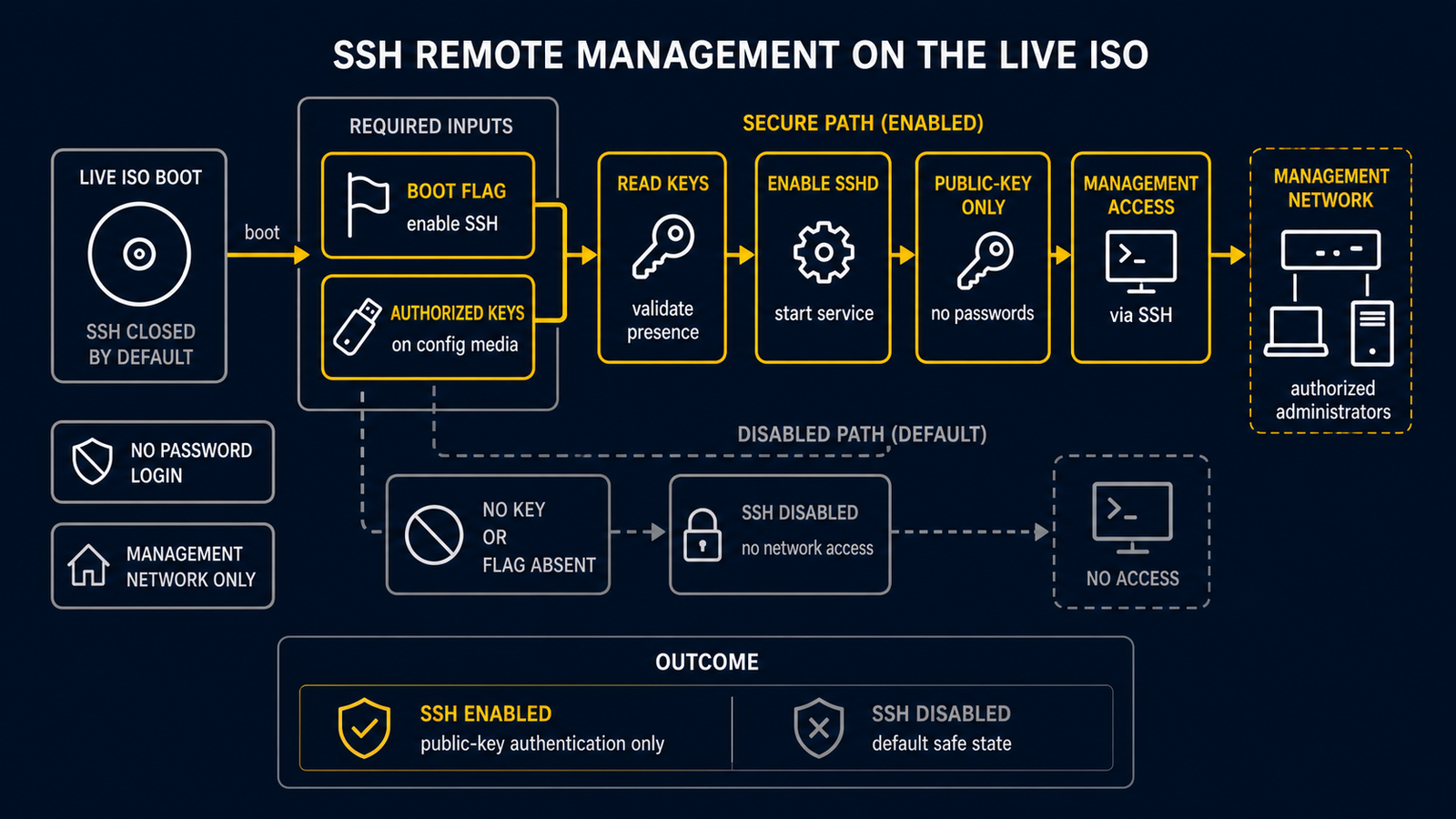
routerd Live ISO 默认不运行 SSH 守护进程。默认姿态是封闭的。仅本地控制台和串行控制台
(tty1、tty2、ttyS0)可用。这样可以避免无密码 root 访问暴露在网络上。
当以虚拟化管理器 VM(Proxmox VE、KVM 等)方式运行设备,且串行控制台访问不方便时, 可以在不将凭据嵌入 ISO 镜像的情况下启用可选的 SSH 模式。
前提条件
- 包含
authorized_keys文件的 config 磁盘(标签为ROUTERD_CONFIG或ROUTERD, 或通过routerd.usb=指定)。 - 在启动时设置内核参数的手段(编辑 GRUB 条目,或从虚拟化管理器设置 VM 的内核参数)。
启用 SSH
步骤 1 — 在 config 磁盘上放置公钥
在 config 磁盘(例如:存储 router.yaml 的 Proxmox VM 磁盘)上的 routerd/
目录中创建 authorized_keys 文件。
routerd/
  router.yaml
  authorized_keys       <- 添加此文件
该文件遵循标准 OpenSSH authorized_keys 格式。
ssh-ed25519 AAAA...yourkey... user@host
也支持主机特定的密钥文件(优先于通用文件搜索)。
routerd/hosts/<hostname>/authorized_keys
routerd/hosts/<mac>/authorized_keys   (冒号分隔或紧凑小写)
步骤 2 — 使用 routerd.ssh=1 启动
在内核命令行中添加 routerd.ssh=1 参数。
GRUB(Live ISO 启动菜单 — 按 e 编辑):
linux /boot/vmlinuz-lts ... routerd.ssh=1
Proxmox VE — 设置 VM 的启动参数:
qm set <vmid> --args "-append routerd.ssh=1"
或者在 VM 的 GRUB 条目中设置一次,即可在重启后持久化。
启动时的行为
live-persistence.sh init挂载 config 磁盘并恢复router.yaml。live-autostart.sh安装依赖包(如果尚未存在则包含openssh)。live-ssh.sh在内核命令行中检查routerd.ssh=1。- 如果设置了该标志,则在已挂载的 config 磁盘上搜索
authorized_keys。 - 如果找到,将密钥安装到
/root/.ssh/authorized_keys,通过ssh-keygen -A生成主机密钥,并启动sshd。 - 如果设置了
routerd.ssh=1但未找到authorized_keys文件,sshd 不会启动, 并在/run/routerd/logs/routerd-ssh.log中记录警告。
安全模型
| 属性 | 值 |
|---|---|
| 默认状态 | SSH 禁用 |
| 认证方式 | 仅公钥 |
| root 的密码认证 | 永久禁用(PasswordAuthentication no) |
| root 登录 | PermitRootLogin prohibit-password(仅密钥认证) |
| ISO 内的凭据 | 无 — 密钥在运行时从 config 磁盘获取 |
SSH 仅通过显式选择启用,且仅在外部介质提供了凭据时才能工作。不会回退到密码认证。
故障排除
sshd 未启动时:
cat /run/routerd/logs/routerd-ssh.log
常见原因:
- 内核命令行中缺少
routerd.ssh=1— 检查/proc/cmdline。 - config 磁盘未挂载 — 在
/proc/mounts中检查/media/routerd-usb。 - 在预期路径中未找到
authorized_keys—live-ssh.sh会在日志中记录预期的位置。
检查 sshd 是否正在运行:
pgrep -x sshd
ss -tlnp | grep :22
无需重启重新执行 SSH 设置:
/usr/share/routerd/live-ssh.sh
相关内容
- USB persistence — config 磁盘的布局和设备检测