Live ISO 的 SSH 遠端管理
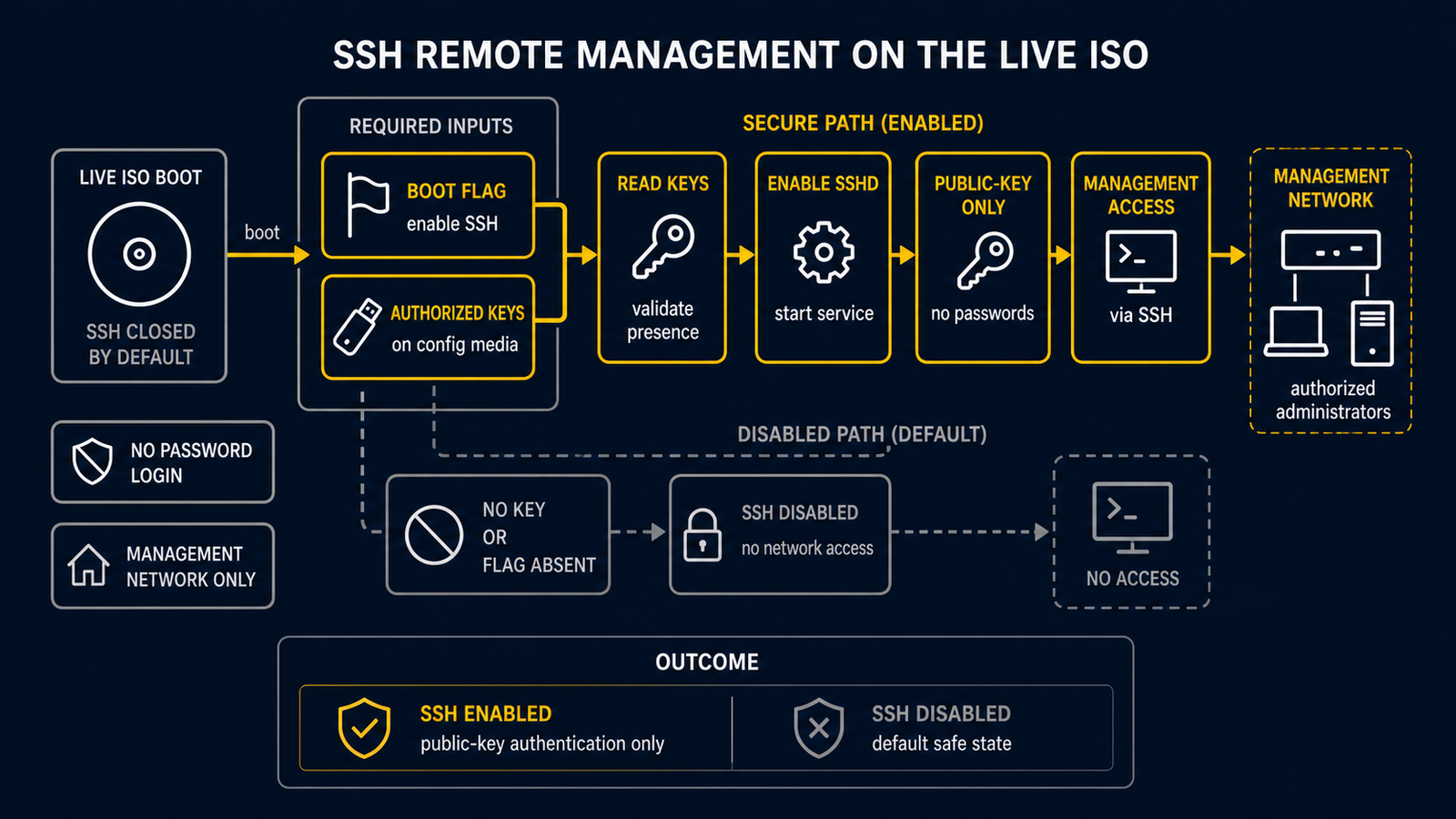
routerd Live ISO 預設不執行 SSH 守護程式。預設態勢是封閉的。僅本機主控台和序列主控台
(tty1、tty2、ttyS0)可用。這樣可以避免無密碼 root 存取暴露在網路上。
當以虛擬化管理器 VM(Proxmox VE、KVM 等)方式執行裝置,且序列主控台存取不方便時, 可以在不將憑證嵌入 ISO 映像的情況下啟用選擇性的 SSH 模式。
先決條件
- 包含
authorized_keys檔案的 config 磁碟(標籤為ROUTERD_CONFIG或ROUTERD, 或透過routerd.usb=指定)。 - 在開機時設定核心參數的方式(編輯 GRUB 項目,或從虛擬化管理器設定 VM 的核心參數)。
啟用 SSH
步驟 1 — 在 config 磁碟上放置公鑰
在 config 磁碟(例如:儲存 router.yaml 的 Proxmox VM 磁碟)上的 routerd/
目錄中建立 authorized_keys 檔案。
routerd/
  router.yaml
  authorized_keys       <- 新增此檔案
該檔案遵循標準 OpenSSH authorized_keys 格式。
ssh-ed25519 AAAA...yourkey... user@host
也支援主機特定的金鑰檔案(優先於通用檔案搜尋)。
routerd/hosts/<hostname>/authorized_keys
routerd/hosts/<mac>/authorized_keys   (冒號分隔或緊湊小寫)
步驟 2 — 使用 routerd.ssh=1 開機
在核心命令列中新增 routerd.ssh=1 參數。
GRUB(Live ISO 開機選單 — 按 e 編輯):
linux /boot/vmlinuz-lts ... routerd.ssh=1
Proxmox VE — 設定 VM 的開機參數:
qm set <vmid> --args "-append routerd.ssh=1"
或者在 VM 的 GRUB 項目中設定一次,即可在重新開機後持續生效。
開機時的行為
live-persistence.sh init掛載 config 磁碟並還原router.yaml。live-autostart.sh安裝相依套件(如果尚未存在則包含openssh)。live-ssh.sh在核心命令列中檢查routerd.ssh=1。- 如果設定了該旗標,則在已掛載的 config 磁碟上搜尋
authorized_keys。 - 如果找到,將金鑰安裝到
/root/.ssh/authorized_keys,透過ssh-keygen -A產生主機金鑰,並啟動sshd。 - 如果設定了
routerd.ssh=1但未找到authorized_keys檔案,sshd 不會啟動, 並在/run/routerd/logs/routerd-ssh.log中記錄警告。
安全模型
| 屬性 | 值 |
|---|---|
| 預設狀態 | SSH 停用 |
| 認證方式 | 僅公鑰 |
| root 的密碼認證 | 永久停用(PasswordAuthentication no) |
| root 登入 | PermitRootLogin prohibit-password(僅金鑰認證) |
| ISO 內的憑證 | 無 — 金鑰在執行時從 config 磁碟取得 |
SSH 僅透過明確選擇啟用,且僅在外部媒體提供了憑證時才能運作。不會退回到密碼認證。
疑難排解
sshd 未啟動時:
cat /run/routerd/logs/routerd-ssh.log
常見原因:
- 核心命令列中缺少
routerd.ssh=1— 檢查/proc/cmdline。 - config 磁碟未掛載 — 在
/proc/mounts中檢查/media/routerd-usb。 - 在預期路徑中未找到
authorized_keys—live-ssh.sh會在日誌中記錄預期的位置。
檢查 sshd 是否正在執行:
pgrep -x sshd
ss -tlnp | grep :22
無需重新開機重新執行 SSH 設定:
/usr/share/routerd/live-ssh.sh
相關內容
- USB persistence — config 磁碟的配置與裝置偵測