新增防火牆例外規則
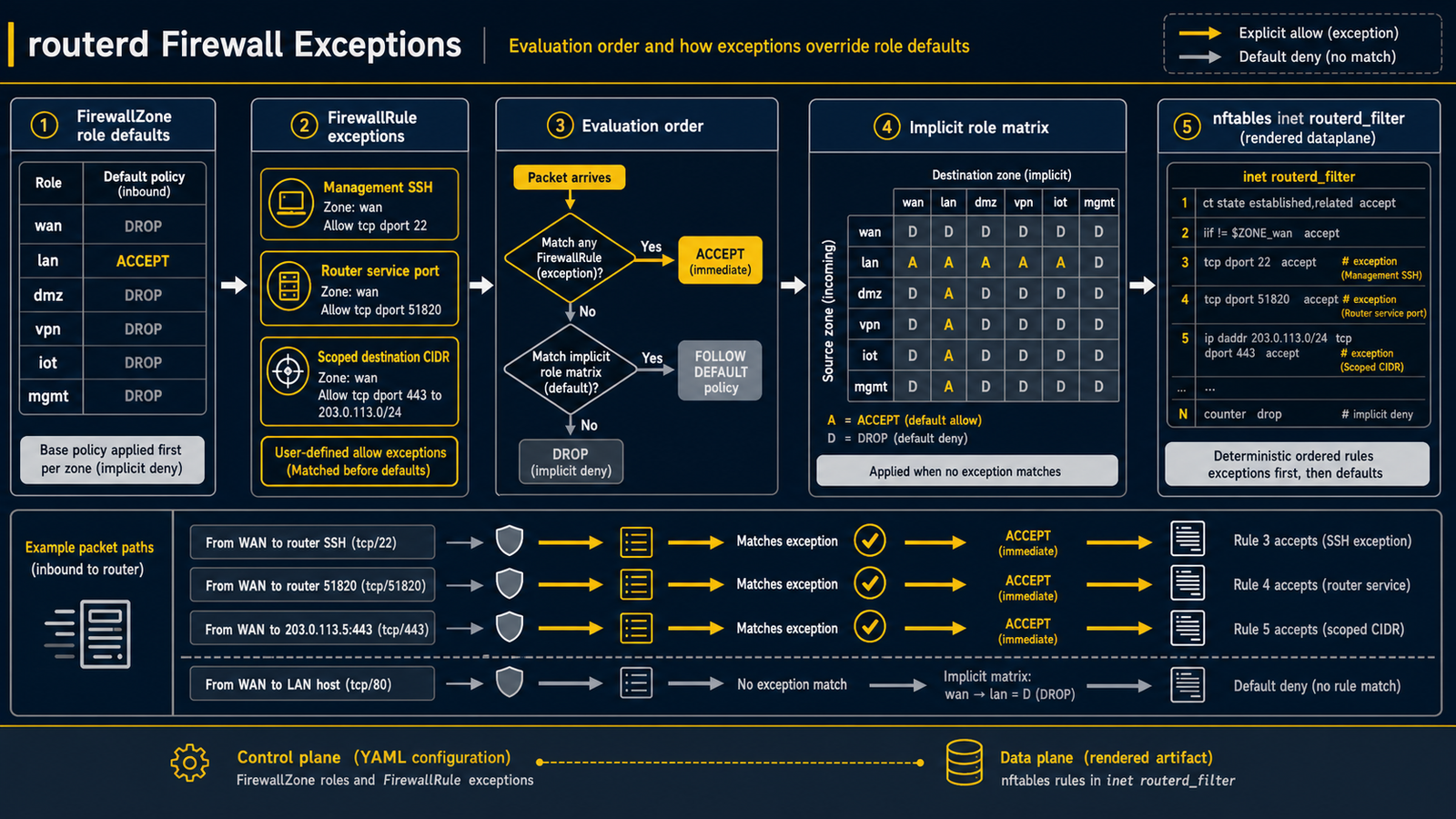
適用情境
FirewallZone 的角色式預設已能滿足大多數需求,但有時仍需要例外處理。
- 希望允許來自特定管理子網路的 SSH 連線。
- 需要開放路由器本機上的服務埠(如 metrics 端點、自訂 listener)。
- 需要讓 WAN 的 inbound 連線通往某台特定的 LAN 主機(類似 port forward 或 DMZ 的用途)。
routerd 的解決方式
使用 FirewallRule 宣告例外,覆蓋隱含的角色矩陣。
規則的評估優先於角色矩陣,而 routerd 自動派生的內部通行孔(DHCP、DNS、DHCPv6-PD、DS-Lite 控制等)又優先於使用者規則。
這個順序確保即使新增限制規則,受管服務仍能正常運作。
範例:允許來自管理網路的 SSH
- apiVersion: firewall.routerd.net/v1alpha1
  kind: FirewallRule
  metadata:
    name: allow-admin-ssh
  spec:
    fromZone: management
    toZone: self
    protocol: tcp
    port: 22
    action: accept
fromZone / toZone 參照 FirewallZone 的名稱。
toZone: self 表示路由器本身終止的通訊(非 forward)。
範例:開放路由器本機的服務埠
- apiVersion: firewall.routerd.net/v1alpha1
  kind: FirewallRule
  metadata:
    name: allow-metrics
  spec:
    fromZone: lan
    toZone: self
    protocol: tcp
    destinationPorts:
      - "9100"
    action: accept
範例:僅允許 LAN 存取管理區段中的特定主機
若只需對目的區域內的特定主機開例外,可指定 destinationCIDRs,
無需開放整個管理區段。
- apiVersion: firewall.routerd.net/v1alpha1
  kind: FirewallRule
  metadata:
    name: allow-lan-to-admin-console
  spec:
    fromZone: lan
    toZone: management
    destinationCIDRs:
      - 192.0.2.126/32
    protocol: tcp
    destinationPorts:
      - "8080"
    action: accept
範例:多個 Web 埠與 ICMP echo
若需在單一規則中處理多個 TCP / UDP 埠,請使用 destinationPorts。
ICMP 規則可依 type 名稱進行篩選。
- apiVersion: firewall.routerd.net/v1alpha1
  kind: FirewallRule
  metadata:
    name: wan-web
  spec:
    fromZone: wan
    toZone: self
    protocol: tcp
    destinationPorts:
      - "80"
      - "443"
    action: accept

- apiVersion: firewall.routerd.net/v1alpha1
  kind: FirewallRule
  metadata:
    name: wan-icmp-echo
  spec:
    fromZone: wan
    toZone: self
    protocol: icmp
    icmpType: echo-request
    action: accept
範例:拒絕超過速率/連線限制的 SSH
rateLimit 會比對超過設定閾值的流量;connLimit 則在相同來源已持有超過允許數量的並行追蹤狀態時比對。
- apiVersion: firewall.routerd.net/v1alpha1
  kind: FirewallRule
  metadata:
    name: ssh-bruteforce-over-limit
  spec:
    fromZone: wan
    toZone: self
    protocol: tcp
    destinationPorts:
      - "22"
    action: reject
    rateLimit:
      rate: 8
      burst: 16
      unit: packet
      per: minute
      log: true
    connLimit:
      maxPerSource: 4
      log: true
套用前的確認
請先在本機模擬器確認行為,再正式套用。
routerctl firewall test from=wan to=self proto=tcp dport=22
routerctl describe firewall
第一個指令針對指定的 5-tuple 回傳 accept / drop。
第二個指令顯示包含角色矩陣預設值與受管通行孔在內的完整有效規則。